Live data from Hacker News

Little UI Details

twitter.com

11–20 of 50 posts

Re: Little UI Details

#11

This is a great guide/collection! It does a great job for those who know the basics to step up the game, thank you so much. However, something notable that IMHO is missing is accessibility. This is clearly a DESIGN guide and should NOT be treated as a UI/UX guide. Some of the color in the page for instance don't pass the WCAG 2 AA guidelines, which is a really flexible one, let alone the WCAG 2 AAA (a more strict one…

I was going to comment on much the same thing; I had to adjust my monitor angle a few times to find a sweet spot where I could actually see what the guy was talking about. Also, a fixed font size in the age of responsive design is a huge no-no in accessibility; as well as, general UI/UX.
Re: Little UI Details

#15
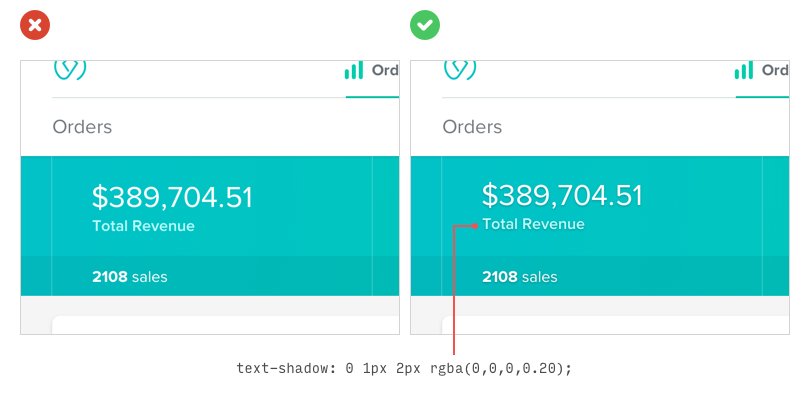
Great list, but Twitter is really not the best platform for this kind of content. Some of the screenshots have such bad compression artifacts that it's difficult to make out the before/after changes. For example: https://pbs.twimg.com/media/DDf7ef1XkAMh3Gp.jpg:large

This is a much more readable version (though doesn't include the handy CSS annotations):

https://codepen.io/tyrellrummage/full/ZJPXgy/

Re: Little UI Details

#17
Some of these seem a bit arbitrary. I wish the author included more info explaining their reasoning.

I'd be amazed in all these examples pass a basic accessibility checklist. It's fine to want to add in small design details here and there, but don't sacrifice accessibility to achieve that goal. Personally, I found a lot of the examples a bit difficult to read.

Re: Little UI Details

#18
post #15

Great list, but Twitter is really not the best platform for this kind of content. Some of the screenshots have such bad compression artifacts that it's difficult to make out the before/after changes. For example: https://pbs.twimg.com/media/DDf7ef1XkAMh3Gp.jpg:large This is a much more readable version (though doesn't include the handy CSS annotations): https://codepen.io/tyrellrummage/full/ZJPXgy/

One of the benefits of using Twitter to publish these tips is having the constraint of 140 characters. This forces me to be creative and simplify the tips down to something that is super digestible. I publish tips regularly and Twitter makes it really easy to share them.

Re: Little UI Details

#19
post #2

There's also Little Big Details ( http://littlebigdetails.com/ ) which does something similar.

Wow, this is a total antipattern: http://littlebigdetails.com/post/164521719457/invision-blog-...

I want the title to tell me which article I might want to return to, not that I should.

Re: Little UI Details

#20
post #15

Great list, but Twitter is really not the best platform for this kind of content. Some of the screenshots have such bad compression artifacts that it's difficult to make out the before/after changes. For example: https://pbs.twimg.com/media/DDf7ef1XkAMh3Gp.jpg:large This is a much more readable version (though doesn't include the handy CSS annotations): https://codepen.io/tyrellrummage/full/ZJPXgy/

One of the benefits of using Twitter to publish these tips is having the constraint of 140 characters. This forces me to be creative and simplify the tips down to something that is super digestible. I publish tips regularly and Twitter makes it really easy to share them.

So set yourself a 140 character limit when you write a list on your blog? In this case though, I really wish there was more substance to the list, because I'm finding it a little difficult to see what exactly he means. As another commenter here said: "I wish the author included more info explaining their reasoning." which, of course, doesn't work in a 140 character limit.

My personal opinion is that for-twitter content has always been sub-par compared to for-blog content, at least in my experience, and Twitter is really just useful for sharing links to other content. But that's just my opinion based on my experience. Obviously your experience is very different from mine! Luckily we have a good mix of content, so we can both be happy.

I also find Twitter incredibly difficult to find things on, so unless I happen to check it at exactly the right time (when you post it but before other people I follow post too much), there's a big chance I'll never see it[1]. I also find the way the replies are threaded difficult to navigate.

[1] On HN, popular things stay at the top of the list for a few hours, so the chances of me seeing things here are much higher and obviously submissions like this one mean that I do see the twitter content.

Post reply on HN