Tonido + XBMC fits your bill
A startup should create this storage device. I would buy it.
41–50 of 77 posts
Re: A startup should create this storage device. I would buy it.
#42Tonido Plug + Drobo methinks.
Re: A startup should create this storage device. I would buy it.
#43Why does Ctrl-F “crypt” not find a single hit on this web page, neither in the blog post nor the comments (there, or on yc)? Are you guys really not concerned about security at all? I’d demand industry-level encryption on both the storage device and the communication protocols. Stealing the device should leave the thief with nothing but worthless random data, decryption/encryption should completely take place on the clients.
Re: A startup should create this storage device. I would buy it.
#44In my case, this device is a Mac Mini + a Drobo. The Mini is connected to my TV and a receiver and is pretty much always on ... I can access the files pretty easily with MacFuse using SSHFS.
Re: A startup should create this storage device. I would buy it.
#45I just upgraded my Dropbox account to 50Gb, and for me, it covers a lot of needs. I keep all my important files in there (my mp3 collection, projects, documents, etc.). I have Dropbox set up on 3 machines (main machine, family computer and my laptop), so I get automatic syncing of all these files, plus backups of all the files on 3 computers, plus access to all these files in the cloud. As far as I'm concerned, it's…
I would love to do this, however, the cost is hard to justify. Though, your post makes me think twice about it. The backup of all my "stuff" would be a welcomed safety net and maybe enough to justify the cost. Thx!
Re: A startup should create this storage device. I would buy it.
#46What you're looking for is Windows Home Server. It's amazing. Stores all the media you need, plus has streaming capabilities over the net. Able to expand perpetually -- no need to reformat or anything like that. I have it running with 10TB of space. It has a great front-end UI, and as close to zeroconf as you can get with this type of service. See exampel screenshot: http://ivivo.files.wordpress.com/2008/09/windowsho…
That does actually sound nice.
What about web access and/or being able to copy a public URL to any file like you can with dropbox?
I guess you'd have to set up your own web server with some software to do that, right?
Is it easy to use with a remote control? Browse movies and play them, etc?
Re: A startup should create this storage device. I would buy it.
#47What you're looking for is Windows Home Server. It's amazing. Stores all the media you need, plus has streaming capabilities over the net. Able to expand perpetually -- no need to reformat or anything like that. I have it running with 10TB of space. It has a great front-end UI, and as close to zeroconf as you can get with this type of service. See exampel screenshot: http://ivivo.files.wordpress.com/2008/09/windowsho…
That does actually sound nice. What about web access and/or being able to copy a public URL to any file like you can with dropbox? I guess you'd have to set up your own web server with some software to do that, right? Is it easy to use with a remote control? Browse movies and play them, etc?
Remote access: You won't need to install your own web server. It's built into WHS (see screenshot: http://www.windows-now.com/blogs/dougknox/WindowsLiveWriter/...).

You will automatically get your desired, password-protected https://[whatever].homeserver.com, pointed to your server. (It's autoconfig too with your router). When you access that remotely, you get access to your WHS server, plus all your connected devices. (it looks something like this: http://www.roughlydrafted.com/RD/RDM.Tech.Q1.07/5B259B0F-B5B...)
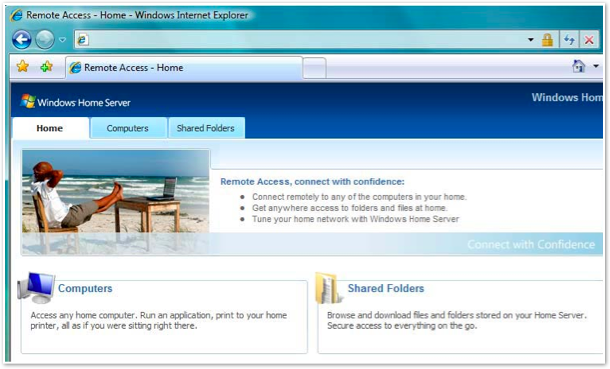
For public URL, you can install dropbox on the WHS box or one of the connected PCs, if you'd like.
For movie playback, that's separate from the WHS. You need to think of the WHS as the Server and the playback devices as the Client. In this way, the WHS is very extensible and your playback options are limitless. You can use windows media center on a different PC, or just use VLC or windows media player.
Effectively, WHS is a very "insanely great" home server that stores your files and serves it, allowing you to decide how you want to consume it.
For what it's worth, I use windows media center on a machine connected to the TV, and a logitech dinovo mini for remote (see: http://www.logitech.com/en-us/keyboards/keyboard/devices/384...).
Because I'm a home theater junkie, I did start a side project called http://www.intellimote.com that uses the iPad as a remote to browse and play movies.
Re: A startup should create this storage device. I would buy it.
#48Earlier quoted context omitted.
That does actually sound nice. What about web access and/or being able to copy a public URL to any file like you can with dropbox? I guess you'd have to set up your own web server with some software to do that, right? Is it easy to use with a remote control? Browse movies and play them, etc?
Remote access: You won't need to install your own web server. It's built into WHS (see screenshot: http://www.windows-now.com/blogs/dougknox/WindowsLiveWriter/... ). You will automatically get your desired, password-protected https://[whatever].homeserver.com , pointed to your server. (It's autoconfig too with your router). When you access that remotely, you get access to your WHS server, plus all your connected devi…
Wow. Awesome ipad project.
And the remote access does look nice.
My blog post was originally about a device that just worked like I described out of the box with no other requirements.
Preferably it would be a small box like my media playing storage device that I have or like the tonidoplug, which costs $100 and is already set up.
Your WHM solution is super awesome, but it's not something I can buy from the store, plug in, maybe configure a little bit and start using. It's a project. It's something you work on to get it working the way you want it to.
What I'd like to see is somebody create a pre built solution, similar to the tonidoplug, with more media capabilities etc, video outputs etc.
If some startup or company would build that, people would buy that.
Your solution is awesome, I must go ahead and try WHS, I didn't even know that it existed.
Re: A startup should create this storage device. I would buy it.
#49What you're looking for is Windows Home Server. It's amazing. Stores all the media you need, plus has streaming capabilities over the net. Able to expand perpetually -- no need to reformat or anything like that. I have it running with 10TB of space. It has a great front-end UI, and as close to zeroconf as you can get with this type of service. See exampel screenshot: http://ivivo.files.wordpress.com/2008/09/windowsho…
I know WHS is probably easier to set up, but Microsoft did not pioneer the concept of "drive extender". Linux had something called LVM since 1998. According to Wikipedia, IBM AIX had a similar feature in 1989. MS also had similar capabilities in NT for quite some time now (disk volume sets), they just weren't shown to the home users.
Autobackup can be done by rsync, file access by Samba, printing through CUPS. Oh yeah, you can run all of the above on an $50 wifi router with custom firmware. It will also barely use any power and not make any noise.
EDIT: I am not attacking MS, and I don't hate people who don't use Linux. Just pointing out there is a way to achieve this functionality with mostly off-the-shelf software and hardware. Startup idea? Nah, more downvotes :)
Re: A startup should create this storage device. I would buy it.
#50Earlier quoted context omitted.
Remote access: You won't need to install your own web server. It's built into WHS (see screenshot: http://www.windows-now.com/blogs/dougknox/WindowsLiveWriter/... ). You will automatically get your desired, password-protected https://[whatever].homeserver.com , pointed to your server. (It's autoconfig too with your router). When you access that remotely, you get access to your WHS server, plus all your connected devi…
Wow. Awesome ipad project. And the remote access does look nice. My blog post was originally about a device that just worked like I described out of the box with no other requirements. Preferably it would be a small box like my media playing storage device that I have or like the tonidoplug, which costs $100 and is already set up. Your WHM solution is super awesome, but it's not something I can buy from the store, pl…
If you want to buy a pre built solution, you're looking for HP MediaSmart. See: http://www.hp.com/united-states/campaigns/mediasmart-server/...
Size wise, it's small (photo: http://www.ehomeupgrade.com/wp-content/uploads/hp_mediasmart...). Cost wise they're relatively cheap (considering it comes with enclosure, cpu, motherboard, hard drives, etc), I've seen them for ~$300-350.

It uses Windows Home Server plus their own custom add-ins. They're nice. You get everything I mentioned before, except this is pre built. They have things like integration with Tivo. I decided to build my own since I had spare parts lying around, otherwise I would have bought one of the MediaSmart machines.
Also, when you say something with "more media capabilities", it is doubtful you will be able to surpass a WHS-based system. This is because a system like MediaSmart, out of the box, will stream everything to any PC, any mobile device, any windows media center, etc. They've built it for streaming media, and all kinds of ways to access the content are already in the ecosystem. They have even included a silverlight/flash based streamer if you decide to only use a browser (they transcode on the fly then stream it to your browser). Devices (eg. xbox 360) and even entire OS's are designed to work with WHS (Windows XP, Vista, Windows 7).
One more thing: the WHS and MediaSmart communities are great. Many websites/forums discussing ways to use it, how to optimally set up your home, issues you'll encounter (and resolutions), etc. (http://www.wegotserved.com, http://www.mswhs.com, http://homeservershow.com, http://www.whsaddins.com, http://www.homeserverhacks.com, http://www.mediasmartserver.net, to name a few)
If you're looking to start out with your first home server/theater, the community welcomes you.