Live data from Hacker News

Putting GPUs to work with Kubernetes

medium.com

31–40 of 54 posts

Re: Putting GPUs to work with Kubernetes

#31
post #30

Earlier quoted context omitted.

I just bought a GTX1080ti + a similar corsair as an upgrade for my 3 year old Dell, it works like a charm. If you have a PSU that big then that probably isn't the problem. I thought you might be using the PSU that comes with those extender boxes and they usually are very puny (250 W or so). Do you use it for gaming or for CUDA? Do you run the 4 GPUs in the extender?

Yes, each GPUs has a 4x -> 16x and a 4x-4x extender, in addition to the m.2 -> PCI-e 4x adapter. So many potential failure points in there. The sole use case is CUDA. Essentially I wanted a portable cluster with GPUs and that did the work for a couple of month. Now it's getting more serious so the switch to T630 makes sense, and I repurposed the NUCs into the control plane of the K8s cluster.

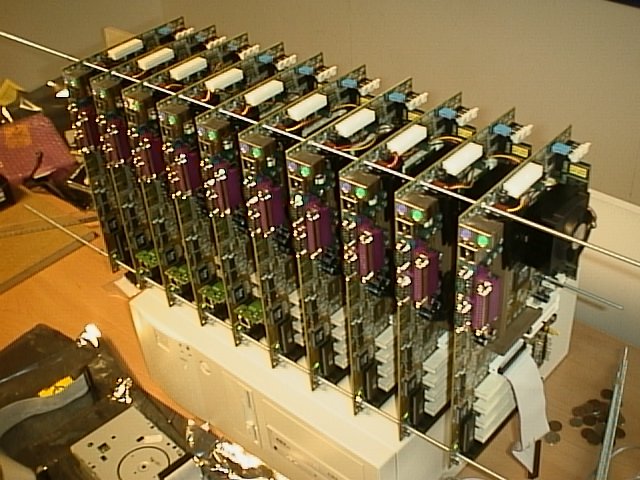
I built this long ago:

https://clustercompute.com/images/image4.jpg

Which was a lot of fun.

Do you have all the GPUs internal to the T630?

Any chance of a picture (of the guts)?

I'm seriously thinking of duplicating your effort.

Re: Putting GPUs to work with Kubernetes

#32
post #8
post #4

Is the author of this working on official support or just testing? I know there's a gpu roadmap for k8s, but I can't tell from this blog if this was part of it.

Canonical will officially support GPUs when they lands GA upstream. The flag is beta as of now in the Canonical Distribution of Kubernetes. Paying customers either for the managed or supported solutions get a best effort for GPU, and this feature is enabled by default.

What is the requirement for privileged containers? The post never explains it.

Re: Putting GPUs to work with Kubernetes

#33
post #30

Earlier quoted context omitted.

Yes, each GPUs has a 4x -> 16x and a 4x-4x extender, in addition to the m.2 -> PCI-e 4x adapter. So many potential failure points in there. The sole use case is CUDA. Essentially I wanted a portable cluster with GPUs and that did the work for a couple of month. Now it's getting more serious so the switch to T630 makes sense, and I repurposed the NUCs into the control plane of the K8s cluster.

I built this long ago: https://clustercompute.com/images/image4.jpg Which was a lot of fun. Do you have all the GPUs internal to the T630? Any chance of a picture (of the guts)? I'm seriously thinking of duplicating your effort.

Here you go :) https://drive.google.com/file/d/0B1CCk51NQ4koSmkxSmxWb1E5Y0E...

Replicating is not very hard. You need a lightweight x86 machine for MAAS, which takes ~20min to install, one VLAN for the iDRAC (IPMI), another for networking that can connect to internet, and off you go. You can also enable KVM power management in MAAS to run the Juju control plane in VMs and save a box if you're limited in compute power.

https://maas.io https://jujucharms.com/docs https://www.ubuntu.com/containers/kubernetes for all the goodies.

If you run into problems, I am SaMnCo on #juju in freenode.

Re: Putting GPUs to work with Kubernetes

#34
post #23

Earlier quoted context omitted.

Typically, you would have a set of "helm charts" (packages) for your application(s). So deploying, without data, would be something like a sequence of "helm install app-appId --values /path/to/config/for/environment.yaml" At this stage, you have no data. Normally, if you app depends on data, the pods will keep failing until data has been moved and is available (at which point they stabilize in an equilibrium state).…

Thanks for your explanation. Looks like k8s is designed by Google with Google in mind - where data is somewhere over network and main problem is to manage code. I just thought it could be perfect solution to completely abstract and isolate such small services and move them around on local hardware with one push of a button, but it seems I'll have to think about external ways to manage data replication.

So, your thought process has apparently led you quickly to the same conundrum that I have found myself in, after experimenting with this stuff for several generations.

You might be interested in Deis v1 PAAS as a historical reference. Deis is a company that specializes in Kubernetes (was just bought by Microsoft). They have been in the container orchestration game since before Kubernetes was a kid (and even before containers were really en vogue.) Deis v1 PAAS is the ancestor of Deis Workflow (or v2) which is a product that runs solely on Kubernetes.

Workflow does not do distributed filesystems internally where PAAS v1 did. That is why I'm telling you about it. PAAS v1 had its own storage layer called deis-store, which is (was) essentially CephFS and RBD under the hood. They did the best they could to make sure you did not have to be a competent Ceph admin just to get it started, but as it happens you would be running Ceph and susceptible to all of the Ceph issues.

Distributed filesystems are complicated business.

Deis was running Ceph for internal purposes. Deis used the Store component to take care of log aggregation ("Logger"), container image storage ("Registry"), and Database backups. When Workflow was released, it was targeting Kubernetes and required PVC support (AWS S3, or GCE PD, or one of the other storage drivers).

It still handles Log Aggregation, Database Backups, and Image Storage, but it uses the platform services to do this in an agnostic way (that is, whatever way you have configured to enable PVC support in Kubernetes.)

The Ceph support provided by Deis v1 was never intended to be an end-user service, it was for internal platform support. I thought about using it for my own purposes but never got around to it. The punchline is this: porting your applications to Deis requires you to re-think the way they are built to support 12factor ideology. Porting your applications to Kubernetes requires no such thing... but it helps!

Also that distributed storage is a complicated problem, and if you undertake to solve it for yourself, you should not take it lightly. (OR do take it lightly, but with the understanding that you haven't given much rigor to that part.)

What was good advice for Deis v1 is still good advice for Kubernetes today. If you are building a cluster or distributed architecture to scale, you should really consider separating it into tiers or planes. In Deis v1, the advice was to have a control plane (etcd, database), storage plane (deis-store or Ceph), data plane (your application / worker nodes), and routing mesh plane (deis-router, traefik, or the front-end HTTP serving nodes.) All of those planes may require special attention to make them reliable and scalable.

In my opinion none of this has anything to do with AWS or Google, but those two providers have positioned themselves well to be the people that do work on solving those hard problems for you. I would certainly start experimenting with Rook, I had good experiences with deis-store and I've been looking for something to fill the void for me.
Re: Putting GPUs to work with Kubernetes

#35
post #33

Earlier quoted context omitted.

I built this long ago: https://clustercompute.com/images/image4.jpg Which was a lot of fun. Do you have all the GPUs internal to the T630? Any chance of a picture (of the guts)? I'm seriously thinking of duplicating your effort.

Here you go :) https://drive.google.com/file/d/0B1CCk51NQ4koSmkxSmxWb1E5Y0E... Replicating is not very hard. You need a lightweight x86 machine for MAAS, which takes ~20min to install, one VLAN for the iDRAC (IPMI), another for networking that can connect to internet, and off you go. You can also enable KVM power management in MAAS to run the Juju control plane in VMs and save a box if you're limited in compute power…

Ok, so 2 GPUs in there. Have you tried 4 or is that not possible for some reason?

I have plenty of other hardware floating around here so no problem on hooking it all up.

Thank you for the image.

Re: Putting GPUs to work with Kubernetes

#36
post #17

Earlier quoted context omitted.

You have several options for this. If it is non HA, then you can pin a RC to a specific node, and use hostpath storage. if the container fails, it will always respawn on the same node, maximizing uptime and also having max capacity from your local SSD. Alternatively, you can also run rook, which is backed by Ceph, and use affinity to make sure that your pods are very close to storage, and gain back some of the speed.…

Thanks for the answer. How easy will it be to transfer this cluster to another set of servers (with data copy)? Like, stop the service for several minutes, push the button "Transfer" and start service on new servers after that. As I understand you'll need rook for something like that?

[deleted]

Re: Putting GPUs to work with Kubernetes

#37
post #17

Earlier quoted context omitted.

You have several options for this. If it is non HA, then you can pin a RC to a specific node, and use hostpath storage. if the container fails, it will always respawn on the same node, maximizing uptime and also having max capacity from your local SSD. Alternatively, you can also run rook, which is backed by Ceph, and use affinity to make sure that your pods are very close to storage, and gain back some of the speed.…

Thanks for the answer. How easy will it be to transfer this cluster to another set of servers (with data copy)? Like, stop the service for several minutes, push the button "Transfer" and start service on new servers after that. As I understand you'll need rook for something like that?

You can use Portworx[1] to transfer data between servers and datacenters. It has a native kubernetes driver, is production ready being used by GE and Lufthansa airlines among others and does sync and async replication of data between environments. (disclosure I work for Portworx). [1] https://portworx.com/

Re: Putting GPUs to work with Kubernetes

#38
post #33

Earlier quoted context omitted.

Here you go :) https://drive.google.com/file/d/0B1CCk51NQ4koSmkxSmxWb1E5Y0E... Replicating is not very hard. You need a lightweight x86 machine for MAAS, which takes ~20min to install, one VLAN for the iDRAC (IPMI), another for networking that can connect to internet, and off you go. You can also enable KVM power management in MAAS to run the Juju control plane in VMs and save a box if you're limited in compute power…

Ok, so 2 GPUs in there. Have you tried 4 or is that not possible for some reason? I have plenty of other hardware floating around here so no problem on hooking it all up. Thank you for the image.

I have not, but it is technically possible. the PSU is the double 1100W with the GPU enablement kit. Up to 4x PCI-x 16x full speed. Also up to 1.5TB RAM, and 8x 3.5" HDD or 16x 2.5". I didn't go this far though ($$$...)

Re: Putting GPUs to work with Kubernetes

#39
post #32
post #8

Earlier quoted context omitted.

Canonical will officially support GPUs when they lands GA upstream. The flag is beta as of now in the Canonical Distribution of Kubernetes. Paying customers either for the managed or supported solutions get a best effort for GPU, and this feature is enabled by default.

What is the requirement for privileged containers? The post never explains it.

privileged containers are required for the GPU to be shared with the containers.

By default, the bundle come with a "auto" tag, which will activate privileged containers just when GPUs are detected.

You can enforce "false" to remove that, but then you won't be able to run GPU workloads.

Or you can enforce "yes" and have them activated all the time.

Does that answer the question? Not sure if I understood it right.

Re: Putting GPUs to work with Kubernetes

#40
post #34

Earlier quoted context omitted.

Thanks for your explanation. Looks like k8s is designed by Google with Google in mind - where data is somewhere over network and main problem is to manage code. I just thought it could be perfect solution to completely abstract and isolate such small services and move them around on local hardware with one push of a button, but it seems I'll have to think about external ways to manage data replication.

So, your thought process has apparently led you quickly to the same conundrum that I have found myself in, after experimenting with this stuff for several generations. You might be interested in Deis v1 PAAS as a historical reference. Deis is a company that specializes in Kubernetes (was just bought by Microsoft). They have been in the container orchestration game since before Kubernetes was a kid (and even before co…

Thanks, I know that distributed storage is hard, that's why I would be ok if K8s could just work with something like docker compose volumes on local storage and copy them between servers if needed.
Post reply on HN