Live data from Hacker News

Ubiquiti all the things: How I fixed my dodgy Wi-Fi

troyhunt.com

251–260 of 277 posts

Re: Ubiquiti all the things: How I fixed my dodgy Wi-Fi

#251

Earlier quoted context omitted.

> Somewhat alarmist https://en.wikipedia.org/wiki/Microwave#Effects_on_health Microwaves can't hurt you unless you focus the hell out of them, right at yourself. Even then, they can't make you experience the health effects that this handsome fellow was talking about (insomnia, really?). You might get buzzing in your ears if you're right next to a radar dish... and that's about it. FCC guidelines on radio emissions ar…

I agree with your overall point that the talk's claims are overblown. > unless you focus the hell out of them By this you mean, increase the intensity of the radiation? Obviously, a person would die inside a microwave oven that uses the same frequency as wifi (2.4Ghz). But it seems myopic to dismiss the possibility that there are no other dangerous effects besides heating. There is still much ongoing research on the…

Look at it this way: regardless of how dangerous you believe WiFi to be, there's a much, much greater chance that you'll die in a car accident on your way to work. Or an unrelated heart attack.

But I'll take you at your word.

Here's how you can calculate flux density caused by your router: http://physics.stackexchange.com/a/48092.

Then compare that calculation to the graph shown here for safety information: http://www.arrl.org/files/file/Technology/RFsafetyCommittee/...
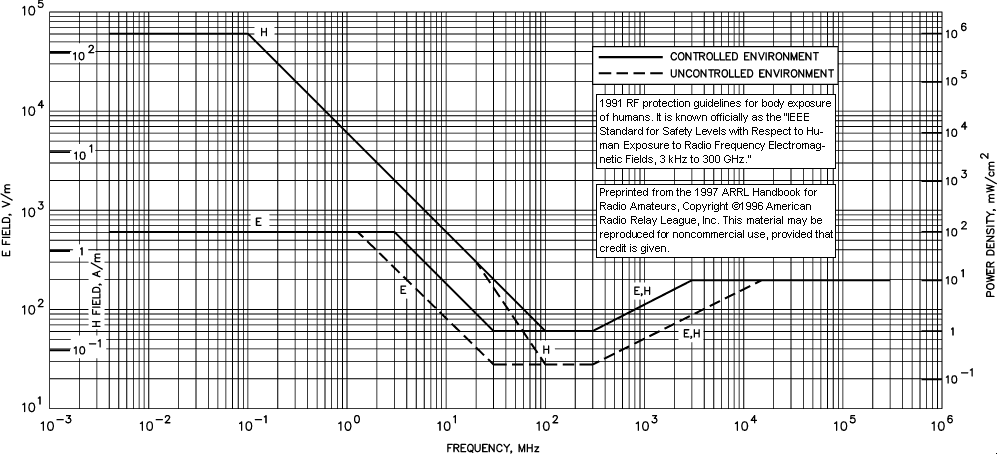
Furthermore, the FCC limits router wattage to 1W. The IEEE says that you shouldn't worry about radiation below 7W. That's on the same page you linked above.

There are specific limits on this sort of radiation. If anything you've said were true, a lot of people would've gotten sued by now.

And myopic or not, true or false, I have more things to think about than WiFi radiation. Link me a peer-reviewed study or else stop fear-mongering.

Re: Ubiquiti all the things: How I fixed my dodgy Wi-Fi

#252
post #88
post #37

So I just got the ac pro access point last week. Its fine, about my only complaint is my laptop will continually drop from ac to n constantly and I'm not more that 15 feet from the AP. My phone stays on ac all the time. Not sure how to fix it. That and the stupid java application needed to configure were not my most favorite on boarding experiences. Seems an ok system but not super great for getting set up. Its defin…

Did you try enabling band steering?

I tried logging in but the java app is giving me the middle finger. I seem to recall turning it on, but will have to set that all back up again tonight. I couldn't logon to the AP via their web app but ssh worked.

So I just reset it to factory defaults and I'll try again tonight after setting it back up.

Re: Ubiquiti all the things: How I fixed my dodgy Wi-Fi

#253

Earlier quoted context omitted.

This. If the OP of this thread would take a few minutes and read through Ubiquiti forums they'd know that there have been 10's of conversations wherein someone from Ubiquiti or a power use has explained why you shouldn't be using the old ZHO hacks. I said this yesterday in another Ubiquiti focused comment, but 1) ZHO forces all AP into the same L2 network and 2) ZHO puts all AP on the same channel and SSID. The last…

> ... and plan and deploy it correctly. This will likely be one of those things requiring experience but as I'm hoping to install a Ubiquiti focused system in my house over the next few weeks, do you have any suggested resources? Particularly on the subjects of spectrum usage, DFS, and channel selection? I'm not in an apartment but still of the opinion that neighboring network boxes are causing congestion on my local…

The /r/homenetworking subreddit will be happy to answer and walk you through your deployment, plan, etc. in whatever level of detail. They basically spend most of their time telling people which Ubiquiti gear to get, since that's the #1 solution to most people's problems (buy good, purpose-built hardware), why to get each peice, and how to arrange it, so basically exactly the sort of thing you're asking.

Re: Ubiquiti all the things: How I fixed my dodgy Wi-Fi

#254
post #164

Earlier quoted context omitted.

Meraki is nice but I don't like the cloud based bit as well as the licensing.

Yeah, the yearly licensing is brutal, but it does encourage you to forklift it after a few years & upgrade.

I'm not sure how artificial barriers to keeping the same hardware makes sense, and selling hardware that also requires licensing is a lot harder than selling e.g. Ubiquiti stuff.

Re: Ubiquiti all the things: How I fixed my dodgy Wi-Fi

#255
post #229

Earlier quoted context omitted.

you might want to look into the Netgear Orbi line, a wifi mesh solution. I tested one at home, the wif connection of the satellite ist really fast and responsive, better than any repeater I tried.

I've heard good things about these. They have two separate antennas and radios for the client-facing part and the backhaul part. That way you don't get the bandwidth-halving effect of a store-and-forward repeater.

Exactly, the transfer rate between the access points is also higher than the possible transfer rate for 2.4 and 5 ghz clients. They are expensive, though.

Re: Ubiquiti all the things: How I fixed my dodgy Wi-Fi

#256
post #61

what is a good way to connect router or access points OVER WIFI. i dont have wired backhaul in my office and it would be fairly cumbersome to build one. are there APs with two radios each - one for backhaul and one for service?

Lots of routers support this, even single-radio consumer stuff with DD-WRT but it dedicates half your bandwidth to uplink and half to clients. Others you can use e.g. the 5ghz radio for uplink and 2.4ghz for clients. I presume there is some enterprise gear that does it too. I know there are consumer products like Eero or Ubiquiti's AmpliFi line have mesh networked repeaters. Especially the AmpliFi might be good enoug…

I've done this exact thing with my second DIR825-C1, with a 5 GHz uplink. It works well as long as there aren't too many obstacles between the two boxes. Aside from acting as a repeater, I can plug wired devices into the second unit as well.

Re: Ubiquiti all the things: How I fixed my dodgy Wi-Fi

#257

I'm happy to see Ubiquiti getting some exposure here and on Reddit and other places recently (and also a bit worried that this means they're about to start releasing garbage and/or get bought by Cisco, since that seems to be a phenomenon that happens). We've been installing and using their gear in deployments all over the place for over 5 years now and it always just works. I think we've had to replace two faulty uni…

The Java stuff caused problems at our office because the installer (on OS X) didn't even run. Not on any computer. It got stuck trying to discover the device, when in fact it was the Java app that didn't work properly. We had start that web server thing from the shell and then point a browser to it. Even then we (one of whom is a former Cisco engineer) had to struggle several hours just getting it to start a working…

As someone who's had to deal with Cisco WLCs/APs, I can't imagine anything more complicated and frustrating to set up and use. Can't download or upload configuration backups without a TFTP or FTP server, the interface is a mess to try to navigate, there's a lot of Cisco-specific terminology that isn't explained so you end up spending a lot of time googling terms to find out that they're things you knew about already.

Then there's running the things. Switching to 40Hz channels screwed up our wireless network until I discovered that iOS devices have problems with bonded channels with upper control. An easy fix usually, but the WLC doesn't give you the option to prefer one or the other; it just randomly picks a channel and then pairs it with the associated channel however. Now I have a dozen APs and I have to manually assign the channels on each one because if I set it to auto it chooses an upper channel 50% of the time.

I had an issue for a while where the APs weren't passing broadcast traffic on my LAN. After a long search, I found tons of documentation on enabling multicast (didn't help), Bonjour caching (wasn't relevant), and so on. What actually fixed it was enabling HREAP on my WLAN, for some reason.

Cisco stuff is probably great if you're spending tens of thousands of dollars and you're a Cisco-certified engineer, or if you're the kind of person to plug everything in and not change any checkboxes you don't have to, but for managing it in an office it's been a frustrating disaster.

Re: Ubiquiti all the things: How I fixed my dodgy Wi-Fi

#258
post #35

> I got a variety of responses including that I should install the open source dd-wrt firmware... No, no, a hundred times no... Silly. If the author doesn't want to follow good advice, too bad for him. I'm using WRT1900ACS with DD-WRT. It works like a charm. > if I buy a product then I expect it to work as advertised and not need to implement hacks to keep it alive. It's not a "hack". It's installing a better quality…

In my experience, the DD-WRT firmwares are on the same level as XDA android images. Yes, the overall feature set is richer, and performance might be better. But all that is offset by some completely ridiculous bugs, like having to modify 5ghz wifi settings only via cli, because touching a single switch on web-based admin panel causes it to die (my current tp-link). And there have been bugs like that on every router I…

Not to mention that for a lot of routers, DD-WRT (and the like) will install and boot and work but they won't support all of the features; I've heard quite a few cases where AC routers would only work in N mode, or where you could set options that the hardware didn't support (and thus wouldn't take effect), and so on.

It's not their fault, necessarily; it's one team which has to maintain support for effectively hundreds of devices, and that's pretty complicated. Still, there isn't a lot of obvious warning that 'hey, a bunch of what makes your router great isn't going to work if you install this so that might not be what you want.'

My E4200 was a great example. Got it because it was well-reviewed and supported DD-WRT and the like, but changed back to the stock firmware because DD-WRT was unstable and slow. After a week of frustrating performance issues and iffy connectivity, I refreshed with the stock firmware and everything was suddenly behaving the way it should. The same thing happened with my R6250; flashed, had problems, unfleshed.

DD-WRT seems like a good way to extend the life and usefulness of existing routers, and not a way to make the latest technology work even better; in my experience, it tends to have the exact opposite effect.

Re: Ubiquiti all the things: How I fixed my dodgy Wi-Fi

#259
post #35

> I got a variety of responses including that I should install the open source dd-wrt firmware... No, no, a hundred times no... Silly. If the author doesn't want to follow good advice, too bad for him. I'm using WRT1900ACS with DD-WRT. It works like a charm. > if I buy a product then I expect it to work as advertised and not need to implement hacks to keep it alive. It's not a "hack". It's installing a better quality…

I know that most people who've had their fair share of problems with technology understand the author and identify with him immediately when he says: "No, no, a hundred times no to both - if I buy a product then I expect it to work as advertised and not need to implement hacks to keep it alive.". The thing with technology, and especially smartphones and computers, is that there seems to be a trend going that devices…

> windows 10 … won't let the user decide when to reboot and install updates

This isn't actually true; there's a setting in the control panel to tell it when to reboot and install updates.

That said, Windows 10 will reboot to install those updates, and then, next time you log in, will make you wait several minutes while it 'finishes installing updates'. It also does so in what is intended to be a user-friendly matter, but which comes across as creepy and menacing. The first time it happened, I logged in to see a screen that said

'Hello'

Then:

'We've made some changes to your computer' (or similar unsettling language)

And then, as if they realized at this point how menacingly they were coming across:

'Your files are all where you left them'

I was 95% sure that I'd been malwared and someone had encrypted all my stuff for ransom. I actually had a moment of panic, wondering what they would have had access to from that machine.

> This is why people buy overpriced stuff (like Apple!).

I would argue that if the frustration-free approach that Apple tends to embody best appeals to you, then it's not 'overpriced', it's just more highly priced.

Re: Ubiquiti all the things: How I fixed my dodgy Wi-Fi

#260
post #46
post #42

Earlier quoted context omitted.

Oh, I agree that criticism is fair. I just don't think his approach was optimal or even the fastest way to fix those issues (and he said in the beginning, that he wants to save time). Those who recommended him DD-WRT were right, but he didn't listen. That "no, no" answer sounded more like a rant.

I've tried DD-WRT and OpenWRT on this particular Linksys router and it was no better, but this is besides the point. It made me step back and realize that I shouldn't ever have to install a third party OS just to have a router that doesn't drop out multiple times per day.

I stopped running Linux and went back to Windows (until I could get my hands on a Powerbook) the day that I sat down to write an essay and six hours later found myself rebuilding a new kernel. All I wanted to do was run a word processor and I yak-shaved myself into a two-hour kernel build before I gave up. It was an edge case, to be sure, but it was just a more extreme example of the problems I'd had already. I gave up the ability to customize every single detail in exchange for the freedom from having to customize every single detail. Simplicity.
Post reply on HN