Live data from Hacker News

What typing ^D does on Unix (2009)

utcc.utoronto.ca

41–50 of 162 posts

Re: What typing ^D does on Unix (2009)

#41

Pressing enter then ~. will gracefully shutdown hung ssh sessions

I am amazed by the fact that I never accidentally trigger this feature.

Yes, it's a good choice of characters.

Specifically, the escape sequence is "\n~", with various options (visible by typing "\n~?"), and if the option is unknown it passes the "\n~{x}" as-is.

The biggest false positive you'll see is "\n~v", when executing bins out of the home dir of a user starting with the letter 'v'.

Re: What typing ^D does on Unix (2009)

#43

I wish articles like this would say what ^D means. I remember when I was new to Unix it took me a while to realize that I wasn't supposed to type a literal caret (^) followed by a D. For reference it means Ctrl+D, unless you you have a strange keyboard from Sun or something.

^D, Ctrl+D and C-d are all different ways of saying the same thing. There's nothing particularly neutral about Ctrl+D, any more than there is about using the word 'water' to mean the substance of which the oceans are mostly comprised — it's just another dialect's term.

Re: What typing ^D does on Unix (2009)

#44
post #43

I wish articles like this would say what ^D means. I remember when I was new to Unix it took me a while to realize that I wasn't supposed to type a literal caret (^) followed by a D. For reference it means Ctrl+D, unless you you have a strange keyboard from Sun or something.

^D, Ctrl+D and C-d are all different ways of saying the same thing. There's nothing particularly neutral about Ctrl+D, any more than there is about using the word 'water' to mean the substance of which the oceans are mostly comprised — it's just another dialect's term.

But Ctrl is easier to figure out from context, since it's a multi-character Googlable symbol that's even printed on the key.

Re: What typing ^D does on Unix (2009)

#45
post #43

I wish articles like this would say what ^D means. I remember when I was new to Unix it took me a while to realize that I wasn't supposed to type a literal caret (^) followed by a D. For reference it means Ctrl+D, unless you you have a strange keyboard from Sun or something.

^D, Ctrl+D and C-d are all different ways of saying the same thing. There's nothing particularly neutral about Ctrl+D, any more than there is about using the word 'water' to mean the substance of which the oceans are mostly comprised — it's just another dialect's term.

It's not about neutrality, it's about ease of understanding. For me at least, when speaking about something that can be entered into a keyboard ^D is less obvious than Ctrl+D–I need to press the key labeled "control" to issue the proper command, the key labeled "^" will not suffice.

Re: What typing ^D does on Unix (2009)

#46
post #43

I wish articles like this would say what ^D means. I remember when I was new to Unix it took me a while to realize that I wasn't supposed to type a literal caret (^) followed by a D. For reference it means Ctrl+D, unless you you have a strange keyboard from Sun or something.

^D, Ctrl+D and C-d are all different ways of saying the same thing. There's nothing particularly neutral about Ctrl+D, any more than there is about using the word 'water' to mean the substance of which the oceans are mostly comprised — it's just another dialect's term.

The same argument you made could be used if the author used the unicode codes for Ctrl+D, which I find to be an indication that the argument was a bit weak. The article itself is written in English, and to expand upon your metaphor, tt would be strange to use the term agua to refer to water in an English article. Language is really based around what people use, so using what people know is generally considered good communication. If you use something different it's considered good form to explain why. Each representation you chose is effectively shorthand for the English phrase 'Control + D', just with different stylistic representations. People are much more familiar with Ctrl+D to refer to the key combination of Control and D.

Anyways, I had the same issue when I first started using Linux. It probably took me over a year to realize the caret stood for ctrl, and that's only because I accidentally typed it in something that printed the codes literally.
Re: What typing ^D does on Unix (2009)

#47

I wish articles like this would say what ^D means. I remember when I was new to Unix it took me a while to realize that I wasn't supposed to type a literal caret (^) followed by a D. For reference it means Ctrl+D, unless you you have a strange keyboard from Sun or something.

Reminds me of how many time I went crazy trying to close a telnet session on memcached ("Escape character is '^]'.") :)

Re: What typing ^D does on Unix (2009)

#48
post #43

I wish articles like this would say what ^D means. I remember when I was new to Unix it took me a while to realize that I wasn't supposed to type a literal caret (^) followed by a D. For reference it means Ctrl+D, unless you you have a strange keyboard from Sun or something.

^D, Ctrl+D and C-d are all different ways of saying the same thing. There's nothing particularly neutral about Ctrl+D, any more than there is about using the word 'water' to mean the substance of which the oceans are mostly comprised — it's just another dialect's term.

The button on the keyboard literally says "control" or "ctrl" on it. How could that possibly not be easier to figure out than "^" or "C-"?

Re: What typing ^D does on Unix (2009)

#49

I wish articles like this would say what ^D means. I remember when I was new to Unix it took me a while to realize that I wasn't supposed to type a literal caret (^) followed by a D. For reference it means Ctrl+D, unless you you have a strange keyboard from Sun or something.

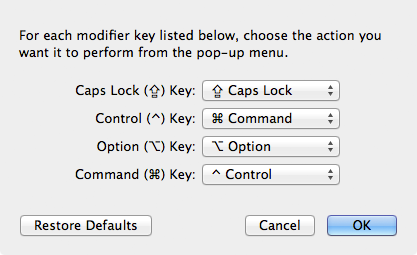
I just tried to search for it as if I didn't know and it was hard. Maybe wikipedia should describe that ^ is common representation among first lines, not in details section. Also macOS (former osx) uses this symbol everywhere: http://www.macinstruct.com/images/command.png

Re: What typing ^D does on Unix (2009)

#50
post #26

As a corollary, typing ^D twice on a non-empty line will also send EOF on the input, allowing you to provide a program with input not ending with \n from the command line. I knew about this behavior, but not why it worked, but this article's explanation clarifies this behavior as well. The first ^D terminates the read() call, passing the line so far, without terminating \n, to the program. The second causes read() to…

I know this article says Unix specifically, but on Linux (Ubuntu) I just tried typing `ls^D` in bash and got a terminal beep. I tried in zsh and got an autocomplete as if I'd hit tab. In ksh and fish nothing happened. I'm curious as to why there are different behaviors here?

[deleted]
Post reply on HN