I don't get it, it doesn't do anything but crash. Whatever I do.
Fork: Fast and Friendly Git Client for Mac
21–30 of 109 posts
Re: Fork: Fast and Friendly Git Client for Mac
#22I love https://www.git-tower.com but it isn't free.
However, you can try before you buy.
Re: Fork: Fast and Friendly Git Client for Mac
#23The web page lacks any screenshots of the change staging screens.
Yes. I looked for that too. Those are the screens that bring by far the most value for me in gui clients... (instead of "git add -p")
Re: Fork: Fast and Friendly Git Client for Mac
#24Re: Fork: Fast and Friendly Git Client for Mac
#25If it doesn't include interactive rebase, it's not worth the cash because I'll have to go back to the CLI before I merge anything. EDIT: Fork looks wonderful, I didn't mean to be so cold—just pointing out that it's hard to write a replacement for the original tool, and that I value it when it happens. I believe Sourcetree supports it.
> it's not worth the cash
Well, it is free :-) (at least while in beta)
Re: Fork: Fast and Friendly Git Client for Mac
#26I don't get it, it doesn't do anything but crash. Whatever I do.
The Fork developer is here. I received few crash reports today, fixing them right now.
P.S. I wasn't ready to be mentioned on HN today :).
Re: Fork: Fast and Friendly Git Client for Mac
#27I'm a Tower user, not really seeing a compelling differentiator here (tabs look interesting however), but perhaps someone is seeing something I'm not.
Re: Fork: Fast and Friendly Git Client for Mac
#28I have been using atlassian sourcetree for quite a while. It has very similar look and feel :) https://www.atlassian.com/software/sourcetree
Anyone know is there are advantages of Fork over SourceTree?
I already got that question today. So, I'll just repost my answer:
here are some differences from the top of the head:
* Fork has tabbed interface
* For each commit you can see not only changes, but also the whole repository as it was at the moment of commit
* Diff viewer shows exact difference between two pieces of code. For example, here are both SourceTree and Fork showing the same commit: https://dl.dropboxusercontent.com/s/fn9mzjmyvhec2sa/2016-08-..., In ST (on the top) you need to figure out what has changed, in Fork (the bottom one) you see the difference clearly.
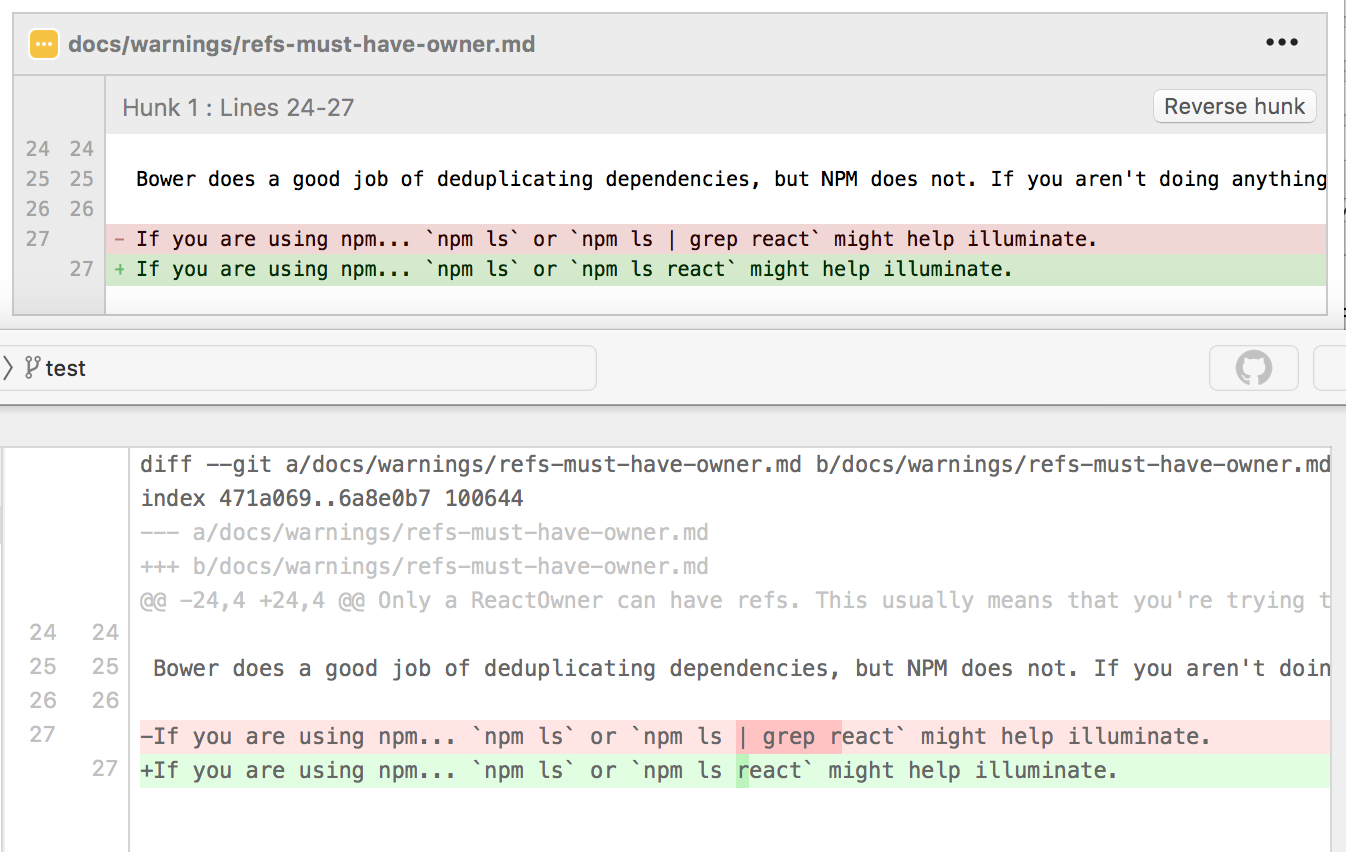
* Repository browser shows you many details about your repositories in the similar way as Finder does
* Commit list marks commits which do not belong to your commit tree with gray color
Re: Fork: Fast and Friendly Git Client for Mac
#29How much faster is it than competitors?
The interface is very fluid and reactive for me. Not on a massive project though.
Re: Fork: Fast and Friendly Git Client for Mac
#30i have been using GitBox ( http://gitboxapp.com ) for quite awhile now, but it seems like it doesn't get much in the way of updates, so i tried this. Very first thing it does is write a file called "gitclient.log" to my home directory. i deleted it, and it came back the next time i started the app. I see nothing in the prefs that allows you to move the file somewhere else. call me picky, but this is is a deal-breaker…
The developer is here. I've already mentioned, I wasn't ready to be on HN today (I'm not the OP), and that's why I missed logging. Anyway, I'm really sorry for that.
Right now I'm making a new build with the fix. Thanks for letting know.