Fantastic.
Regarding non-merge workflows: For me the question is:
should git history reflect a literal record of keystrokes or should it reflect intent?
I strongly believe in the latter.
281–290 of 350 posts
Regarding non-merge workflows: For me the question is:
should git history reflect a literal record of keystrokes or should it reflect intent?
I strongly believe in the latter.
Earlier quoted context omitted.
> You can squash into master without losing the history This is otherwise known as a merge. A single atomic change to master, referencing only the final files, with the first parent referencing the previous master that was also "not" broken. It has only one change: A second parent, referencing the more accurate history.
What you're describing is definitely a squash.
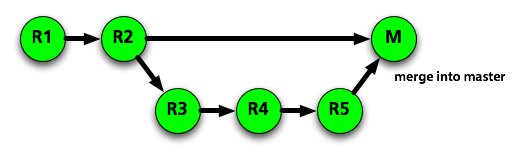
If we start without M, and start with master=R2, temporary-feature-branch=R5, I expect the following outcomes:
"squash" will leave us with master=M, and the graph R1 -> R2 -> M. Once temporary-feature-branch is deleted, R3-R5 are forever lost.
"merge" will leave us with master=M, and the graph R1 -> R2 -> M, + R2 -> R3 -> R4 -> R5 -> M
"rebase" will leave us with master=R5, and the graph R1 -> R2 -> R3 -> R4 -> R5. Once temporary-feature-branch is deleted,
The first case loses the history of the code, and thus can't be what we're talking about.
If you call the second case "squash" I find that very confusing. It's also not what github is referring to when talking about "squash your commits" in the parent article, they're talking about the first case. Now, git confuses the issue a bit too - perhaps I should be labeling the second case a "non-fast-forward merge", but I'd still find that clearer than "squash without losing the history."
Earlier quoted context omitted.
I'm with you. At least for most professional environments. It's weird. Git was made for something very specific, Linux kernel development. It made a lot of decisions to support that environment. However most of us don't work in that type of environment. If you have a private repo for your job you're in a very different environment. At my job mutating history is the opposite of what I want. I don't want people mutatin…
I'm from a Git background but we use Perforce at work. I wish there were blog posts desperately explaining how simple P4 is because I can't understand how to use it for software development. To me it seems like a big dump of files like a network mount with locking and some kind of history. But how the hell is one supposed to write software with it? It has complicated tools for sharing incomplete work. I don't know ho…
Perhaps your issue here is that P4 is too simple. You check a file in and it's there forever. Sync latest, change things, check in, voila! Once in P4 there is literally nothing you can do to permanently screw things up.
Binary files are locked so only one person can edit at a time. Text files can be merged. New users may need help resolving conflicts. I recommend Araxis Merge.
Code review tools always exist on top of source control. There are different tools that integrate with Git, Mercurial, SVN, Perforce, etc. What did you use at your old job that you were happy with?
I do have at least some good news for you. If your company is running a semi-recent version of the Perforce server you can use Git with it. You can work 100% in Git if that's what floats your boat. https://www.perforce.com/gitswarm
Earlier quoted context omitted.
I'm with you. At least for most professional environments. It's weird. Git was made for something very specific, Linux kernel development. It made a lot of decisions to support that environment. However most of us don't work in that type of environment. If you have a private repo for your job you're in a very different environment. At my job mutating history is the opposite of what I want. I don't want people mutatin…
> It just works. You can't fuck it up. Unless someone checks out everything in the depot by accident..
Earlier quoted context omitted.
A few tips! 1. Always use the "upstream" branch as your rebase target - "git rebase -i master", or " git rebase -i origin/master". This is almost always what you want, and picking the wrong base is the most common error I've seen when teaching people rebase -i 2. Use autosquash! https://robots.thoughtbot.com/autosquashing-git-commits . If you have trouble with the text-editor interface you get when you run rebase -i,…
Thanks! I get the feeling I should give up on using a GUI for most of my git usage as doing many of these seems awkward or impossible with the GUI. That's probably part of my problem.
However, I am squashing very rarely, mainly for commits which correct typos.
This is a bad idea masquerading as a good idea. Before making a pull request (or doing any sort of merge), you should rebase against upstream master (or whatever you're going to push to). However, keeping distinct atomic commits that change one and only one small thing, when possible, is much preferable if bisect or blame is used. If you have broken or poorly written commits, use fixup, reword, squash, etc. in rebase…
> Before making a pull request (or doing any sort of merge), you should rebase against upstream master (or whatever you're going to push to) See, and maybe this is because I'm just dumb or something, but I have never gotten rebasing to work for me. Ever. Every single time I do it I read at east 3 articles about it so I don't screw something up, I attempt to do it and ultimately I lose a bunch of work. I just don't ge…
I hate squashing branches. There's a lot of value in commit messages; they're educational and are a form of documentation. It's on the developer to squash the "oops" commits, during a rebase, rewriting the commit message so it has some value when going back in time to look at changes. I'd love to see a commit linter, that points at commits with text like "oops" and "fix my derp" to suggest possible commits to squash.…
Earlier quoted context omitted.
I'm from a Git background but we use Perforce at work. I wish there were blog posts desperately explaining how simple P4 is because I can't understand how to use it for software development. To me it seems like a big dump of files like a network mount with locking and some kind of history. But how the hell is one supposed to write software with it? It has complicated tools for sharing incomplete work. I don't know ho…
I can teach an artist or designer everything they need to know about Perforce in 5 minutes. I can spend a year helping and they still won't be comfortable with Git. Every studio needs a Git expert to help people when they have a Gitastrophe. Perhaps your issue here is that P4 is too simple. You check a file in and it's there forever. Sync latest, change things, check in, voila! Once in P4 there is literally nothing y…
From my point of view, Perforce is designed from completely the wrong standpoint. The "big dump of files" paradigm makes everything strange in software development. In particular, I find it needlessly difficult to share incomplete work that isn't ready to be merged (In Git, you just commit and push, in P4, you use something else, like the shelf for that).
In contrast with the "big dump of files" paradigm, Git is "create patches and share them". The beauty of this is that "sharing" part works without some dedicated, blessed server and changesets are easily shared over e-mail or any other medium.
I must agree with you that the Git UI is quite bad, inconsistent and not easily discoverable (ie. not something for artists). But the concepts of Git are well-defined and elegant and are thoroughly explained in the README in the first commit[0] of Git(!). To mitigate the issues with the bad UI, I've always found the Git manpages to be fairly clear and useful (but not everyone agrees).
What comes to using Git client with Perforce server, I'd use it if our monorepo workflow wasn't completely incompatible with that.
For me, software development has always been about creating and sharing patches, and that's why Git makes sense for me.
[0] https://github.com/git/git/commit/e83c5163316f89bfbde7d9ab23...
Earlier quoted context omitted.
I'm curious, what do you think of the commit history of the last few years of LibreOffice? https://cgit.freedesktop.org/libreoffice/core/log/ (Don't look at the OpenOffice.org years, they literally took a whole bunch if development work from SVN branches and then merged them in as a single commit and put in single line descriptions with internal tracking numbers and odd project management codes... utter disaster! And…
How about I just look at the latest ~33h directly on that page ;) I like the scope of a lot of those commits, although a few are still chunkier looking than I'd like - take that with a grain of salt, though, as I don't have a good enough feel for the codebase to reasonably estimate how much more they could be chunked up. Pretty much everything has a review link, which is nice. I'd expect more back and forth in the co…
Thanks for the info, that's really quite insightful. Appreciate you taking the time to give it!
Earlier quoted context omitted.
> you trying to push this conversation towards it's extreme, absurd ends I would remind you that you are the one introducing morally charged terms like "lying" when describing rebasing. The fact that you cannot conceded even that those who disagree with you are at least morally good actors is the source of the extremism in this conversation. I would encourage you to seek hard to understand how it could be that morall…
Not all lying makes you a bad person (thank you so much for the gift! I love it!). But it's still lying.
The general rules of Linus Torvalds are the only real sane ones in this situation, at least IMO:
1. For a clean commit, make sure you rebase only on your private history. If the branch is public and in any way used by anyone else, then unfortunately it's not something that can be considered "private" any more (at least not unless you give strict warnings that no serious work should be done on the code in the branch until it is finalized).
2. Once your code is committed into a public branch or into the master branch, then you can't change it. No rebasing on this code!
3. Do NOT rebase other people's code, even if it is very messy. If you pull in messy code, then complain about their messy code or try to avoid depending on it. Which basically means that developers that collaborate need to practice pushing and merging clean code.