Live data from Hacker News

Lenovo Launches ThinkPad X1 Yoga at CES with OLED Display

anandtech.com

21–30 of 105 posts

Re: Lenovo Launches ThinkPad X1 Yoga at CES with OLED Display

#21
post #6

Earlier quoted context omitted.

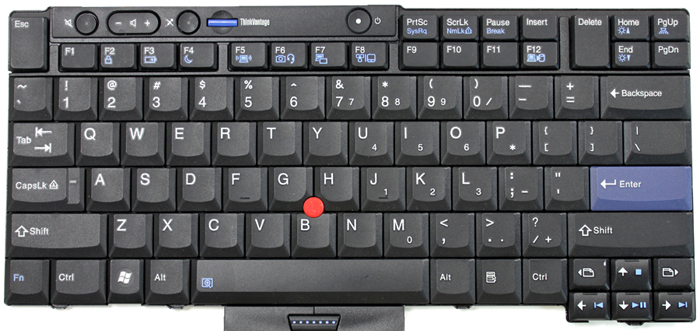
Thanks for the pointer. It looks promising, except for the keyboard layout. WTF http://images.anandtech.com/doci/9889/T460.jpg Can we please go back to IBM designed keyboard layout. The T410 had a very good keyboard, I want to keep such an layout :( I want my keys grouped together not such a mess. The F1-4, F5-F8, F7-F12 keys should be grouped. The Del, Home, Page Up/Down keys should be grouped. I want to be producti…

I really don't understand what is their logic when they place a full Print Screen key (which I use 10 times a year at most) right between the Alt and Ctrl but the arrow keys are smaller and crowded and Home and End (which I use every time I edit something) are not even on the keyboard (or maybe there is some unhandy Fn+ shortcut?). WTF ? I got used to Sony Vaio which has full arrow keys and a smaller shift and an add…

You can remap Print Screen (or any key really) to anything you want in software.

Home and End... Have you seen this keyboard? They're in the top right corner.

Page Up/Down near the arrow keys is really nice.
Re: Lenovo Launches ThinkPad X1 Yoga at CES with OLED Display

#22
post #6
post #3

Earlier quoted context omitted.

I think you are looking for T460p http://www.anandtech.com/show/9889/lenovo-refreshes-thinkpad...

Thanks for the pointer. It looks promising, except for the keyboard layout. WTF http://images.anandtech.com/doci/9889/T460.jpg Can we please go back to IBM designed keyboard layout. The T410 had a very good keyboard, I want to keep such an layout :( I want my keys grouped together not such a mess. The F1-4, F5-F8, F7-F12 keys should be grouped. The Del, Home, Page Up/Down keys should be grouped. I want to be producti…

The function keys are grouped! Hard to see on the photo, but on my X240 they're grouped: Esc-F1-F4, F5-F7, F9-F12, Home-End-Delete.

Re: Lenovo Launches ThinkPad X1 Yoga at CES with OLED Display

#24

Earlier quoted context omitted.

Other features they definitely need to add back before I'll consider buying another ThinkPad: - Non-chiclet keyboard with decent layout - HDD and network activity indicator lights - Hardware wireless-off switch - Latching lid They certainly don't need to make it any thinner -- I've had to carry some Macbooks around and the sharp edges are not very hand-friendly. I think 1" throughout is about right for a laptop thick…

>HDD and network activity indicator lights I never understood the point of removing these. I think it may just be cutting costs, trying to save a few cents on the custom shape LEDs.

With SSDs and the density of network traffic these days, both indicator lights are pretty much obsolete. Your HDD activity light would never be on, and the network activity light would constantly be on.

Re: Lenovo Launches ThinkPad X1 Yoga at CES with OLED Display

#25
post #9

Oh great. Now we can experience OLED burn-in on our notebook displays, too. And since the thing is freakin' glued together, good luck repairing it.

New gen OLEDs like the one in Samsung S6 do not have any significant burn-in. If this thinkpad's display is sufficiently advanced, there won't be a problem. I do hope they are sourcing it from Samsung.

The s6's expected longevity (~2yrs per the contract model) is much smaller than the expected longevity of say, the average college students who buys this laptop for use in college.

For the record, my Note 4 isn't showing any burn in after > 1yr of use, but who knows what it will be like 4 years down the line.

A small number of users report burn-in on the newer s6/6p so I hope QC on the new Yogas will be tighter at the very least

Re: Lenovo Launches ThinkPad X1 Yoga at CES with OLED Display

#26
post #10
post #6

Earlier quoted context omitted.

Thanks for the pointer. It looks promising, except for the keyboard layout. WTF http://images.anandtech.com/doci/9889/T460.jpg Can we please go back to IBM designed keyboard layout. The T410 had a very good keyboard, I want to keep such an layout :( I want my keys grouped together not such a mess. The F1-4, F5-F8, F7-F12 keys should be grouped. The Del, Home, Page Up/Down keys should be grouped. I want to be producti…

I have a W530 and it looks very similar to this layout (Return key is over 2 rows though).

Usually, European keyboards have the weirdly shaped enter/return key that's over 2 rows, and US keyboards have a single-row return key.

Re: Lenovo Launches ThinkPad X1 Yoga at CES with OLED Display

#28

Earlier quoted context omitted.

>HDD and network activity indicator lights I never understood the point of removing these. I think it may just be cutting costs, trying to save a few cents on the custom shape LEDs.

With SSDs and the density of network traffic these days, both indicator lights are pretty much obsolete. Your HDD activity light would never be on, and the network activity light would constantly be on.

You could simply normalise them to not be constantly on then.

Re: Lenovo Launches ThinkPad X1 Yoga at CES with OLED Display

#29
post #2

Will Lenovo ever produce a high quality notebook again? All I want is a real "ThinkPad". Give me a proper T460 with 32GB RAM, IPS display, a recent Intel i7 CPU, replaceable batteries and the notebook body of the T410 or better the T60 or IBM ThinkPad T41.

Other features they definitely need to add back before I'll consider buying another ThinkPad: - Non-chiclet keyboard with decent layout - HDD and network activity indicator lights - Hardware wireless-off switch - Latching lid They certainly don't need to make it any thinner -- I've had to carry some Macbooks around and the sharp edges are not very hand-friendly. I think 1" throughout is about right for a laptop thick…

> Non-chiclet keyboard with decent layout

This. These cheap keyboards are very annoying.

I hope Lenovo produces the old IBM style business quality keyboards for their brand new models.

@Lenovo: have a look at your great T410 keyboard, build them again: http://cdn6.bigcommerce.com/s-blhknq8/product_images/images/... (only the cursor keys are a bit too small, otherwise great)

Re: Lenovo Launches ThinkPad X1 Yoga at CES with OLED Display

#30

Earlier quoted context omitted.

>HDD and network activity indicator lights I never understood the point of removing these. I think it may just be cutting costs, trying to save a few cents on the custom shape LEDs.

With SSDs and the density of network traffic these days, both indicator lights are pretty much obsolete. Your HDD activity light would never be on, and the network activity light would constantly be on.

As an user of a X201 with an SSD, that's not really the case, the differences of blinking rate are noticeable.
Post reply on HN