Live data from Hacker News

Staffpad: a new class of notation app

staffpad.net

41–50 of 104 posts

Re: Staffpad: a new class of notation app

#41
post #37

Earlier quoted context omitted.

Really, I was hooked on the video as soon as he did the pen flourish 4 seconds in. Nailed it.

In light of this example, it's interesting to consider that world-class pen spinners [1] might have opportunities as advertising consultants. "Let us perform or teach you the exact pen spin that's required for your advertisement - should it communicate confidence, sophistication, should it be quick n' simple or slightly over-the-top? We've got you covered." [1]: https://en.wikipedia.org/wiki/Pen_spinning

[deleted]

Re: Staffpad: a new class of notation app

#42
post #12

Just wondering - wouldn't it be easier, not only for music notation but also for math and other scientific notation, if there was an on-screen keyboard custom-built for this very purpose with the required symbols and movement keys? After all, why require a stylus and why sketch the characters when you can just as easily type (actually, typing may turn out to be a much faster input method). Is there a real benefit to…

Being able to select a note value from a palette, and then just drawing the head without having to bother with stems and beams would be a time saver in this case.

The app seems to allow a sort of shorthand

'A quick slanted line is what StaffPad wants for quarter notes and smaller; simple circles or ovals for half notes and whole notes.'

http://www.sibeliusblog.com/news/staffpad-is-a-music-handwri...

Re: Staffpad: a new class of notation app

#43
post #6

When I saw this my first thought was: We need something like that for Math / technical drawing. I can understand that music is a good first application of this technology, but entering mathematical and engineering-related content through such an interface could be a huge deal as well.

Flow charts and geometric shapes too.

Microsoft's iPad Pro demo showed drawing geometric shapes in PowerPoint. Reminded me of drawing in Flash but not quite as free form. I'd be very surprised if PowerPoint on Surfaces never got similar features. Maybe it does already? I don't have Office on mine.

Re: Staffpad: a new class of notation app

#44

When I saw this my first thought was: We need something like that for Math / technical drawing. I can understand that music is a good first application of this technology, but entering mathematical and engineering-related content through such an interface could be a huge deal as well.

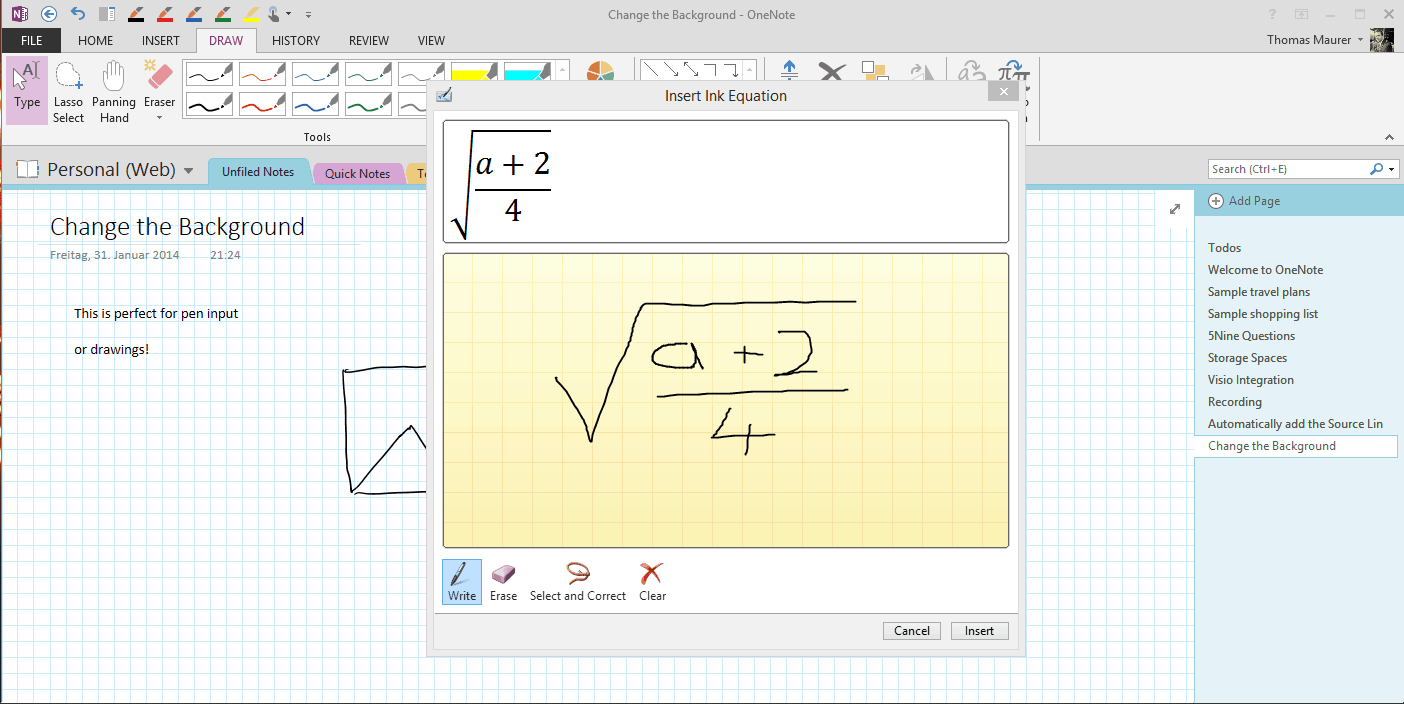
OneNote does this. You can either insert a new equation and get an editor, or select existing strokes to convert (to either writing or math). There's sometimes error correcting involved, but it's pretty impressive.

http://www.thomasmaurer.ch/wp-content/uploads/2014/01/Math-I...

Re: Staffpad: a new class of notation app

#45

Holy shit, this is amazing. For those that haven't written music before, previous programs are some of the clunkiest, slowest, most infuriating pieces of crap that I've ever had to deal with. This makes the process literally ten times easier, and so much more fun to use - and the MP3 export? Amazing. I'm actually considering using Windows because of this and the new hardware. If you had told me that two days ago I an…

It is a very cool piece of tech to be sure, but as a composer who has used notation programs almost daily for over a decade, this really doesn't solve any new problems, and it isn't anywhere near powerful enough for professionals (yet), so most will be importing files from StaffPad into Finale/Sibelius/etc.

With a MIDI keyboard and some keyboard shortcuts I can enter music extremely quickly. To write a string of 8 16th notes, for example, I can press 1 button to select the note length, then press the 8 notes on the keyboard to write the notes (this is with any modern notation program). With this app, I have to draw each individual notehead, beam across the top, and then an additional beam for the 16th notes, then I have to hope I got everything in the right place so that it correctly recognizes my intentions. On that last point, anything beyond very simple scores would probably end up being a nightmare in terms of productivity. A video from last April shows a person making a very common action - beaming more than 2 eighth notes together in a 4/4 measure, but the program thinks he wants triplets, so he has to go back and erase the marking. I can only imagine how many of these "hitches" would pop up in a more complex score.

The price is fairly low, and they seem to promising more features and refinement, so it will be interesting to see where it goes. But the input method, while neat to look at, is fundamentally a regression for professionals. A Vim-style system that allows for extremely rapid entry of music would be an interesting and useful approach, but something that might not have a wide appeal. This app will be useful for those that want to jot down ideas while not at their desktop, and many people will buy it for the novelty, but I would imagine most professionals will wait.
Re: Staffpad: a new class of notation app

#46

Earlier quoted context omitted.

Either. http://www.vexflow.com/ and http://www.musicxml-viewer.com/ use canvas. http://www.alphatab.net/ and http://abcjs.net/ use svg.

What would be the advantages of using one over the other. I'm in the process of refactoring/improving a web game (connwars.com) I made a while ago and I was planning on using canvas, but I don't know if svg would work better.

[deleted]

Re: Staffpad: a new class of notation app

#47
post #45

Holy shit, this is amazing. For those that haven't written music before, previous programs are some of the clunkiest, slowest, most infuriating pieces of crap that I've ever had to deal with. This makes the process literally ten times easier, and so much more fun to use - and the MP3 export? Amazing. I'm actually considering using Windows because of this and the new hardware. If you had told me that two days ago I an…

It is a very cool piece of tech to be sure, but as a composer who has used notation programs almost daily for over a decade, this really doesn't solve any new problems, and it isn't anywhere near powerful enough for professionals (yet), so most will be importing files from StaffPad into Finale/Sibelius/etc. With a MIDI keyboard and some keyboard shortcuts I can enter music extremely quickly. To write a string of 8 16…

To write a string of 8 16th notes, for example ...

You haven't actually tried out the app have you? To do 8 16th notes, you just need to draw 8 small slanted lines.

Re: Staffpad: a new class of notation app

#49
post #12

Just wondering - wouldn't it be easier, not only for music notation but also for math and other scientific notation, if there was an on-screen keyboard custom-built for this very purpose with the required symbols and movement keys? After all, why require a stylus and why sketch the characters when you can just as easily type (actually, typing may turn out to be a much faster input method). Is there a real benefit to…

Music is hard because there's simultaneous linear and horizontal organisation. So picking symbols and placing them can be harder than it looks.

I'd like to see this app being used for something simple-ish like the Prelude in C from Bach's WTC. The usual notation shows three independent lines - two in the left hand - and I don't know if the app has enough awareness of context to make that easy.

I haven't used Sibelius or Finale for a while, but last time I looked you had to enter the lines separately. You couldn't just "write" them in one pass and make them fit together, as you can on paper.

As for handwriting - I don't think anyone really wants it. QWERTY is faster, easier to read, and more accurate.

Symbol input (math, music, etc) is different. But for basic text, I don't think there's any clear advantage to using handwriting for input.

Post reply on HN