Even with a VPN, open Wi-Fi exposes users
arstechnica.com
Even with a VPN, open Wi-Fi exposes users
1–10 of 44 posts
Re: Even with a VPN, open Wi-Fi exposes users
#2Always-on VPN (which blocks non-VPN connections) seems to be possible on iOS if the device is supervised/managed and connected to an IKEv2 VPN, http://www.howtogeek.com/218851/how-to-enable-always-on-vpn-...
Re: Even with a VPN, open Wi-Fi exposes users
#3Inspired by the article: http://stackoverflow.com/questions/30817771/accept-any-wi-fi...
Re: Even with a VPN, open Wi-Fi exposes users
#4Windows is a step ahead of OSX with it's Private/Public networks distinction. Having little snitch installed on OSX it's staggering to see how many core services are trying to access external services, most of them on port 80.
In both cases we're still lacking good representations of network traffic. If things didn't happen in the dark in the background users would probably be more concerned and watchful.
Re: Even with a VPN, open Wi-Fi exposes users
#5Tunnelbear[0] has Vigilant mode[1] that blocks all outgoing connections until you have connected to the VPN server. It was one of the main reasons to start using it.
Re: Even with a VPN, open Wi-Fi exposes users
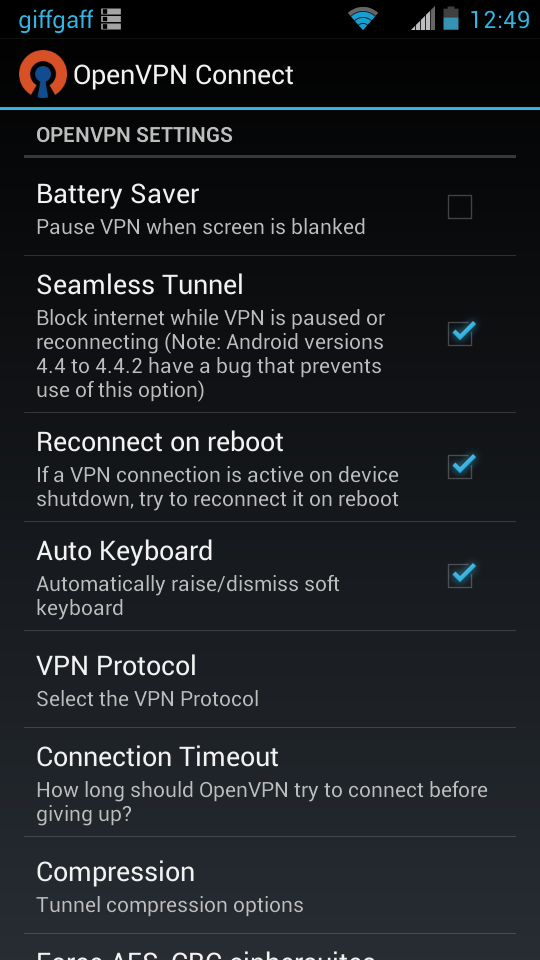
#6OpenVPN on Android can block internet traffic until the tunnel has been established, very handy.
Re: Even with a VPN, open Wi-Fi exposes users
#7Windows is a step ahead of OSX with it's Private/Public networks distinction. Having little snitch installed on OSX it's staggering to see how many core services are trying to access external services, most of them on port 80. In both cases we're still lacking good representations of network traffic. If things didn't happen in the dark in the background users would probably be more concerned and watchful.
Little Snitch is one of my favorite pieces of software, it is truly amazing how noisy most software is. Without it, your ISP knows even what programs you have open because they call home every 15 minutes for stupid reasons.
Re: Even with a VPN, open Wi-Fi exposes users
#8Tunnelbear[0] has Vigilant mode[1] that blocks all outgoing connections until you have connected to the VPN server. It was one of the main reasons to start using it. [0] https://www.tunnelbear.com [1] https://www.tunnelbear.com/updates/vigilant/
Similar to Cloak's (https://www.getcloak.com/) "OverCloak" feature that blocks all outgoing connections until the VPN connects. I use it religiously when traveling since airport WiFi is often a huge risk.
Re: Even with a VPN, open Wi-Fi exposes users
#9OpenVPN on Android can block internet traffic until the tunnel has been established, very handy. e.g. http://img.nux.ro/4nV-openvpn_seamless.png
Does orbot do this as well?
Re: Even with a VPN, open Wi-Fi exposes users
#10Tunnelbear[0] has Vigilant mode[1] that blocks all outgoing connections until you have connected to the VPN server. It was one of the main reasons to start using it. [0] https://www.tunnelbear.com [1] https://www.tunnelbear.com/updates/vigilant/
I love Tunnelbear, but I assure you their vigilant mode is far from perfect. In particular, I take a train to and from work. When the network goes down, and it goes down several times every trip, sometimes Tunnelbear goes into vigilant mode, but it frequently doesn't - i.e. I can absolutely connect to sites from the open wifi while the Tunnelbear icon is spinning up a fresh connection but before it has fully secured the tunnel.
My very convoluted solution has been to use my phone and PDAnet [1] for the actual connection, instead of the public train's wifi (they go down with similar frequency). When my phone connection goes down, it requires a hard reset (unlike the public train wifi). Before I actually initiate the hard reset, I use Pauser [2] to manually stop my main browser, then I open my secondary browser and verify I can connect to one of several different generic sites, while Tunnelbear is active. Once I know Tunnelbear is active, I'll un-pause my main browser and go back to work.
In other words, (A) I avoid the public wifi, (B) I manually have to pause my main browser when I loose connection, (C) I have to ensure I'm not using me secondary browser for anything secure, and (D) I have to manually ensure Tunnelbear has fully secured my connection before restarting my main browser.
I'm sure this still leaves me open to attack, but less so than not using this process.
[1] http://pdanet.co/ [2] http://sdunster.com/project/pauser/