Building a USB SNES Controller
blog.chybby.com
Building a USB SNES Controller
1–10 of 101 posts
Re: Building a USB SNES Controller
#2Of course completely awesome to make a modification like this.
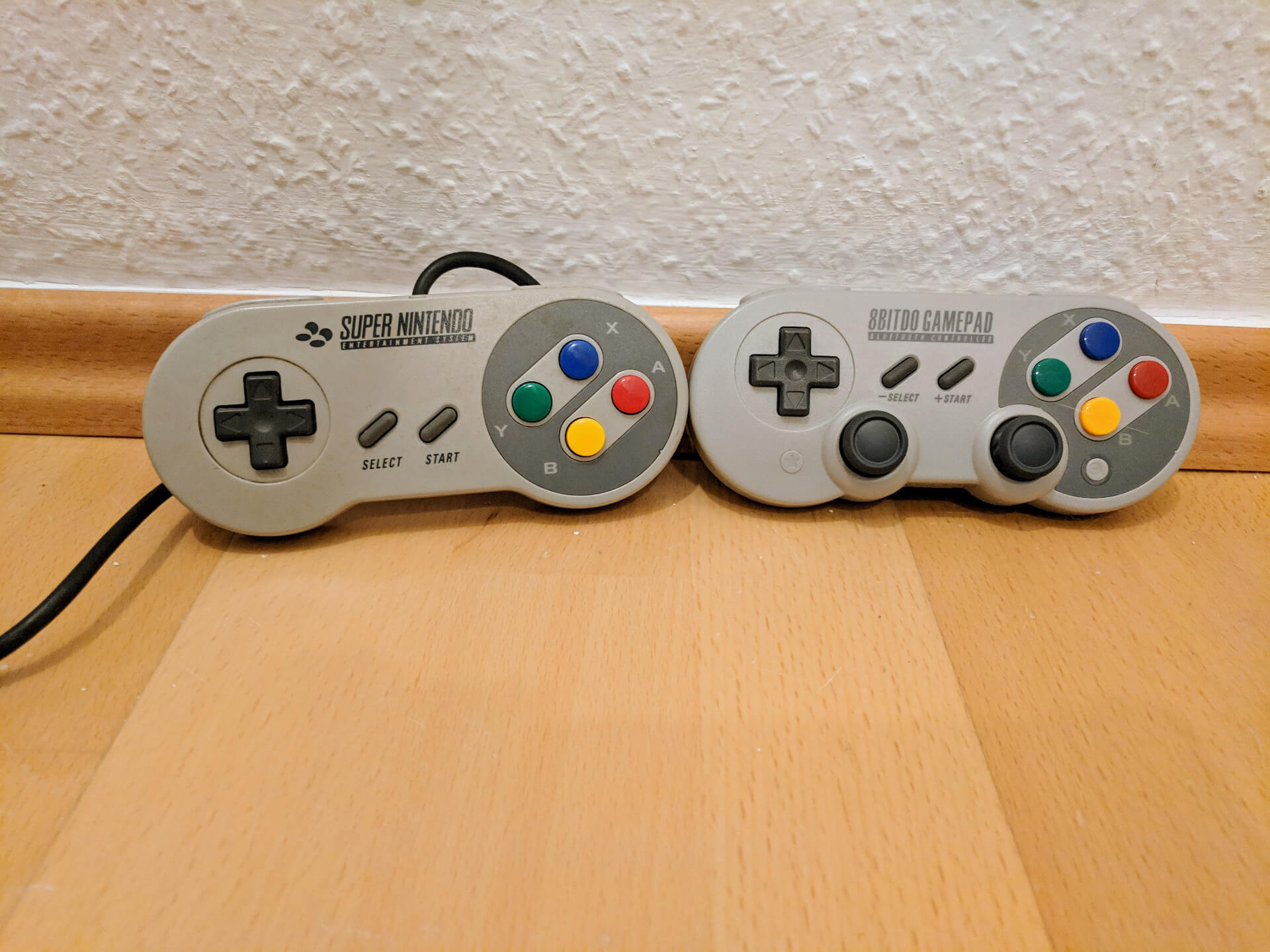
However, if you yourself want a USB SNES controller, consider buying one instead. 8BitDo offers them with the SN 30 Pro - the quality is good, they work with the Nintendo Switch or PC (including Linux), they have the additional buttons needed for modern games, there is a wired and a wireless version and the newer variant has afaik a replaceable battery (unlike the first).
Edit: I was probably wrong about the replaceable battery, that was the 8BitDo Pro 2. Which might indeed be the better choice. Looks less like a SNES controller, but at least still has the correct button labels and core layout, see https://www.8bitdo.com/pro2/
Re: Building a USB SNES Controller
#3Title should say converting a SNES controller to USB. I was thinking there would be 3D printing involved.
Re: Building a USB SNES Controller
#4Of course completely awesome to make a modification like this. However, if you yourself want a USB SNES controller, consider buying one instead. 8BitDo offers them with the SN 30 Pro - the quality is good, they work with the Nintendo Switch or PC (including Linux), they have the additional buttons needed for modern games, there is a wired and a wireless version and the newer variant has afaik a replaceable battery (u…
I did try different 8BitDo controllers, and one issue with them is the "multi-mode": in order to make them work with Android/iOS/Windows/whatever, you need to press some key before connecting them, to change the way the OS recognizes the input. Which is a deal-breaker for small children, and prevents keeping things simple (e.g. "remember to disconnect and reconnect the USB before turning the power on", e.g. when using a Raspberry Pi-based console emulator). For wireless controllers, it's even worse (extra Bluetooth mode). If only they had mechanical switches to select this behavior... You may need to keep the instructions booklet with it, just to remember which keys must be pressed before turning it on, to see which mode will be activated. The controller in TFA is more useful in this scenario, since it will always behave in the same way.
Re: Building a USB SNES Controller
#5Of course completely awesome to make a modification like this. However, if you yourself want a USB SNES controller, consider buying one instead. 8BitDo offers them with the SN 30 Pro - the quality is good, they work with the Nintendo Switch or PC (including Linux), they have the additional buttons needed for modern games, there is a wired and a wireless version and the newer variant has afaik a replaceable battery (u…
8BitDo makes great controllers. I have an SN30 Pro, a Zero 2 and a pair of Ultimate Cs. All of them have been used extensively and they are all excellent quality.
On the other hand I've had back luck with generic NES and SNES knockoff USB controllers. The quality is much worse than the originals especially in the D-Pad. It seems nobody but 8BitDo can get this right.
If you stick with 8BitDo you'll have great quality but they don't necessarily match the form factor of the originals. I can see why OP would want to convert a real one.
Re: Building a USB SNES Controller
#6I'm fairly novice with Arduino and interfacing with buttons/pots but I thought delays / loop interrupts were discouraged versus a reset-able counter variable?
Re: Building a USB SNES Controller
#7Of course completely awesome to make a modification like this. However, if you yourself want a USB SNES controller, consider buying one instead. 8BitDo offers them with the SN 30 Pro - the quality is good, they work with the Nintendo Switch or PC (including Linux), they have the additional buttons needed for modern games, there is a wired and a wireless version and the newer variant has afaik a replaceable battery (u…
I did try different 8BitDo controllers, and one issue with them is the "multi-mode": in order to make them work with Android/iOS/Windows/whatever, you need to press some key before connecting them, to change the way the OS recognizes the input. Which is a deal-breaker for small children, and prevents keeping things simple (e.g. "remember to disconnect and reconnect the USB before turning the power on", e.g. when usin…
Completely agree. I even had that situation myself - I misremembered how the mode switch/bluetooth pairing mode worked and was not able to connect my controller to a switch, thinking it was broken, until I realized what had happened. A small toggle switch really would be much easier.
Still think it's worth it, also to not destroy an original one. On the other hand, better to modify it like this than to throw it away of course...
Re: Building a USB SNES Controller
#8Great write-up. Next logical step is adding Bluetooth support so you can use it on the Switch:
https://www.instructables.com/DIY-ESP32-Bluetooth-GamePad-fo...
Re: Building a USB SNES Controller
#9This reminds me, years back I picked up an NTT Data Super Famicom Controller [0] with the idea of adapting it to USB. An off-the shelf USB converter only handled the standard SNES/SFC buttons and completely ignored the number pad. At the time few resources even mentioned the existence of this thing, so I put it on the shelf and promptly forgot about it for other projects.
[0] https://www.raphnet.net/divers/ntt_data_sfc_controller/index...
Re: Building a USB SNES Controller
#10Of course completely awesome to make a modification like this. However, if you yourself want a USB SNES controller, consider buying one instead. 8BitDo offers them with the SN 30 Pro - the quality is good, they work with the Nintendo Switch or PC (including Linux), they have the additional buttons needed for modern games, there is a wired and a wireless version and the newer variant has afaik a replaceable battery (u…
8BitDo makes great controllers. I have an SN30 Pro, a Zero 2 and a pair of Ultimate Cs. All of them have been used extensively and they are all excellent quality. On the other hand I've had back luck with generic NES and SNES knockoff USB controllers. The quality is much worse than the originals especially in the D-Pad. It seems nobody but 8BitDo can get this right. If you stick with 8BitDo you'll have great quality…
The form factor is really close though. Ignoring the added buttons, which is completely possible while gaming, it does not feel much different. https://www.onli-blogging.de/uploads/sf30pro.jpg for an example picture :)