I want to get into more Discord servers, but it gets harder and harder to keep track of all of them.
Ask HN: How do you keep track of all your Discord servers?
1–10 of 10 posts
Re: Ask HN: How do you keep track of all your Discord servers?
#2Have you tried using folders?
Re: Ask HN: How do you keep track of all your Discord servers?
#3Folders for Content, Tech, Entertainment
Leave any server I've not spoke in or read in a month. I'm in 8 servers currently and 4 of them are on the chopping block soon :)
Re: Ask HN: How do you keep track of all your Discord servers?
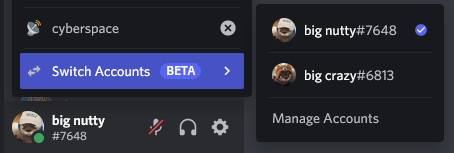
#4Discord doesn't seem to have any way (besides kludgy stuff where you run multiple instances of the client) to have different logins on different servers like Slack allows. Instead, it's one account everywhere.. which is frustrating when I have both "work" and "personal" Discords. I prefer to keep my work and personal personas separate; Slack allows this even though it's not as good a platform for community/personal servers as Discord is.
Re: Ask HN: How do you keep track of all your Discord servers?
#5I created a custom notification system that notifies me about certain keywords in certain channels. Not even visiting discord, just receiving notifications by email.
Re: Ask HN: How do you keep track of all your Discord servers?
#6Discord doesn't seem to have any way (besides kludgy stuff where you run multiple instances of the client) to have different logins on different servers like Slack allows. Instead, it's one account everywhere.. which is frustrating when I have both "work" and "personal" Discords. I prefer to keep my work and personal personas separate; Slack allows this even though it's not as good a platform for community/personal s…
I believe this is actually in development. I've seen some previews shared by people who datamine new Discord releases, so it may or may not become available soon.
Example: https://user-images.githubusercontent.com/28404851/139339574...
Re: Ask HN: How do you keep track of all your Discord servers?
#7I created a custom notification system that notifies me about certain keywords in certain channels. Not even visiting discord, just receiving notifications by email.
Any chance you could share more about this notification system? I do know of client modifications that allow you to track certain keywords, but I haven't heard of anything that would email you without even having to run Discord. Except for bots, but those could only be used in servers you own or moderate.
Re: Ask HN: How do you keep track of all your Discord servers?
#8Have you tried using folders?
Are folders just on the phone app? I don't see how you can do that on the desktop app?
Edit: Ok - RTFM (or rather Google Search ). There's no folder create per se but if you drag a channel over another and wait a second, it turns into a folder.
Re: Ask HN: How do you keep track of all your Discord servers?
#9I created a custom notification system that notifies me about certain keywords in certain channels. Not even visiting discord, just receiving notifications by email.
Any chance you could share more about this notification system? I do know of client modifications that allow you to track certain keywords, but I haven't heard of anything that would email you without even having to run Discord. Except for bots, but those could only be used in servers you own or moderate.
The client modifications you are talking about are not allowed anymore.
You don't have to control anything. All the data is delivered to your browser in a form of push notifications. Read them programmatically, filter and send yourself an email.
I don't think this can fall to definition of a "discord bot" at all. It certainly doesn't violate anyones' ToS.
Re: Ask HN: How do you keep track of all your Discord servers?
#10Earlier quoted context omitted.
Any chance you could share more about this notification system? I do know of client modifications that allow you to track certain keywords, but I haven't heard of anything that would email you without even having to run Discord. Except for bots, but those could only be used in servers you own or moderate.
The client modifications you are talking about are not allowed anymore. You don't have to control anything. All the data is delivered to your browser in a form of push notifications. Read them programmatically, filter and send yourself an email. I don't think this can fall to definition of a "discord bot" at all. It certainly doesn't violate anyones' ToS.
Ah push notifications, that's smart. Don't think that would really work for me as I actually use Discord a ton and use push notifications to only notify me of important channels, but cool nonetheless.
And yea I know client modifications haven't been allowed in years, although they haven't really cracked down on it much aside from completely separate third party clients.