Joe's Online WAD Editor and Creator
wad-editor.vercel.app
Joe's Online WAD Editor and Creator
1–9 of 9 posts
Re: Joe's Online WAD Editor and Creator
#2It seems to be more of a test/toy. Wally is about 3Mb and you can actually manipulate the textures so they go in right. All I can do here is add pre-prepared pre-formatted images. In what situation do you see this being used? To be fair, perhaps Wally doesn't run on linux etc., and maybe if someone wanted to extract some texture to image really quick without any installs, this might do the trick. Though, the person who has a WAD file in the first place...
Re: Joe's Online WAD Editor and Creator
#3It seems to be more of a test/toy. Wally is about 3Mb and you can actually manipulate the textures so they go in right. All I can do here is add pre-prepared pre-formatted images. In what situation do you see this being used? To be fair, perhaps Wally doesn't run on linux etc., and maybe if someone wanted to extract some texture to image really quick without any installs, this might do the trick. Though, the person w…
I had the same thoughts as you... also, wally runs totally fine under wine, and I always get a kick out of using old win32 apps for some reason :)
Re: Joe's Online WAD Editor and Creator
#4It's interesting to see other people still making tools for HL, even after 20+ years!
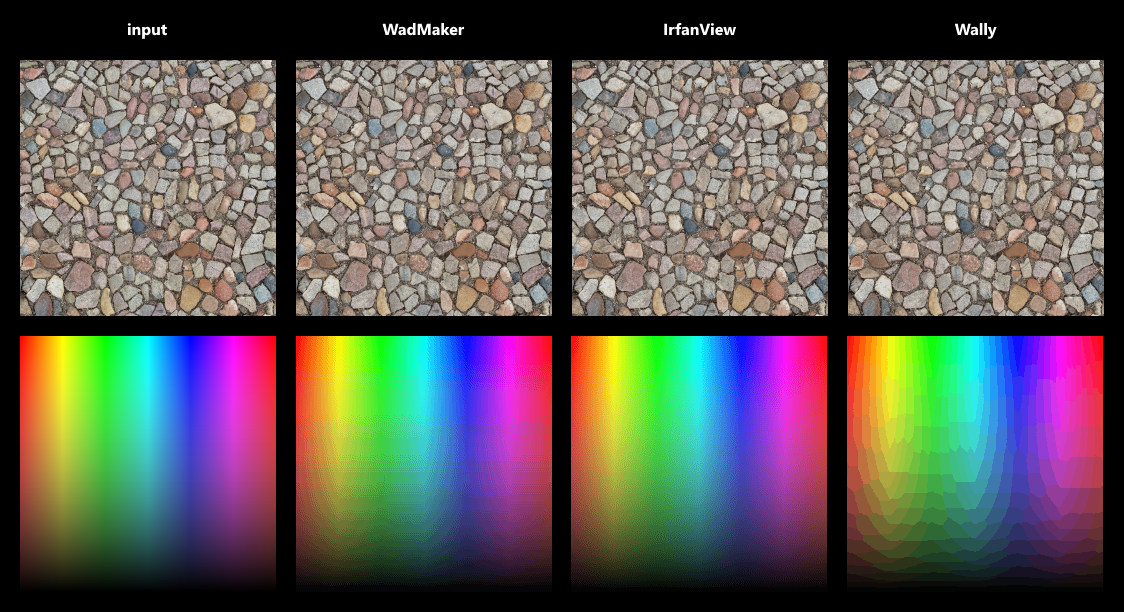
Unfortunately sorting colors by frequency and then taking every Nth color causes a notable loss of quality. A median-cut or octree-based algorithm is more suitable, and dithering can further improve the results. For the tool I'm working on (WadMaker) I settled on using a modified median-cut algorithm and dithering with an adjustable scale. This produces results that are on-par and sometimes better than Wally, though for images with lots of distinct colors and gradients I haven't been able to beat IrfanView.
One thing that surprised me is just how deep this subject goes. Color clustering, perception, gamma correction, non-linear vs linear color spaces... the more I read the more I realize just how much more there is to learn.
Re: Joe's Online WAD Editor and Creator
#5It's interesting to see other people still making tools for HL, even after 20+ years! Unfortunately sorting colors by frequency and then taking every Nth color causes a notable loss of quality. A median-cut or octree-based algorithm is more suitable, and dithering can further improve the results. For the tool I'm working on (WadMaker) I settled on using a modified median-cut algorithm and dithering with an adjustable…
Indeed goes deep it was the first time I look into code doing something like this done, Joe the original creator wrote a tutorial for his method whic:h helped me understand it a bit
https://www.j0e.io/tutorials/wad3-format/
I'm not that good when it comes to algorithms and such so I can't say I can replicate the method by myself in other languages for example, That's why my additions were only the redesign and minor features like search and exporting
Oh and maybe y'all can talk about the parsing etc, that's his website I linked above, when I emailed him he said he forgot about the project since no one ever mentioned it (despite being the only HL WAD editor that works online I found)
Re: Joe's Online WAD Editor and Creator
#6It seems to be more of a test/toy. Wally is about 3Mb and you can actually manipulate the textures so they go in right. All I can do here is add pre-prepared pre-formatted images. In what situation do you see this being used? To be fair, perhaps Wally doesn't run on linux etc., and maybe if someone wanted to extract some texture to image really quick without any installs, this might do the trick. Though, the person w…
You guessed it right, I use Linux and I couldn't even use Wine when I needed to view some WAD files, Joe's editor was the only one I could use.
It lacked an export feature however so I added that and redesined it to be reactive with Petite-Vue while at it
The reason I had WAD files is not because of Half-Life lol, I just looked them up cause I wanted to view old-school textures and how they're made. I was interested in PSX style games cause it's a trend now and that was the first reference material that came to mind.
Re: Joe's Online WAD Editor and Creator
#7It seems to be more of a test/toy. Wally is about 3Mb and you can actually manipulate the textures so they go in right. All I can do here is add pre-prepared pre-formatted images. In what situation do you see this being used? To be fair, perhaps Wally doesn't run on linux etc., and maybe if someone wanted to extract some texture to image really quick without any installs, this might do the trick. Though, the person w…
I had the same thoughts as you... also, wally runs totally fine under wine, and I always get a kick out of using old win32 apps for some reason :)
Well I'm or was in a bit of a unique situation, I'm running PuppyLinux live on a 4gb RAM, without a disk--only a 16gb flash drive.
Meaning I can't install large apps such as wine.
Since then I've found an Appimage for Proton/Wine[1] that I can save in my flash drive and use occasionally (But I may have to often delete the `.wine/` folder because it take up space).
Also, I didnt care about quality cause I needed to see old low-res textures for reference, i was interested in PSX style games for like 2 days.
Re: Joe's Online WAD Editor and Creator
#8I'm a bit disappointed the tool wasn't for Doom WADs.
Re: Joe's Online WAD Editor and Creator
#9It's interesting to see other people still making tools for HL, even after 20+ years! Unfortunately sorting colors by frequency and then taking every Nth color causes a notable loss of quality. A median-cut or octree-based algorithm is more suitable, and dithering can further improve the results. For the tool I'm working on (WadMaker) I settled on using a modified median-cut algorithm and dithering with an adjustable…
Indeed goes deep it was the first time I look into code doing something like this done, Joe the original creator wrote a tutorial for his method whic:h helped me understand it a bit https://www.j0e.io/tutorials/wad3-format/ I'm not that good when it comes to algorithms and such so I can't say I can replicate the method by myself in other languages for example, That's why my additions were only the redesign and minor…
Ah, so this is a revamped UI for Joe's tool, I've seen his website before. I think the main reason why his tool didn't get much traction is that it didn't offer any tangible improvements over existing tools. Wally, one of the oldest available tools, set a pretty high standard right from the start. Later came Half-Life Texture Tools, which added sprite-making capabilities, so it became popular as well. And recently, I made WadMaker/SpriteMaker, which enables a much faster workflow by removing several tedious steps (no more exporting files, adjusting palettes, manually managing wad file contents, etc). People are finding it useful so it's slowly getting some traction, but it has also taken several months of working on updates, writing tutorials and helping people out.
The wad and sprite formats have already been documented by others (most notably by Yuraj), and if you're a bit familiar with the HL modding scene then it isn't hard to find source code that deals with these formats, so parsing was actually one of the easier parts. Figuring out how to convert true-color images to 256 colors without too much quality loss was much harder.
If you're interested, here's how I'm making palettes: https://github.com/pwitvoet/wadmaker/blob/master/Shared/Colo... . It starts with creating a color histogram (the 'frequency list'), and then it treats these colors as 3D points within a 256x256x256 'RGB cube'. It calculates the bounding box for these colors and then splits this box along the longest edge. It then takes the box with the most colors and splits it up, and repeats that process until it has created 256 boxes. Ideally, these boxes will all be fairly small, which means that they contain very similar colors. A palette can then be created by taking the average color of each box (weighted by color frequency). When combined with dithering this produces quite reasonable results: https://raw.githubusercontent.com/pwitvoet/wadmaker/master/d... (but clearly there is still room for improvement!)