It's a damn shame that the control characters for "Field Separator" (FS ASCII 28 decimal) and "Record Separator" (RS ASCII 30 decimal) weren't used instead of TAB and CR/LF. Then the whole CRLF vs CR vs LF for line endings in files would have been totally avoided, with CR returning the print-head/cursor to the left-most position (right-most on R-L languages) and LF literally moving the print-head/cursor down. The dri…
The day Return became Enter (2023)
91–100 of 179 posts
Re: The day Return became Enter (2023)
#92Earlier quoted context omitted.
We already have two keys, they are called Shift and Enter
I think I have about a 50% success rate in typing a multiline message without accidentally sending it early, having to edit / copy and delete the message and finish typing it before the recipient has a chance to read it, confusing both me and them in the process.
Re: The day Return became Enter (2023)
#93Earlier quoted context omitted.
> It's a damn shame that the control characters for "Field Separator" (FS ASCII 28 decimal) and "Record Separator" (RS ASCII 30 decimal) weren't used instead of TAB and CR/LF. No, it's not. That stuff is left over from 1940s-1950s schemes for polled multidrop teletype machines - multiple stations on one wire, taking turns. The idea was that you punched paper tapes locally and then put them into a reader. When it was…
Why? The use of TTYs for computing interfaces is very different to using them as teletypes on comms links. I thought the control characters for that sort of use were the DC1-4 characters? RS-485 uses polling but my understanding is that the characters for polling usually involve like "FF" (hex) and some sort of device ID. I just read a TTY model 28 manual about the stunt box and I didn't see anything specific about F…
Re: The day Return became Enter (2023)
#94Re: The day Return became Enter (2023)
#95Earlier quoted context omitted.
On a current Mac laptop, you can still press fn + return to get the effect of the Enter key. The only thing I really use this for is renaming files in Finder: select a file and press Enter to edit the filename. Are there any other apps in which it does something useful nowadays?
On my 16" M1 MacBook Pro both Return and Fn+Return edit the filename... does it work differently on yours?
The habit of using Enter has been so ingrained for so many years that I never tried pressing Return before now. Has that always worked? I suspect that it didn’t at some point in the past, though it may be you have to go back a long way. Or perhaps I've been mistaken about this for decades and never realised…
Re: The day Return became Enter (2023)
#96Re: The day Return became Enter (2023)
#97Earlier quoted context omitted.
We already have two keys, they are called Shift and Enter
I think I have about a 50% success rate in typing a multiline message without accidentally sending it early, having to edit / copy and delete the message and finish typing it before the recipient has a chance to read it, confusing both me and them in the process.
That won't change if you had a different dedicated key for "move one line down but don't send `enter` keycode". You'd still accidentally hit `enter` due to muscle memory.
After all, if you could get past muscle memory, you'd simply press Shift while hitting Enter.
Re: The day Return became Enter (2023)
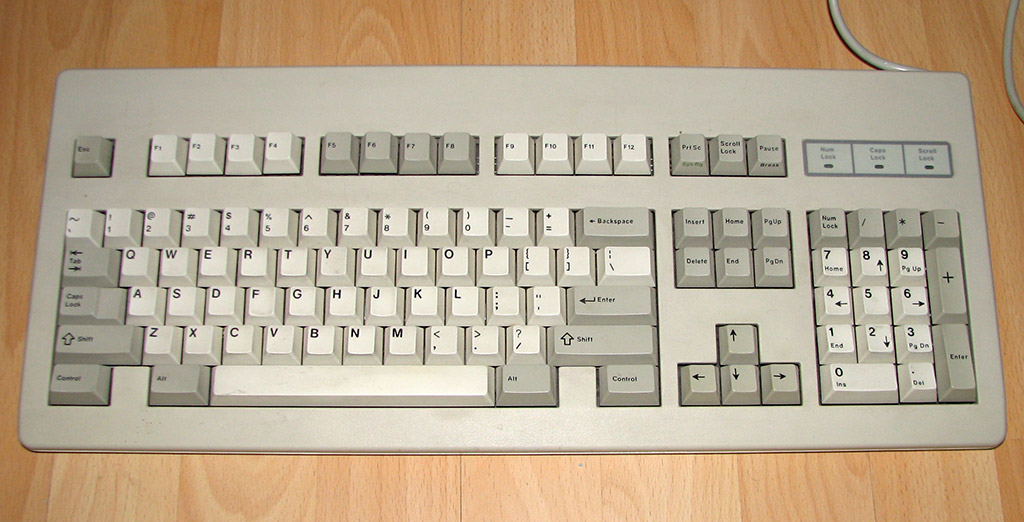
#98We had distinct keys for Enter and Return for the longest time. An ISO standard keyboard has Return in the main block and Enter in the numpad. https://en.m.wikipedia.org/wiki/Enter_key#/media/File%3AEnte...
https://commons.wikimedia.org/wiki/File:AT_keyboard_original...
https://commons.wikimedia.org/wiki/File:IBM_Model_M.png
https://www.daskeyboard.com/blog/wp-content/uploads/Cherry_k...
Re: The day Return became Enter (2023)
#99I'd claim that the article draws its own wrong conclusions.
The key was not renamed. On the IBM PC, the key got overloaded with two functions.
The IBM PC keyboard was preceded by larger keyboards with the same mechanism, style and font for use with IBM's terminals. Those had two separate keys for ↵ and Enter.
The ↵ symbol was the Return symbol signifying the Return function. The textual legend "Enter" signified the Enter function, for data entry.
Some early Model F XT keyboards did not have stabilised keys so the touch-area had to be 1×1 with room only for ↵. From the Mode F AT (large backwards-L key) forwards however, the key did have both legends: ↵ and Enter. From there on, "Enter" is mostly just what IBM PC users called it.
There are other common misconceptions about key legends. For example that ↹ would mean Tab, when it is two symbols: ⇥ for Tab and ⇤ for Back-Tab. Back-tab is on the top because it is activated with Shift. (And again, some IBM terminal keyboards had separate Tab and Back-Tab keys. Apple keyboards have only the ⇥ symbol, BTW.)
Re: The day Return became Enter (2023)
#100When Apple introduced the Macintosh II, buyers had the option to get a keyboard with the Macintosh layout, or the larger Apple Extended Keyboard with a mixed Macintosh/IBM PC layout.
The Apple Extended Keyboard was intended to be used with a IBM PC in a card slot. That is why it has a layout like a IBM Model M with two Control keys. It also has some sublegends that are PC-specific and otherwise didn't make sense on Macintosh.
But this keyboard got popular, and influenced its successors.