Live data from Hacker News

Subscription Changes for Computer Backup

backblaze.com

91–100 of 100 posts

Re: Subscription Changes for Computer Backup

#91

How are Americans using Backblaze for multi-terabyte backups? comcast/xfinity has a 1TB/month bandwidth cap (unless you pay for the unlimited tier). The main thing that's held me back from getting a cloud backup solution is not knowing how I would feasibly backup my ~10TB of data.

I tried online backup from my NAS to B2 for 3TB of data (worked fine, ultimately too expensive for my scenario), and it's feasible if you don't mind the first backup taking weeks (or maybe months in your case).
Re: Subscription Changes for Computer Backup

#92

How are Americans using Backblaze for multi-terabyte backups? comcast/xfinity has a 1TB/month bandwidth cap (unless you pay for the unlimited tier). The main thing that's held me back from getting a cloud backup solution is not knowing how I would feasibly backup my ~10TB of data.

Only a minority of Americans are on a decent ISP, but that's still tens of millions with FTTP.

Backblaze also has data centers in the EU, where most of the population has FTTP and even the people who don't are much less likely to have data caps because the EU is actually pro-competition.

Re: Subscription Changes for Computer Backup

#93

Earlier quoted context omitted.

No but you may want to try rclone. Not exactly lightweight but it’s very easy to use and configure with a variety of storage services.

Thanks, this is the only answer that seems to understand what I want. Most of the other comments say sync != backup, but depending on your (or my) use case either could work just fine. rsync is good enough for me so rclone may be too. Hopefully I don't run into any OS/filesystem difference problems, e.g. case-insensitivity, special chars, or path lengths.

FYI, rclone is built on top of rsync. So you’ll have a good understanding of how it works underneath. Think of it as rsync + remote storage and service mounting tool. The nicest part about rclone IMO, is the plethora of services it can mount, so if you have compatibility issues (which you shouldn’t) then you could choose another service.

Re: Subscription Changes for Computer Backup

#94

Earlier quoted context omitted.

I'm curious, can you clarify? What do you mean by "current" in "only current local files" and "current remote files"? What does it mean to want a remote copy of only current local files, as opposed to all local files?

'current local files' are the files that are currently on the machine I'm using right now. 'current remote files' are the files that the cloud storage has from the last sync operation with any computer. When I perform a sync between a computer I'm on and cloud storage, any new remote files (since last sync on this computer) are copied down, any files deleted locally are deleted remotely, newer local files copied up.…

Sorry, you said "I don't actually need/want any sort of sync integration".

But what you're describing is just... regular sync?

What are you asking for that's not regular sync? What am I missing here?

Re: Subscription Changes for Computer Backup

#95

Earlier quoted context omitted.

OneDrive and Google Drive are similar and fail in similar ways, I think because they look at files and not blocks. A lot of the goofy OneDrive gotchas have been resolved, but I don’t trust it for backup. Dropbox is king of sync, especially if you are on the same LAN as it syncs locally. That said, Dropbox has a long-term strategy of alienating their customers through annoying upsell and doing weird stuff with clients…

Woah, it occurs to me that I've cloud-blinded myself. Do I really, really need offsite backup? If not having an always on third machine really does do the job, especially if I can get remote access set up for it. I kinda don't want to handle the physical media though. It works well short term, but for longer time frames I can't be trusted. I have misplaced/erased/reused/damaged so many devices. It's also a pain to ke…

if you want protection from a ransomware attack you absolutely want a cloud backup, or you need to setup a cloud-like backup solution, where the "local" server is somehow airgapped from your local network and uses a different set of credentials, and none of your local-net pc's have access to it, except to write new files.

Re: Subscription Changes for Computer Backup

#96

Earlier quoted context omitted.

I've used Syncthing to sync between Mac, Linux and Android. They have a Windows client. It's not the most intuitive software to set up, especially on mobile where there are confusing filesystem restrictions from the OS, but once set up seems to work nicely. I don't use the versioning / read-only features, so I don't know how well it performs for sort-of-backup purposes.

This looks interesting, but I was interested in each computer doing a sync with cloud storage. I realize that's not well-defined, but even keeping the more recently updated version in any sync session is ok with me. The thing I wanted is that I only use one computer at a time and don't leave the others on so doing direct pc mac sync is less convenient, compared to run a sync on whichever machine I'm using at the time…

If there's always at least one computer switched on (which be a rented VM, or even a phone if that's enough storage) then Syncthing could work. I haven't tried making many edits from different places with lots of time offline though — mostly, I use it to sync photos I take on my phone to my computers and vice-versa for DSLR pictures, and music etc from the computers to my phone. Files generally sync within a few seconds.

rclone is the cloud equivalent of rsync, it syncs to S3, GCS etc. But you'd have to set up the "latest version" part yourself (--update?) and something to make the synchronization happen after changes (inotify on Linux?).

Re: Subscription Changes for Computer Backup

#97

I went the "DIY" Arq/AWS Glacier Deep Archive route for personal backups. I have roughly 2-3TB of storage and pay about $5/month for it (I think a bit of that cost is just uploads of new backup data and that all churns through normal S3 until the lifecycle marks the files as Deep Archive later). BackBlaze's backup option looks a whole lot more elegant and would absolutely be a lot cheaper for restores. The small pric…

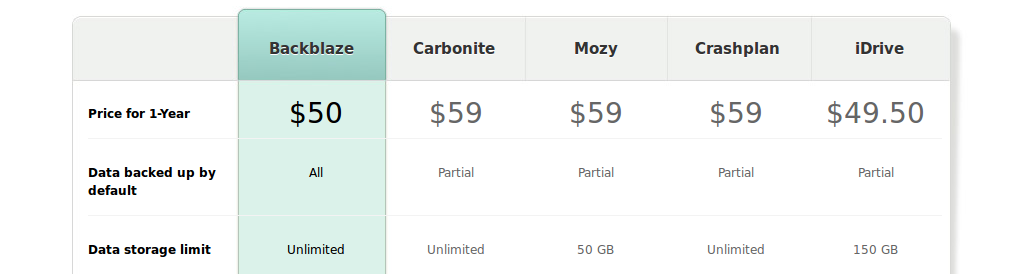
When I did my DIY AWS Glacier solution in 2014 (still in use), for 500 GB of storage Dropbox billed 499 eur/year. However there were many other companies (haven't looked whether they are still in business) at 59 eur/year. https://nikonyrh.github.io/GlacierBackup_blackblaze_cmp.png

Re: Subscription Changes for Computer Backup

#98
post #33

Hey, I hope there is a BackBlaze person lurking the comments. I use BackBlaze to make sporadic, one time backups. I then disconnect everything - which is just 2 mirrored drives. These drives only contain important documents. Can BackBlaze please not delete my backups if my drives are not connected for X days, even though I pay for the backups? It is very confusing to me, and actually pretty damn frustrating. To be mo…

I am not an user of this service, can backups be deleted due to inactivity? This sounds very confusing.

Re: Subscription Changes for Computer Backup

#99

Earlier quoted context omitted.

OneDrive and Google Drive are similar and fail in similar ways, I think because they look at files and not blocks. A lot of the goofy OneDrive gotchas have been resolved, but I don’t trust it for backup. Dropbox is king of sync, especially if you are on the same LAN as it syncs locally. That said, Dropbox has a long-term strategy of alienating their customers through annoying upsell and doing weird stuff with clients…

Woah, it occurs to me that I've cloud-blinded myself. Do I really, really need offsite backup? If not having an always on third machine really does do the job, especially if I can get remote access set up for it. I kinda don't want to handle the physical media though. It works well short term, but for longer time frames I can't be trusted. I have misplaced/erased/reused/damaged so many devices. It's also a pain to ke…

You don’t need to be dogmatic about it!

You can have a little file server, and have it backup to something like backblaze, aws, rsync.net, and just focus on the backup aspect.

Re: Subscription Changes for Computer Backup

#100
post #46

Earlier quoted context omitted.

The whole value proposition of Backblaze and similar services is that I don't have to have sysadmin levels of knowledge. It just works. If I wanted to deal with regular validation of backups and similar sysadmin tasks, I'd just run the whole thing myself.

It takes like an hour a year to request a USB stick from Backblaze, browse through it and return it. Validating backups on top of rolling your own would take a lot more time (i.e. the value proposition is more complex.) There’s really no “it just works” in backups of data you care about unless you have people you can delegate the restore testing to.

How do you know for sure that the stick they send you is a valid restore snapshot?

Do you have a program you wrote to go verify the contents of each and every file on the stick and compare that to what is currently on your system?

It seems to me that the backup validation process also has to be provided by the vendor that created the backup software itself. Only they know their file formats. Only they know how to properly compare file A and file B to see if they are correct and accurate.

Post reply on HN