Live data from Hacker News

Making Remote Work Work

source.opennews.org

81–90 of 92 posts

Re: Making Remote Work Work

#81
post #48
post #37

Create another local user account on your computer for being at work. Change the desktop background to big work logos. Don't configure your personal instant messenger accounts and whatnot. Set up the email client to only check the "work" account so you don't fall down personal email item rabbit holes. Configure the WasteNoTime Safari extension appropriately (more strictly than your personal account's config, with sit…

You dont need to do any of this. Walking away from a problem and doing something else ends up in faster more elegant solutions every time than avoiding distractions on the machine. I'll tap out a tune on my piano, play with the kids or sit in the garden for a bit whilst working from home. Then I'll do an hour or two of work and repeat. I deliver more finished higher quality code and solutions than anyone else chained…

You mean taking breaks from work like every profession ever does / requires of its employees?

I don't know where this 'being chained to the keyboard all day' mentality came from, even if I experience and have seen it a lot in the industry. Take breaks; in a lot of countries, the law or health & safety regulations even make it obligatory. And don't feel guilty over it.
Re: Making Remote Work Work

#82
post #51
post #48

Earlier quoted context omitted.

You dont need to do any of this. Walking away from a problem and doing something else ends up in faster more elegant solutions every time than avoiding distractions on the machine. I'll tap out a tune on my piano, play with the kids or sit in the garden for a bit whilst working from home. Then I'll do an hour or two of work and repeat. I deliver more finished higher quality code and solutions than anyone else chained…

I'm glad you found a routine that works for you. If doing particularly grueling work (hey, who doesn't here and there?) or I'm in a mental slump, your methods don't work for me. I don't think productivity has a turn-key solution

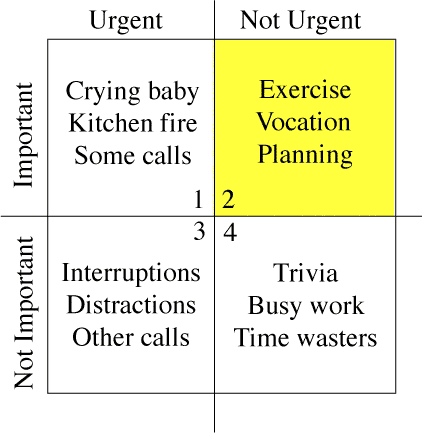
Productivity isn't something that can be forced; there's some good books out there on the subject. The 'grueling work' you described (and likewise) remind me of Stephen Covey's quadrants [1] (and similar); being in one quadrant (grueling work being 'urgent but not important') too much will cause someone to go to another for escape (not important, non-urgent tasks; distractions). It's important to find a balance there, for both personal planning and if you're a resource planner / project manager / scrum master / whatever

http://sidsavara.com/wp-content/uploads/2009/01/merrillcovey...

Re: Making Remote Work Work

#83

Earlier quoted context omitted.

I wish he had left that out, only because it was obviously going to lead to lots of reactions like this. Pair programming, at least on HN/reddit, is a fairly polarizing issue. I'm in favor of it, but plenty of folks aren't, and it's really an orthogonal issue with respect to working remotely. (For the record: tmux/vim/skype has worked perfectly fine for me while remote pairing)

For me personally, I hate it. Mainly for ideological reasons. I believe that when I'm "programming," most of it is spent in thought or jotting things down on paper. When it comes to actually typing things on a keyboard, I've already figured out exactly what should happen. Pair programming goes against this work methodology, so I don't subscribe to it. Naysayers tell me that I can work through the "thought process" in…

That is a very reasonably response, and I certainly wouldn't push the idea that pair programming is great for everyone. It definitely works better for people with a particular personality type, and worse for people with other personality types. And I think it's a shame that the industry sometimes pushes things like pair programming as a panacea - like any "best" practice or agile catechism, it only works if it works for your developers. I just find a lot of resistance to pairing from people who have never even tried it, and I think that this is unfortunate, because it doesn't have to be as awful as it's often described here, reddit, etc.

Re: Making Remote Work Work

#85
post #48
post #37

Create another local user account on your computer for being at work. Change the desktop background to big work logos. Don't configure your personal instant messenger accounts and whatnot. Set up the email client to only check the "work" account so you don't fall down personal email item rabbit holes. Configure the WasteNoTime Safari extension appropriately (more strictly than your personal account's config, with sit…

You dont need to do any of this. Walking away from a problem and doing something else ends up in faster more elegant solutions every time than avoiding distractions on the machine. I'll tap out a tune on my piano, play with the kids or sit in the garden for a bit whilst working from home. Then I'll do an hour or two of work and repeat. I deliver more finished higher quality code and solutions than anyone else chained…

> You dont need to do any of this. Walking away from a problem and doing something else ends up in faster more elegant solutions every time than avoiding distractions on the machine.

I am not talking about what I do when I take breaks, I'm talking about keeping those breaks from turning from "a short 5 minute break" to "oh shit I just spent four hours in a wikipedia rabbit hole about nuclear energy and now the day is over and I'm tired and my work isn't done".

Re: Making Remote Work Work

#86
post #80
post #30

Earlier quoted context omitted.

I've tried a few things. I find Sqwiggle's ( https://www.sqwiggle.com/ ) approach the best. You can see your team thanks to a-few-minute-apart snapshots and you're just a click away from talking to them.

I like Sqwiggle, in theory, but the CPU use and constant camera connection even while it's not in active-recording-mode was annoying... it murdered the battery life on my laptop. Some of my coworkers also found it a little privacy-invasioney.

Thanks for the feedback! We definitely hear these concerns and are working on a few things to improve in this area, particularly with privacy :)

Re: Making Remote Work Work

#87
post #66
post #37

Create another local user account on your computer for being at work. Change the desktop background to big work logos. Don't configure your personal instant messenger accounts and whatnot. Set up the email client to only check the "work" account so you don't fall down personal email item rabbit holes. Configure the WasteNoTime Safari extension appropriately (more strictly than your personal account's config, with sit…

I tend to keep completely separate physical machines. I have Thinkpad provided by work, and a personal Thinkpad. When the workday starts, the work machine goes in the dock, then at the end of the workday, I swap it out for the personal machine. I'm a strong believer in using company hardware only for work, and never using personal hardware for work related tasks, if only because it makes things slightly less complica…

It doesn't need to be different physical machines, separate user accounts on the same machine (as long as both are unprivileged and can't access the other) are fine.

Re: Making Remote Work Work

#88
post #74

Earlier quoted context omitted.

It depends what you're doing. If you're getting up to speed on a completely new system, you're going to waste a lot of time if you don't have someone who's familiar with the codebase helping you out. If two people have fairly similar levels of expertise in a given area, the benefit is going to be a lot lower.

Totally and its great to mentor someone for a little while or occasionally work on a problem together. Pair programming though is practice where two people work together all day everyday until one of them becomes batshit crazy or quits the company.

I don't think it's fair to define X as "doing X badly" and then complain about people who encourage X.

Re: Making Remote Work Work

#89

Earlier quoted context omitted.

For me personally, I hate it. Mainly for ideological reasons. I believe that when I'm "programming," most of it is spent in thought or jotting things down on paper. When it comes to actually typing things on a keyboard, I've already figured out exactly what should happen. Pair programming goes against this work methodology, so I don't subscribe to it. Naysayers tell me that I can work through the "thought process" in…

That is a very reasonably response, and I certainly wouldn't push the idea that pair programming is great for everyone. It definitely works better for people with a particular personality type, and worse for people with other personality types. And I think it's a shame that the industry sometimes pushes things like pair programming as a panacea - like any "best" practice or agile catechism, it only works if it works…

Yea I was careful to qualify my preference as a "personal" one. As a former educator, I believe it can be helpful in some cases, especially for people in an "exploratory" stage where they haven't learned the best way to reason about things yet. However, once individuals start performing at a level where they have particular individual methodologies, pair programming manifests itself as an impedance mismatch.

Re: Making Remote Work Work

#90
post #32

Any remote-working developer who's pair-programming ? I'd love to hear about your experiences? I know there's been a few attempts at creating remote pair-programming tools but I'm not familiar with any particularly successful one.

Screen sharing in google hangouts work pretty well. Can't both type with that, but you both can see the editor with acceptable lag, IMO.

I've done it in Google hangouts but I only shared my IDE. And I reduced the size of the IDE window a bit so that it was large and clear on my co-worker's screen. The way we did it, I had the keyboard all the time, so when he wanted something to be typed, he told me. Or, we would work on two different files, i.e. the kind of change that cascades across several classes, and since we were working on an SVN branch, we frequently committed to share the work to date. It is a different kind of pairing than the single PC with two keyboards and two mice, but it worked well enough to get two pairs of eyes working on one set of code. With two PCs it was easier for one person to drop into a browser to do research while the other was still looking at the shared IDE and thinking about the next move. I have used a tablet to do research while doing single PC pairing but it was actually more awkward than the remote pairing.

And if there is enough timezone difference you can relay the work by doing handovers at the beginning of your colleague's workday.

Post reply on HN