I really don't mean this as a slight, honestly just asking, what's the big draw towards using a markdown editor (as opposed to just writing in plain text in something like vscode and clicking 'preview markdown' occasionally when really necessary) ?
I write lots of markdown but never got into using a markdown editor. Just trying to understand. Is it mainly to make sure your formatting is correct? Or to get a feel for what the final product looks like?
Marktext – Elegant Markdown Editor for Linux, macOS, Windows
81–90 of 110 posts
Re: Marktext – Elegant Markdown Editor for Linux, macOS, Windows
#82Earlier quoted context omitted.
I've been working on one ( https://github.com/blackhole89/notekit ) for a while now (which, unlike the aforementioned, also is not built on Chrome/Electron). Unfortunately it seems to be pretty hard to get the word out, or at least I haven't found any better strategy than to pounce, as I am doing now, whenever I see a HN thread about markdown editors (which invariably wind up having some comment thread lamenting the…
I mean the following as feedback to help you find more users, not as critique; I understand where you’re coming from and this is just how I would personally approach it: What I immediately noticed looking at the README, is that the communication is centered around you and your values, rather than on the end-user: You mention why you created it, not what it enables the user to do. You use Linux-lingo, like “free (spee…
Thanks for the feedback! I can certainly try to improve the structure of the README, though I'm not sure if I agree with some of your points about giving more priority to non-Linux users. The thing is, at least in my eyes, Gtk generally feels terrible on platforms where it is not native (I would in fact even avoid using it in a Qt-based Linux desktop setup, just as I avoid Qt-based applications as far as possible in my Gtk-based one), and at any rate the ports are often lacking even in features (for instance, last I checked, Windows Gtk would not allow me to read tablet pressure information). If you are using Windows, and don't care for "free (speech and beer)", why would you even want to use anything other than OneNote? I'm somewhat wary of repeating the mistakes of Firefox (and GNOME) of snubbing a likely target demographic to court an unlikely one.
(Regarding Mac, I unfortunately don't have a Mac and neither does anyone who I know well enough to ask to borrow theirs, though someone did in fact contribute homebrew-based build scripts that supposedly work at some point. I just have no idea how to package the result to make it easy to install.)
Re: Marktext – Elegant Markdown Editor for Linux, macOS, Windows
#83I really don't mean this as a slight, honestly just asking, what's the big draw towards using a markdown editor (as opposed to just writing in plain text in something like vscode and clicking 'preview markdown' occasionally when really necessary) ? I write lots of markdown but never got into using a markdown editor. Just trying to understand. Is it mainly to make sure your formatting is correct? Or to get a feel for…
I use Vim with a Markdown plugin (vim-markdown). Works well, can generate a pane with a table of contents from the headers, fold and jump around based on document structure, and more.
Re: Marktext – Elegant Markdown Editor for Linux, macOS, Windows
#84I really don't mean this as a slight, honestly just asking, what's the big draw towards using a markdown editor (as opposed to just writing in plain text in something like vscode and clicking 'preview markdown' occasionally when really necessary) ? I write lots of markdown but never got into using a markdown editor. Just trying to understand. Is it mainly to make sure your formatting is correct? Or to get a feel for…
Some people just really enjoy working with a WYSIWYG editor as opposed to a split pane with source and preview.
With Mark Text I can immerse myself much better into writing, reading or editing. It is visually much more appealing to me.
Also, just needing one pane saves screen space.
Re: Marktext – Elegant Markdown Editor for Linux, macOS, Windows
#85Earlier quoted context omitted.
what about emacs org-mode?
Strictly speaking not a markdown editor. But markdown-mode (with M-x markdown-toggle-markup-hiding) definitely counts.
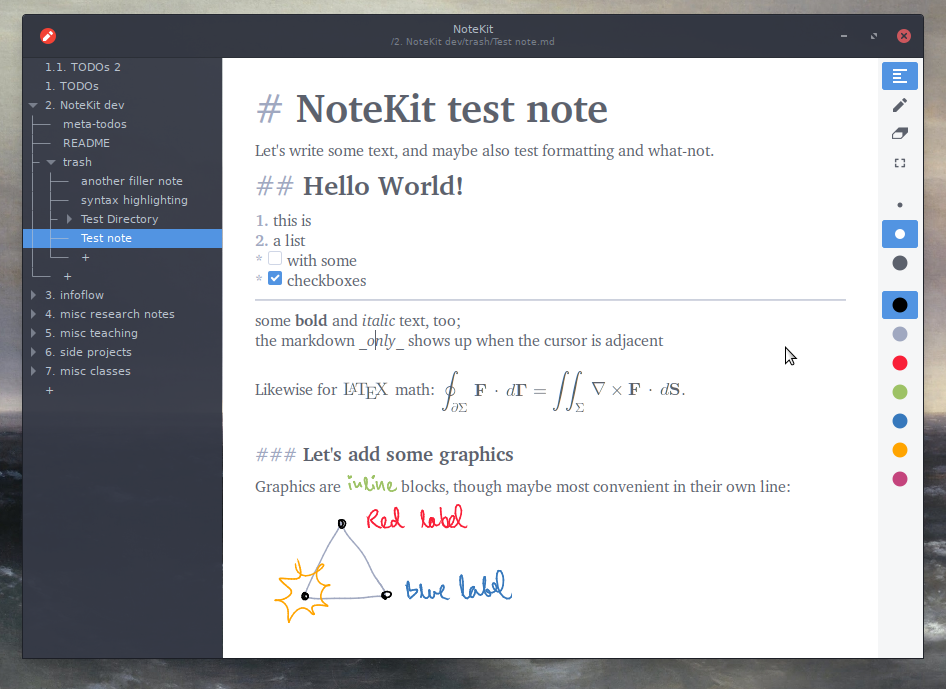
I hadn't seen Emacs's markdown-mode's markdown-hide-markup before, but trying it just now, it goes too far and has the opposite problem: it's harder to see the markup when you do want it. What Typora and MarkText (and, from the replies above, NoteKit) do is to show the markup around the cursor. (See the screenshot from NoteKit: https://raw.githubusercontent.com/blackhole89/notekit/6d6278... ) This seems to be missing in some "WYSYWIG-only" editors. I think it may be possible to implement that in Emacs, but no one seems to have done it so far.
Re: Marktext – Elegant Markdown Editor for Linux, macOS, Windows
#86Just another one in an endless stream of bloatware Electron markdown text editors. Stop giving these projects recognition.
This one even prouds itself of being "fast".
Re: Marktext – Elegant Markdown Editor for Linux, macOS, Windows
#87Earlier quoted context omitted.
Slack on the desktop continues to be a prominent unnecessary resource hog (just watch top -u with Slack open in the background). If Electron wants to shed its reputation, they should consider engaging with the Slack team, since it’s the primary unavoidable Electron app for a lot of us.
Add MS Teams to that list. It’s got a poor UX, is sluggish, and makes the system sluggish.
Just place all Electron apps where they deserve to be and run them from the browser directly.
The only one I cannot do it is VSCode.
Re: Marktext – Elegant Markdown Editor for Linux, macOS, Windows
#88To the best of my knowledge this (Marktext) is the only free/open-source Markdown editor that has WYSIWYG (like Typora: https://typora.io/ ). Not a separate preview window, but the actual editor window renders each Markdown "block" (paragraph, list item, whatever) except the one you're editing.
I've been working on one ( https://github.com/blackhole89/notekit ) for a while now (which, unlike the aforementioned, also is not built on Chrome/Electron). Unfortunately it seems to be pretty hard to get the word out, or at least I haven't found any better strategy than to pounce, as I am doing now, whenever I see a HN thread about markdown editors (which invariably wind up having some comment thread lamenting the…
I have to tell you that your approach is the only one I can work with: change the display of text based on the semantic level (title, emphasis, etc) _but_ keep the formatting visible so you can easily edit it. If it's not there, no markdown editor makes it easy to e.g change a level 1 title to a level 2 title, apart from having to reach to the mouse.
Hope your approach gets more widespread !
Re: Marktext – Elegant Markdown Editor for Linux, macOS, Windows
#89Re: Marktext – Elegant Markdown Editor for Linux, macOS, Windows
#90Earlier quoted context omitted.
Strictly speaking not a markdown editor. But markdown-mode (with M-x markdown-toggle-markup-hiding) definitely counts.
I hadn't seen Emacs's markdown-mode's markdown-hide-markup before, but trying it just now, it goes too far and has the opposite problem: it's harder to see the markup when you do want it. What Typora and MarkText (and, from the replies above, NoteKit) do is to show the markup around the cursor. (See the screenshot from NoteKit: https://raw.githubusercontent.com/blackhole89/notekit/6d6278... ) This seems to be missing…
Yeah, org-mode has org-fragtog but I'm not aware of something like that for markdown.