Live data from Hacker News

Porn, Zen, and .vimrc

karolis.koncevicius.lt

81–90 of 131 posts

Re: Porn, Zen, and .vimrc

#81

Bro I don't mean to make you the shining example of what I'm talking about but can we please try to be succinct with write-ups? The whole first half of the article could've been summarized with a single sentence: "As is typical with newbie vim enthusiasm, I spent many hours producing a 1000+ line vimrc over a long time that I eventually realized complicates my word editing process more than it helps." I mean come on.…

Also drop the first word of the title. Click bait

I think it makes sense in context, where many tech enthusiasts do almost fetishise their or other's configurations as nerd cred. Just look at /g/ board on 4chan, people post their neofetches and compare kernels..

Let's all just move on from this trend of things that are sexy in a category being regarded as 'porn': earthporn, cityporn, natureporn. Maybe I am getting old..
Re: Porn, Zen, and .vimrc

#82

I personally find vin to be a good tool for editing text without leaving the terminal. But when I’m writing a lot of code, I’ve found the vim ide concept to be far more trouble than its worth. Modern IDEs like VSCode + Vim bindings is my preferred platform

One thing I never understood is why Vim bindings are a big gain when you have a mouse. I see a single edit, it takes me all of one second to click for a large jump, even less for cursor key combos in case of a small jump. For mass edits there is find/replace and find+multi cursor. 80% of my time in the editor I spend thinking about the code anyways - I have zero interest to optimize deciseconds of my time, or worse,…

> One thing I never understood is why Vim bindings are a big gain when you have a mouse.

Vim bindings are a gain because you don’t have to use the mouse.

Re: Porn, Zen, and .vimrc

#83

I agree that defaults are good! I have to at least "set number" in my vimrc, and most importantly get rid of those horrible swap files. Here's my minimal vimrc if anyone is curious https://gitlab.com/jane314/settings-and-scripts/-/blob/maste...

All it’s missing is ‘set expandtab’ ;-)

Re: Porn, Zen, and .vimrc

#84
post #71

The simple truth was that, no matter how much energy I invested in my custom configuration, the people who built and designed Vim knew it a lot better than me. That would make sense if the defaults we were talking about had been carefully selected five or ten years ago or shown any signs of evolution since they were first laid down in 1975. If I was editing code in the languages they used in environments like theirs…

One of these things that aged really badly is : for command mode. On the particular keyboard that vi was made on : was accessible without modifiers, but on virtually all other keyboards it needs shift and is not a good default. Comma (,) would make much more sense. I'm sure there are other instances where the keybind initially made sense on the keyboard the devs were using that nowadays makes less sense.

Re: Porn, Zen, and .vimrc

#85

Good read. My strategy for avoiding all the vim porn and "plugin-madness" is to never install a plugin or mapping/override without learning to do the thing manually in vanilla vim. This way you'll KNOW if that plugin is really worth the bloat, and if you do end up away from your config on a remote server you're just mildly uncomfortable instead of dead in the water.

Thank you that didn't take 6 minutes to read, very good and informative and helpful.

What's with this attitude? The guy wrote a blog post and by definition he can write what's in his mind at his desired level of length and verbiage. It's not like he was asked to write the eject procedure manual of a spacecraft...

Re: Porn, Zen, and .vimrc

#86
post #63
post #17

Earlier quoted context omitted.

I also find that vim defaults are very lackluster, I could spend all day listing its faults: - hjkl is not a reasonable default mapping for motion, for one it doesn't make it obvious that j is down and l is up since the keys are next to one another (which makes it a lot harder to memorise in the first place) but on top of that it wastes two very premium home row keys, h and l, for something that you really shouldn't…

> hjkl is not a reasonable default mapping for motion, for one it doesn't make it obvious that j is down and l is up since the keys are next to one another (which makes it a lot harder to memorise in the first place) It's the same order as Dance Dance Revolution ;) https://youtu.be/kaMq1i7BZuM?t=25

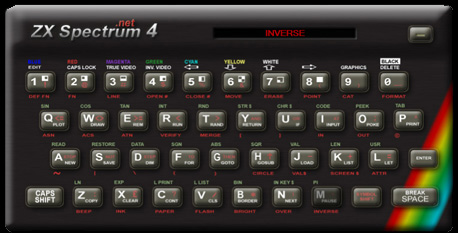
Also the same layout as the "cursor keys" (aka Protek Joystick) on the Sinclair machines - 5 (and ' would be the equivalent of 0 for fire.)

http://www.zxspectrum4.net/help/images/keyboard.jpg

Re: Porn, Zen, and .vimrc

#87
post #82

Earlier quoted context omitted.

One thing I never understood is why Vim bindings are a big gain when you have a mouse. I see a single edit, it takes me all of one second to click for a large jump, even less for cursor key combos in case of a small jump. For mass edits there is find/replace and find+multi cursor. 80% of my time in the editor I spend thinking about the code anyways - I have zero interest to optimize deciseconds of my time, or worse,…

> One thing I never understood is why Vim bindings are a big gain when you have a mouse. Vim bindings are a gain because you don’t have to use the mouse.

I've yet to find a study that would validate that claim.

Re: Porn, Zen, and .vimrc

#88
post #75

Bro I don't mean to make you the shining example of what I'm talking about but can we please try to be succinct with write-ups? The whole first half of the article could've been summarized with a single sentence: "As is typical with newbie vim enthusiasm, I spent many hours producing a 1000+ line vimrc over a long time that I eventually realized complicates my word editing process more than it helps." I mean come on.…

Thanks for the honest feedback, but I think everything you want summarized is in the summary at the top: > Vim is a highly customizable text editor geared towards writing code. But open-ended configuration possibilities often lure users into wasting time while chasing after perceived minute gains in productivity. This article describes my Vim journey, starting from heavy personal customization and ending with a renew…

I don‘t agree with rapferreira. I liked that the article included the actual technical details, including these that were the “old” solutions. Some insights are impossible to be achieved if the details are omitted.

Re: Porn, Zen, and .vimrc

#89
post #79

Earlier quoted context omitted.

One thing I never understood is why Vim bindings are a big gain when you have a mouse. I see a single edit, it takes me all of one second to click for a large jump, even less for cursor key combos in case of a small jump. For mass edits there is find/replace and find+multi cursor. 80% of my time in the editor I spend thinking about the code anyways - I have zero interest to optimize deciseconds of my time, or worse,…

Vim bindings operate on commands that can automate many of the daily work you do in a text editor besides inputting text and search & replace. Deleting or copying text inside delimiters or by lines, changing words in place, recording and replaying macros, etc. are all possible with a few keystrokes. Since commands are generic and composable, once you learn the few basic ones you'll be able to come up with combination…

Your examples of automation are all possible with multi-cursor edits as well. To me it's exactly the right mental model - I can do mass edits with the same commands I've learned in single cursor edits, and, maybe more importantly, I have immediate visual feedback between the edits I compose this way. I'd recommend anyone thinking about learning Vim to give this a try first and then evaluate whether there is any additional benefit from spending a lot of time learning Vim commands.

Re: Porn, Zen, and .vimrc

#90
Regarding to the remapping for Y, I also only memorized y$, c$, and d$ and they seem more natural to use for me.

Therefore, I remap D to delete the whole line, but do not put it into any register. This allows me to cut a line with dd, while I can throw away a few other lines with D to clean up around the target location, before finally pasting with p.

nmap D "_dd vmap D "_dd

Post reply on HN