Live data from Hacker News

The ReMarkable Tablet: A Review

blog.liw.fi

81–90 of 165 posts

Re: The ReMarkable Tablet: A Review

#81
post #75
post #62

Earlier quoted context omitted.

And most importantly: their full toolchain is available. https://remarkable.engineering/

Did you try downloading it by chance? I get 404 on that toolchain link...

Strange, getting alternative responses of 404 and 200 when doing a request, with the 200 page showing

> It's sunday, we'll try to get it up during next week.

> In the meantime a normal cross-compiling ARM toolchain should work (e. g. the one packaged in Ubuntu).

Edit: now a added "Sorry, forgot to update this..." so seems someone updated the link right now

Re: The ReMarkable Tablet: A Review

#82
post #57

Theoretically it’s good but I wonder how much market there is for it at that price. Tablets themselves are used a subset of population, compared to the phones. On top of that for people wanting to read ebooks only amazon already sells a reader for far less than this one. The iPad for example offers all these features on top of the 100s more. What is special about this and Where is the market for this?

Science, engineering, medicine. There are tens of millions of folks who would use this over an iPad.

Re: The ReMarkable Tablet: A Review

#83
After reading this article I was all set to look into the ReMarkable as a big e-reader. Then I read this thread and I'm glad that I don't!

I have no use for writing in a tablet. Can anyone recommend a big e-reader suitable for textbooks? I'd like a 13" Kindle or something...

Re: The ReMarkable Tablet: A Review

#84

Earlier quoted context omitted.

> [...] but having a mosh console on there would allow here to ditch her macbook. [..] Being able to code on it would also cause me to get one and ditch my iPad Pro. Not officially supported or endorsed in any way, shape or form, and I don't even know if it even still builds, but I did a quick proof of concept porting fingerterm; https://iskrembilen.com/fingerterm+vim.jpg https://github.com/reMarkable/fingerterm I do…

I didn’t realize it until visiting your HN profile but I see you are one of the people behind reMarkable! And you guys are based in Norway too! A few questions if you don’t mind. How many people are in your company? What are the current and future plans of the company in terms of product? Keep improving the software for the current hardware? Make new models with different hardware? Where in Norway are you located? Ar…

We generally have a policy of not communicating externally by default (way too many startups have failed because of loose lips and over-promising), but I'll answer with what's already known publicly. :-)

> How many people are in your company?

Around 70¹.

> Where in Norway are you located?

Oslo¹ (or you can search for reMarkable on google maps).

> Are you looking to increase the number of people working in your company? Planning to hire more software developers?

Yes, yes and yes. :-)

https://remarkable.com/careers

> [...] is everything that the community would need available in order to create a fully open source alternative “firmware” (or really, a “distro” might be a better name for it since it’s running a Linux kernel and all) that can run on your hardware?

It's just a completely standard Linux system, and as required we publish the source code for u-boot and Linux and whatnot, so yes.

I originally wanted to just run plain Debian on it (or ALARM), but it was easier to just start with a minimal system and put on as little as possible, especially when you're a single person trying to keep track of everything.

Now we've expanded the team a bit, and ideally we could upstream at least the kernel patches so we don't have to forward-port everything ourselves, but it's not a high priority unfortunately.

And we're still a relatively small team, it's a bit hard to find a lot of good kernel developers who want to switch jobs in Norway.

¹: https://www.dn.no/teknologi/teknologi/nettbrett/remarkable/r...
Re: The ReMarkable Tablet: A Review

#85
post #22

I've stopped using mine. It's gathering dust in a corner somewhere. The hardware is pretty decent, and the writing experience is good. The software, on the other hand, is not good. There have been a couple of updates since I bought it, but they've been few and far between. Everything about it is mediocre. The file manager, meh. The note taking app, meh. The sync, meh. Getting stuff on it automatically is all but impo…

I had the same experience, unfortunately - although I recognized early and returned it a few weeks after getting it. At the time the software was bad across the board: on device and off. But the clincher for me was the price of the device was as much as you'd spend on an iPad and it had no backlight. I'd go back to considering ReMarkable on next generation if they've learned from gen 1. My use case was 50% book readi…

Lack of backlight was a disappointing surprise for me. Seems like such an obvious feature, I spent 20 minutes trying to figure out how to turn it on. Then found on their website there's no backlight b/c they want to maintain a true paper-like experience. :unamused:

Re: The ReMarkable Tablet: A Review

#86
post #63
post #22

I've stopped using mine. It's gathering dust in a corner somewhere. The hardware is pretty decent, and the writing experience is good. The software, on the other hand, is not good. There have been a couple of updates since I bought it, but they've been few and far between. Everything about it is mediocre. The file manager, meh. The note taking app, meh. The sync, meh. Getting stuff on it automatically is all but impo…

I love mine, even though I can't use it at work due to having a very secretive employer. It's essentially an electronic notebook with zero distractions, which IMO is the whole point. The iPad pro has a browser, Facebook, Twitter, email, messenger, hacker news, Instagram, and a million other ways to get distracted. Even if I don't use them, you still get the temptation to use those, and it's pretty distracting. When I…

When I need to use mine with confidential work documents, I just put it into airplane mode and upload documents to it over USB. I confirmed (a few software versions back) that deleting while in offline mode resulted in a full delete, and that nothing was synced after coming back online.

I’d really really like a means to maintain a direct-sync-only folder, or some sort of robust encryption story, but to date, the team has said that corporate compliance use cases aren’t a priority for them. I see that some of the team is participating here; perhaps we can all convince them to prioritize some sort of solution?

Re: The ReMarkable Tablet: A Review

#87

Earlier quoted context omitted.

For one, unlike most Android devices, you don't have to root the RM. It comes with SSH running and you have the root password. The company's Github [1] has most of the source code, from their Linux kernel to the software update daemon. Their CTO, Martin Sandsmark, is a long-time KDE developer. Unfortunately, xochitl (the device's main UI) isn't open. It's a major miss in their open approach, and frankly I don't get w…

In case anyone is curious about the name of the main UI, "xochitl", it is a fairly common female name (for people, not UIs) in Mexico. It means flower in Náhuatl, the language of spoken by the Aztecs and still spoken by between 1 and 2 million people in Mexico. The Spanish word for flower, "Flor", is also a fairly common female name in Mexico. The name "Xóchitl" is pronounced with the "x" sounding like "s" and the "t…

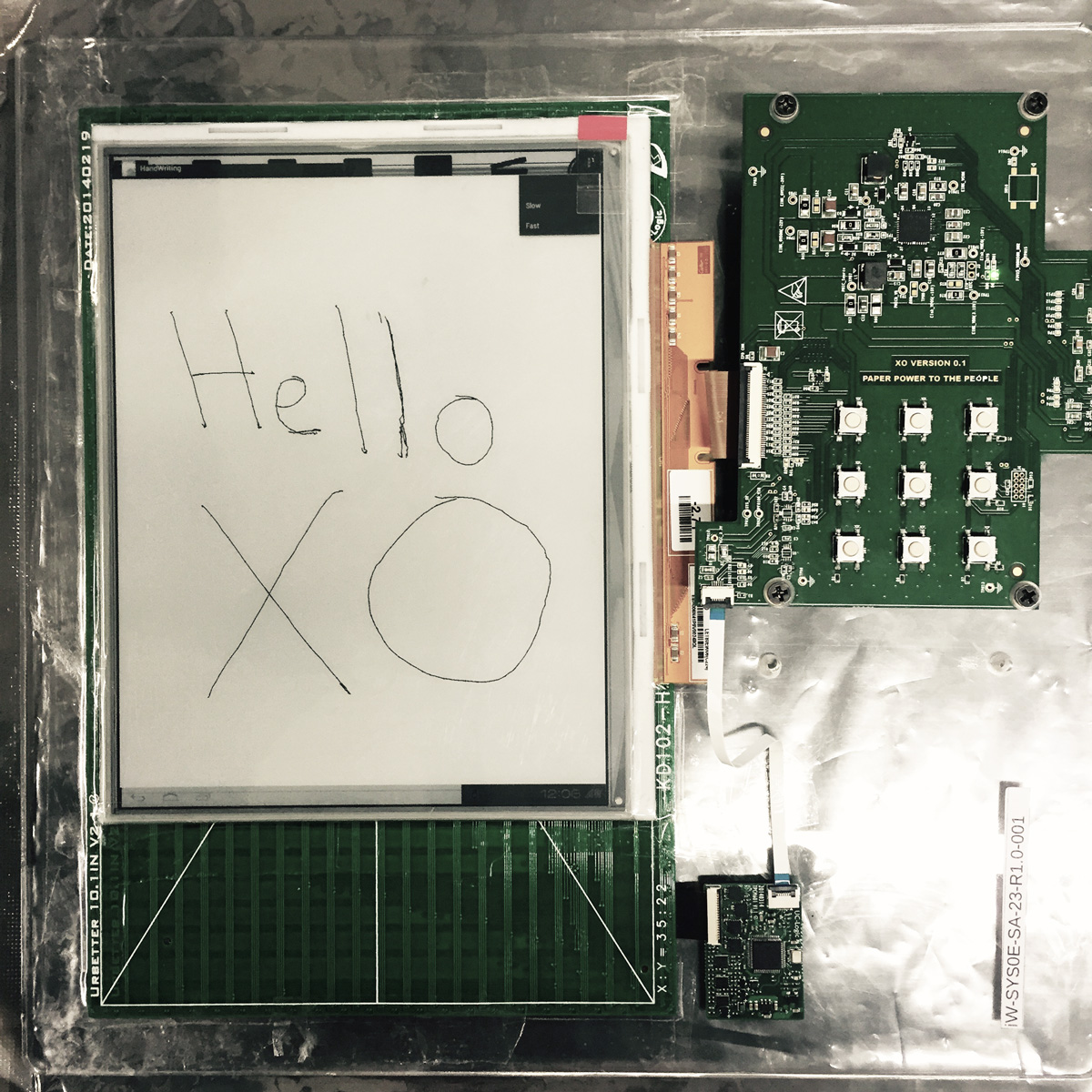
Picture of one of the first prototypes (from 2015 or thereabouts) from remarkable.com/careers, guess the naming scheme: https://images.ctfassets.net/og7ujiyra5gx/15KAaMUsNXP8cQu3lP...

:-)

Re: The ReMarkable Tablet: A Review

#88

Earlier quoted context omitted.

The password is randomly generated for each device, yes. And of course the network only becomes available once you connect the device to your WiFi, or via cable to a PC. Once you're connected, you can also change to key-only authentication if you want. The SSH daemon is Dropbear, and it doesn't seem to be updated though: > reMarkable: ~/ dropbear -V > Dropbear v2016.72

Hmm, I thought we were at 2017.75, are you sure your device is up to date? We shipped the first software with an old dropbear, though it had backported patches for the known CVEs: http://cgit.openembedded.org/openembedded-core/tree/meta/rec...

I'm on 1.7.2.3, so only missing the latest update.

Re: The ReMarkable Tablet: A Review

#89
post #86
post #63

Earlier quoted context omitted.

I love mine, even though I can't use it at work due to having a very secretive employer. It's essentially an electronic notebook with zero distractions, which IMO is the whole point. The iPad pro has a browser, Facebook, Twitter, email, messenger, hacker news, Instagram, and a million other ways to get distracted. Even if I don't use them, you still get the temptation to use those, and it's pretty distracting. When I…

When I need to use mine with confidential work documents, I just put it into airplane mode and upload documents to it over USB. I confirmed (a few software versions back) that deleting while in offline mode resulted in a full delete, and that nothing was synced after coming back online. I’d really really like a means to maintain a direct-sync-only folder, or some sort of robust encryption story, but to date, the team…

If they had done this I would have already bought one. I won't until they do. I regard my reading and note taking as private and I don't want them processed off device.
Post reply on HN