This is super cool, and I wish something like this existed at my place, as it enables information sharing without the need for phones/actual screens that shine in your face when the lights are low or tempt you to doomscroll. That said, the large primary display this uses is $2000. That's very hard to justify for any "normal" household, and that's without any mounts, backend, services etc.
I built Timeframe, our family e-paper dashboard
71–80 of 385 posts
Re: I built Timeframe, our family e-paper dashboard
#72Earlier quoted context omitted.
Agreed. Especially the current weather conditions. That's mostly useless info. Knowing the weather forecast for tomorrow or this weekend is actually useful. It's strange that pretty much every weather widget assumes you want to know the current weather conditions and not the forecast.
Eh, depends. If you have a dog, and live in a place with actual seasons, February requires frequently checking the current conditions before you head out—at least where we live, it could be anywhere from -10°C to +12°C right now, raining, snowing—annoying to put on a light jacket because you let the sun fool you, and discover it's freezing and starting to rain once you're on the field. That said: I seem to get by pre…
Re: I built Timeframe, our family e-paper dashboard
#73This is super cool, and I wish something like this existed at my place, as it enables information sharing without the need for phones/actual screens that shine in your face when the lights are low or tempt you to doomscroll. That said, the large primary display this uses is $2000. That's very hard to justify for any "normal" household, and that's without any mounts, backend, services etc.
Re: I built Timeframe, our family e-paper dashboard
#74This is cool. I bought an Inkplate for this and got as far as writing a custom image format suitable for e-ink sort of things (4-bit RLE; trivial to decode, but good compression for diagram/text type images). Where I got stuck is calendars... Unfortunately Google Calendar doesn't seem to provide a nice API where you can just say "give me the events for these days", instead you can only download all of your events in…
There are several ways to get all events for the day! The easiest one in my experience has been to write a simple Apps Script project and expose that as a published Web App[1]. That moves all of the oAuth logic and Calendar API plumbing to Google's server-side code, and gives you a simple long URL that contains exactly what data you want. Something like: ``` function doGet(req) { let start = new Date(); start.setHour…
Re: I built Timeframe, our family e-paper dashboard
#75I’m always surprised how much people seem to want to constantly know the weather.
Re: I built Timeframe, our family e-paper dashboard
#76This is awesome but I still find it funny that he said he wants a healthy relationship with technology then goes and fits his entire house out with technology. It doesnt seem like any of this would really be useful as you'd have to enter all the useful data manually(calendar). For example the washing machine. You dont need real time information because you know how long it takes since you've done it 1000s of times an…
Re: I built Timeframe, our family e-paper dashboard
#77This is awesome but I still find it funny that he said he wants a healthy relationship with technology then goes and fits his entire house out with technology. It doesnt seem like any of this would really be useful as you'd have to enter all the useful data manually(calendar). For example the washing machine. You dont need real time information because you know how long it takes since you've done it 1000s of times an…
Re: I built Timeframe, our family e-paper dashboard
#78This is super cool, and I wish something like this existed at my place, as it enables information sharing without the need for phones/actual screens that shine in your face when the lights are low or tempt you to doomscroll. That said, the large primary display this uses is $2000. That's very hard to justify for any "normal" household, and that's without any mounts, backend, services etc.
OP's Timeframe looks rad, but yes on the pricy side. check out trmnl .com for smaller / less expensive options and self hosted options. (disclaimer: i'm on the team)
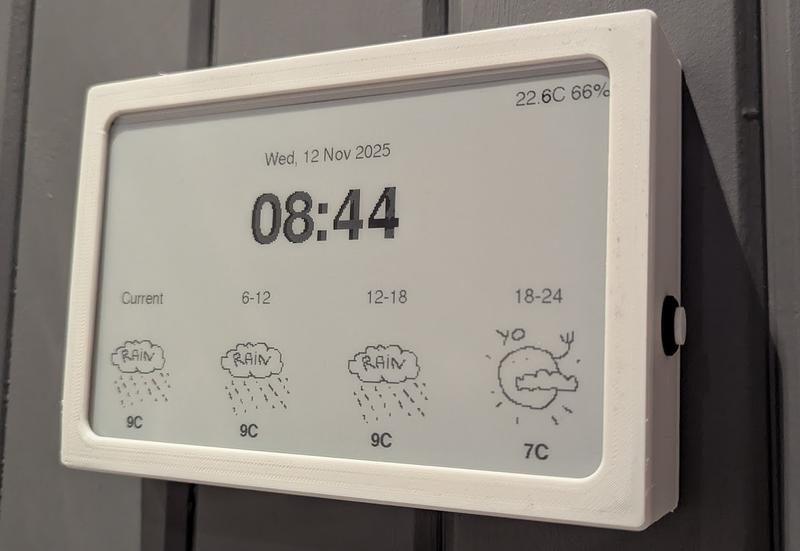
I love my original one and am planning to get a model X when budget permits
Re: I built Timeframe, our family e-paper dashboard
#79This is super cool, and I wish something like this existed at my place, as it enables information sharing without the need for phones/actual screens that shine in your face when the lights are low or tempt you to doomscroll. That said, the large primary display this uses is $2000. That's very hard to justify for any "normal" household, and that's without any mounts, backend, services etc.
You can make smaller ones for much much less. I’ll post pics of mine a bit later but waveshare 7.5” display in a photo frame and almost any ESP32 dev board and you are set for less than $100 (along with suitable HomeAssistant and ESPhome infrastructure to support it). The original article is a very slick bit of work, so well done
I can vouch for the reTerminal: the build quality is excellent, and they come with a battery, sd card reader, and some sensors: https://www.seeedstudio.com/reTerminal-E1001-p-6534.html