Live data from Hacker News

M4 Mac mini's efficiency

jeffgeerling.com

71–80 of 632 posts

Re: M4 Mac mini's efficiency

#71
post #44

Earlier quoted context omitted.

> With education discount I don't understand why so many people use the discounted price as reference. Surely very few of us on HN are still in college? So let's use the actual price when making comparisons.

all you need is a .edu address If I recall correctly. you can buy them on alumni addresses. That said, a far chunk of HNs never completed college, like myself and lost access to any email accounts of this sort, which only further supports your argument directly, as the EDU discount isn't universally attainable

I’m going to have to check this out, I no longer have access directly to my old college email, but it still forwards to my gmail over a decade later!

Re: M4 Mac mini's efficiency

#72

Earlier quoted context omitted.

I just got one (M4Pro model). It's pretty zippy. I have pressed the power button exactly once, since Friday (the day I got it). All other restarts were "soft" (including a couple of crashes). The keyboard and trackpad do fine, starting a shut-down computer. It's replacing a docked MBP. That power button was a lot more difficult to reach, and I needed to hit it more often than this.

I spent a few minutes looking up whether a Mac could be booted from a Bluetooth keyboard but couldn't find any documentation of that. Back in the day some(?) Mac models could be booted by a USB keyboard, see https://www.projectgus.com/2023/04/griffin-imate/ for technical details.

> Back in the day some(?) Mac models could be booted by a USB keyboard

Heck, way back in the day, Macs all had power buttons on the keyboard.

https://en.wikipedia.org/wiki/Power_key

Re: M4 Mac mini's efficiency

#73

Also interesting, the M4 Mini has the flash storage on a replaceable module, instead of being soldered to the motherboard, although the NVMe controller is still integrated into the SoC. iFixIt and others have already posted videos showing that the flash storage is now upgradable. > M4 Mac mini Teardown - UPGRADABLE SSD, Powerful, and TINY https://m.youtube.com/watch?v=rtdGxBeSkz8

"Upgradeable" is too big of a word here, specially considering that they're using different form-factors even between the models released on the same year (e.g. pro vs non-pro) ; and also different from models released on the previous year (e.g. studio). This almost certainly means that next year's model will also use a different interface, so you won't be able to upgrade your storage at all.

Re: M4 Mac mini's efficiency

#74
While it may not be the literal fastest CPU ever, it still seems very, very fast, and the efficiency is pretty compelling. I'm not sure how much of those efficiency gains are a product of the design constraints that Apple is not beholden to (external memory, x86 backwards compatibility, other aspects of the AMD64 architecture, etc.), the slightly better process nodes, or superior design. I'm honestly dying to know, but I guess we won't find out, and as far as the products go, it doesn't really matter that much. The end result is a pretty good deal.

As a mainly non-Apple user I see the following caveats for my own uses:

- I'd love to see better Linux support. (As far as I know, Asahi Linux only covers the M1 and M2 lines, and as amazing of a project as it is, last I looked, it's neither upstreamed nor exactly what one might consider first class. Maybe it's getting there now, though...)

- I'm worried about the SSD situation still. It seems like it hasn't amounted to much (yet), but some use cases might be more impacted than others, and once the SSD does finally fail, the machine's dead. This is not how things work in most PCs, even mini PCs, and it's a bit of a hard pill to swallow.

- The pricing is great at the baseline, but it gets progressively worse as you go up. The Apple M4 Pro Mac Mini has a baseline price of $1,399.00, which I think is pretty decent for a high-end computer with 24 GiB of RAM. But, it maxes out at 64 GiB of RAM, which is less than half of what I have in my current main machine, and believe me, I use it. That 64 GiB of RAM upgrade costs $600. For comparison, the most expensive 64 GiB DDR5 RAM kit on PCPartPicker is $328.99. Don't get me wrong either, I understand that Apple's unified RAM is part of the secret sauce of how these things are as efficient and small as they are, but at least for my main computer I really don't need things to be this compact, so it's another tradeoff that's really hard to swallow.

But on the other hand, for people happy to use macOS as their primary operating system, the M4 line of Macs really does look the best computer Apple has ever produced. (For me, it is rare that I feel compelled to even consider an Apple computer; the last time was with the original M1 Mac Mini, which I did buy, although after some experimentation I mainly just use it for testing things on macOS rather than as a daily driver machine.) There really aren't many caveats especially since the base memory configurations this time around are actually reasonable.

I suspect these things could be great on homelab racks if the longevity issues don't wind up being a huge problem.
Re: M4 Mac mini's efficiency

#75

> If only they didn't put the power button on the bottom. I can't tell if anyone is being serious about the "Powergate" issue. The thing is 5" wide and weighs 1.5 lbs, it's not exactly a burden to lift it a little. And there are highly practical workarounds: https://www.reddit.com/r/macmini/comments/1gncek7/nailed_the...

Because minis are very commonly racked in bulk, and its both very irritating for that use case, and entirely unnecessary

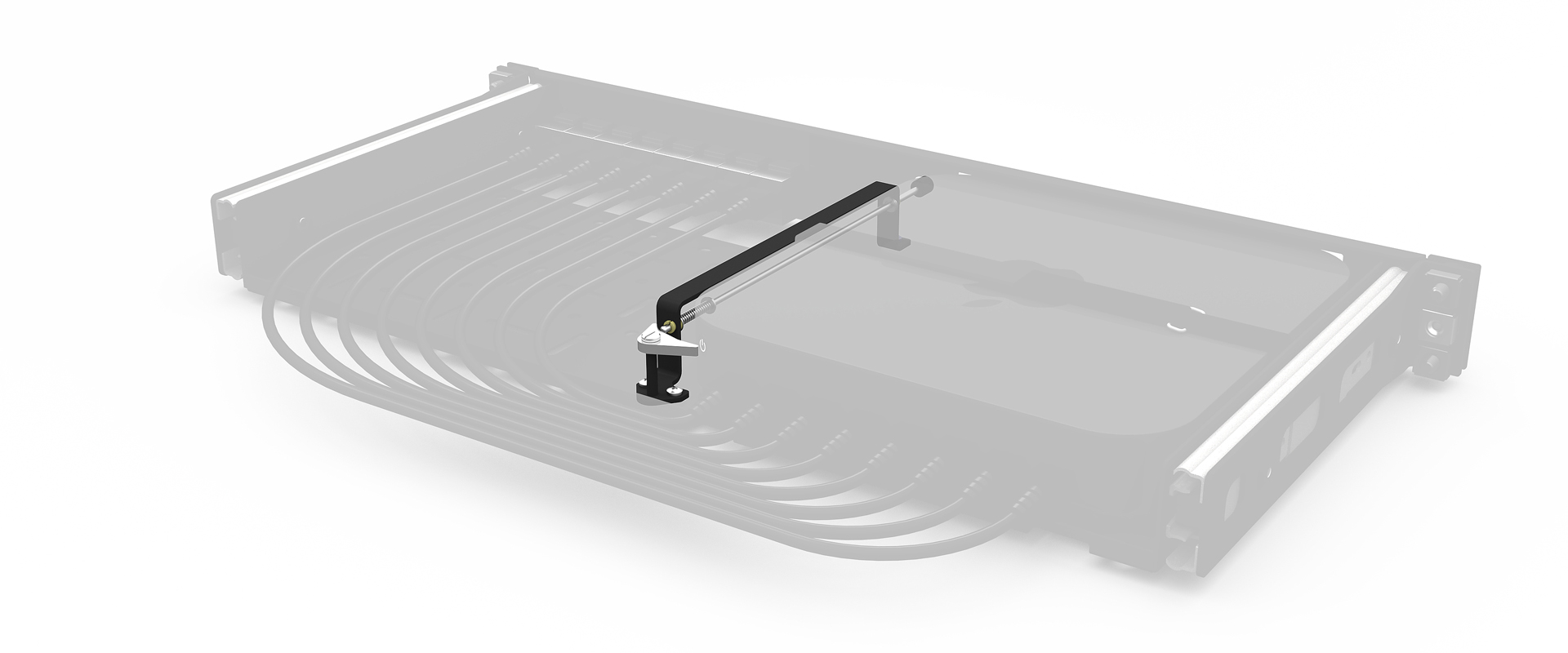
Some of the rackmount kits for previous generations already reroute the power button and connectors to the front, like this https://racknex.com/wp-content/uploads/2023/04/with-power-bu.... (Though why not just install it backwards?) I guess they will be able to run a little lever under the M4 model the same way.

Actually, the M4 model is a little taller so it no longer fits in a 1U rack mount. Whereas before you could fit 2 horizontally in 1U, now you'd possibly fit 8 or 9 vertically in 3U. (Edit: This company says 10 per 2U https://www.racksolutions.com/m4-mac-mini-apple-hypershelf.h....)

Re: M4 Mac mini's efficiency

#76
post #44
post #9

I use Linux, but I think the cheapest M4 Mini offers an incredible value and efficiency per €. With education discount, it's around €650, including VAT. It's pretty hard to find such a silent and powerful machine for that little. Any comparable options? A good fanless build with a i3-14100T is more expensive and 40-50% slower on Geekbench. An i5 is a bit closer. Some 2024 Ryzen CPUs can match or exceed its multicore…

> With education discount I don't understand why so many people use the discounted price as reference. Surely very few of us on HN are still in college? So let's use the actual price when making comparisons.

> Surely very few of us on HN are still in college?

What makes you think that? I'm back in school getting a MEng degree in my 30s.

Re: M4 Mac mini's efficiency

#77

Earlier quoted context omitted.

What specific feature gaps would you like to see them address?

Linux support. MacOS is a desktop first gui based operating system. Linux on the other hand is a server first cli/terminal based operating system. Everything server related is designed to on linux first and foremost and may or may not incidentally also run on MacOS.

macOS is explicitly designed to not be a server, and the consumer hardware it runs on is also designed that way. Apple even discontinued the Server tools that you could buy on the App Store that used to be called Mac OS X Server.

If you want to run Linux server apps, you should run Linux. Because Apple hardware and macOS isn't giving you any advantages over a generic piece of hardware running a Linux distribution. The hardware costs more and is less upgradable than off-the-shelf hardware.

Servers should not run desktop environments because they are a waste of resources and widen the attack surface due to having more components installed and running.

And even if you want a desktop environment for your Linux server, Linux most certainly has a wide selection of mature stable desktop environments.

If you need to do development work or just achieve the goal of running Linux applications on a Mac, that can be easily done via virtual machines, containers, etc.

Re: M4 Mac mini's efficiency

#78

Earlier quoted context omitted.

It’s not a burden. I consider it a typical Tim Cook decision, in that the man led the company that made one of the fastest CPUs in the world, makes it draw as much as a Raspberry Pi. Absolutely crazy feats of engineering, design, manufacturing… and - There is that ONE detail that would’ve made it perfected but it’s botched! I don’t mind it too much, since it’s still 99% close to perfect. But, but…

Hah, Tim Cook decision pretty much sums it up; its the kind of thing that wouldn't have lasted 5 seconds when placed in front of Jobs (although there is a strong chance Jobs would have demanded his own nonsensical addition/subtraction to the design).

Yeah he likely would have said no ports, or lets have only one port, or he would have demanded that the Mac mini has the dimensions of some multiple of pi…

Nobody’s perfect.

Re: M4 Mac mini's efficiency

#80
post #44
post #9

I use Linux, but I think the cheapest M4 Mini offers an incredible value and efficiency per €. With education discount, it's around €650, including VAT. It's pretty hard to find such a silent and powerful machine for that little. Any comparable options? A good fanless build with a i3-14100T is more expensive and 40-50% slower on Geekbench. An i5 is a bit closer. Some 2024 Ryzen CPUs can match or exceed its multicore…

> With education discount I don't understand why so many people use the discounted price as reference. Surely very few of us on HN are still in college? So let's use the actual price when making comparisons.

very few on HN pay full price for Mac products ;)
Post reply on HN