Live data from Hacker News

I'm done making desktop applications (2009)

kalzumeus.com

71–80 of 88 posts

Re: I'm done making desktop applications (2009)

#71
post #49

Earlier quoted context omitted.

Total Commander is great but there are tons of real file explorers for any user "robust" enough. I think what user above is pointing out what we have all noticed, people browsing the web from a phone are usually younger, less intelligent and unrefined enough to be better off not given access to the file system . 1. https://play.google.com/store/apps/details?id=com.ghisler.an...

You are only further affirming the point I am making. You need a third party app in order to be able to browse files well enough on Android devices. And even then you do not get the same experience as you would get on a desktop OS. Simply because the same amount of information (file name, icons, creation date, change date, file size) which does fit fine on desktop does not fit as well on a phone screen without creati…

And you affirm my point, that its incredibly easy for anyone to take 15 seconds to install a file browser but most won't because they are too daft. A good file explorer does does have all the bells and whistles on any OS (except iOS) not sure what straw man you are attacking there).

The people who don't bother to do so probably are better off without it anyway, so no harm no foul and everyone is better off.

Re: I'm done making desktop applications (2009)

#72
post #69
post #67

Earlier quoted context omitted.

I don't think it's possible to end this debate unless one of you finally names an example. Please provide a screenshot or at least a name of an UI/application from before 2000 that's not braindead easy to implement with pure html/trivial css and simple click handlers. If you can provide one, I'll yield to your point. Otherwise you're just high on nostalgia and comparing today's complexities caused by a vastly bigger…

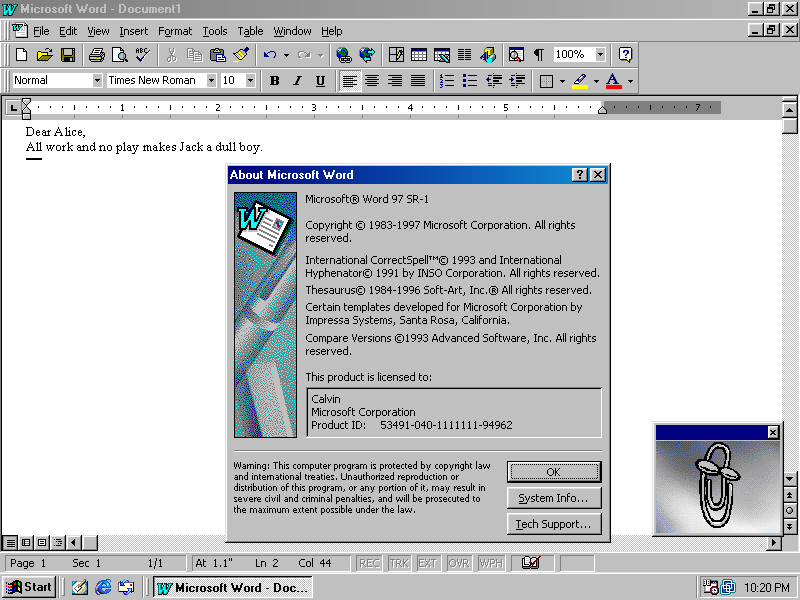
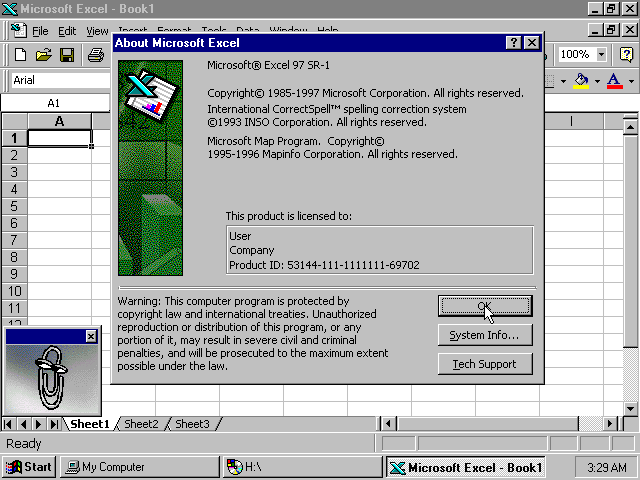
> Please provide a screenshot or at least a name of an UI/application from before 2000 that's not braindead easy to implement with pure html/trivial css and simple click handlers. I'm not sure what exactly you think "UI/applications from before 2000" looked like and were. You do know that, e.g. Word, Excel, Photoshop, Logic, WinAmp, Paint, Framemaker, 3ds Max, Final Draft, Lotus Domino/Agenda, Visio, QuickBooks, Cine…

Oh yes, i do know that. but do YOU know how they looked back then? because they're literally just toolbars with buttons on em and canvas frames which are just fricking images / application logic! rendering these viewports/canvases are challenging for sure -- back then just like today, because thats where where the domain logic goes.

the UI back then were fucking trivial, youre deluding yourself if you think anything else.

Lets go through your first examples one-by-one, as the theme continues i will stop at some point.

* Word: literally just 1 menu/text, 2 rows of icons. And a range picker. you can do that within ~15 minutes even as a beginner.

https://winworldpc.com/res/img/screenshots/97-98-11f3805bab5...

* Excel: same as word, with the addition of a grid in the body. the challenge is in chaining together the cells. trivial as hell -- as long as you ignore the application/domain logic, which would've been just as complicated back then. https://winworldpc.com/res/img/screenshots/57db2161e19c9e95d...

* slightly challenging for someone that hasn't encountered flex. extremely easy -- albeit time consuming just because of the quantity of buttons. still doable within https://www.webdesignmuseum.org/uploaded/old-software/graphi...

* logic: once again, the challenge is in the domain. the UI itself is just buttons in rows. trivially done by simple flex rows. https://www.muzines.co.uk/images_mag/articles/mt/MT_93_04_no...

* winamp 2.5: once again, trivial to do. creating this UI -- without the domain logic of actually playing the music etc behind it -- can be done within https://preterhuman.net/software/wp-content/uploads/2018/08/...

It goes on and on. Every single example youre citing is just rows and rows of icons. Thats extremely easy to implement with pure html and trivial css.

give any of these UIs to an experienced frontend dev and they'll provide you with a click dummy within 15 minutes to 3hours, depending on the quantity of elements on it.

I'd be pointless, precisely because nobody cares about such trivial UIs anymore... But hey, whatever floats your boat, right?

And everything I wrote here is ignoring the fact that every one of your example was the opposite of easy back in the 90s. They were developed by whole teams over years to get to that point, despite what was claimed initially. And duplicating this with html5 is trivial, that itself should tell you how much easier it's gotten if you just don't chase the hippest tech that's fotm right now
Re: I'm done making desktop applications (2009)

#73
post #59

Earlier quoted context omitted.

There are only 3 browsers these days pretty much: Chrome, Safari, Firefox. It really shouldn’t be hard to test.

Have you ever tested something in mobile browsers?

Also, a quick test is easy. But a quick fix - often not so much. Unless you want to break something else.

Re: I'm done making desktop applications (2009)

#74
post #55
post #53

Earlier quoted context omitted.

While I also don’t think that a mouse click handler would be problematic, my recent experience is that more complex apps are more and more often broken under firefox, but still work fine under chrome. E.g. miro boards are unusable under firefox, and it’s absolutely shameful of every company that can’t bother testing it on like 2 browsers.

"that can’t bother testing it on like 2 browsers" Current browser market share: Chrome 64%, Safari 20%, Edge 5.3%, Samsung Internet 3.5%, Firefox: 2.2% https://www.similarweb.com/browsers/ It is hard justifying extra effort for those 2.2% marketshare, unless you count in idealism. And most companies are there for profit.

> It is hard justifying extra effort for those 2.2% marketshare, unless you count in idealism. And most companies are there for profit.

To me, this attitude always sounds like a local business owner choosing to randomly kick 1 out of every 45 customers out of his store. Is it really that much time/cost/effort to test one more browser?

Re: I'm done making desktop applications (2009)

#75

Every time I take a stab at a web gui app, I’m daunted. The toolkits, the apparently billions of dependencies, the vastly complicated build processes. I tried again recently. HTML file and a separate JS file. Some SVG elements with a click handler. I had mouse in and mouse out logic, and that worked great. But for some reason the click handler did not. I tried it in Safari, Chrome, and Firefox. It worked in Firefox.…

I have the same background (25 years of C and C++), and tried the same thing: Let's learn web programming by putting together a 700 line web app that allows you to edit, load, and save some proprietary file format. Sounds like a good learning project. How hard could it be? I'll use this JQuery thing, that looks popular. I guess I need HTML, CSS, and JS, not sure what should go in which file, but I'll learn it as I go.

But nothing has as thorough documentation as I'm used to in native / systems programming. It's all rando tutorials and incomplete/outdated web pages.

Weeks later, I have something barely working, but it looks ugly as sin because there is no nice, well-documented GUI library like Qt, wxWidgets, and so on. And the ones that are decent would require me to rewrite my whole app around them. I find JQueryUI which is still at the level of banging rocks together to create fire. In fact, the whole process of putting a web app together feels like I'm using stone tools and blunt chisels instead of the C++ workshop full of power tools and well-lit workbenches.

I don't know how developers can live with this pain. Good for y'all--I couldn't do it day in and day out.

Re: I'm done making desktop applications (2009)

#76
post #72
post #69

Earlier quoted context omitted.

> Please provide a screenshot or at least a name of an UI/application from before 2000 that's not braindead easy to implement with pure html/trivial css and simple click handlers. I'm not sure what exactly you think "UI/applications from before 2000" looked like and were. You do know that, e.g. Word, Excel, Photoshop, Logic, WinAmp, Paint, Framemaker, 3ds Max, Final Draft, Lotus Domino/Agenda, Visio, QuickBooks, Cine…

Oh yes, i do know that. but do YOU know how they looked back then? because they're literally just toolbars with buttons on em and canvas frames which are just fricking images / application logic! rendering these viewports/canvases are challenging for sure -- back then just like today, because thats where where the domain logic goes. the UI back then were fucking trivial, youre deluding yourself if you think anything…

In ignoring this subthread because you introduced the “pre-2k” filter which I never mentioned and turned this into a no-true-Scotsman debate.

Re: I'm done making desktop applications (2009)

#77
post #52
post #45

Earlier quoted context omitted.

> You're just looking at the past with extremely rose tinted glasses Dude, some of us still write 90s style code, even Delphi style stuff (FreePascal and Lazarus), and can still compare it everyday to modern web dev. It was better without any "rose tinted glasses" needed. Same for 00s C#/.NET or even "classic" Visual Basic - dead easy to make even an elaborate UI going. > It's way,way easier to implement a UI like in…

You're putting words into my mouth I didn't say: The "modern web stack" has an incredibly high ceiling wrt how complicated it can be. It's floor isn't particularly complicated however, and definitely not higher then the equivalent software with the native APIs from the 90s. You had buttons, inputs, text boxes. Pre-2k UI APIs were extremely limited. Did we even have hover in windows 95/98 or MacOS 9.0? The first time…

There were definitely many issues with Win32 that HTML has fixed, but the controls available in Windows 98 were significantly more numerous and featureful than what HTML5 offers, even today. You could certainly react to mouse hovers. It also had:

• Tree view controls

• Table views, with draggable, resizable and sortable headers

• Image list views

• Menu bars (something HTML will probably never have!)

• Context menus

• Embeddable file explorer views

• A rich text editor control that wasn't plagued with weird formatting and cursor movement bugs

• Embeddable Word/Excel/PowerPoint if you needed more than that

• Date/time pickers (something HTML didn't get until 2014 and I never see any real app use it)

• A calendar widget

• Tab views

• Toolbars

• Wizards/task dialogs

There's some docs here: https://learn.microsoft.com/en-us/windows/win32/controls/ind...

To get these many of these on the web you need to import large third party frameworks, because HTML5 doesn't offer them out of the box. So apps are all very inconsistent.

Re: I'm done making desktop applications (2009)

#78
post #72

Earlier quoted context omitted.

Oh yes, i do know that. but do YOU know how they looked back then? because they're literally just toolbars with buttons on em and canvas frames which are just fricking images / application logic! rendering these viewports/canvases are challenging for sure -- back then just like today, because thats where where the domain logic goes. the UI back then were fucking trivial, youre deluding yourself if you think anything…

In ignoring this subthread because you introduced the “pre-2k” filter which I never mentioned and turned this into a no-true-Scotsman debate.

...what? how is 90s not pre 2k? you do know what timeperiod the 90s is, right?

oooh, i see. you edited it out of your initial comment back then and i didn't notice.

I guess you realized how dumb that statement was and couldn't man up to it.

Re: I'm done making desktop applications (2009)

#79
post #55

Earlier quoted context omitted.

"that can’t bother testing it on like 2 browsers" Current browser market share: Chrome 64%, Safari 20%, Edge 5.3%, Samsung Internet 3.5%, Firefox: 2.2% https://www.similarweb.com/browsers/ It is hard justifying extra effort for those 2.2% marketshare, unless you count in idealism. And most companies are there for profit.

> It is hard justifying extra effort for those 2.2% marketshare, unless you count in idealism. And most companies are there for profit. To me, this attitude always sounds like a local business owner choosing to randomly kick 1 out of every 45 customers out of his store. Is it really that much time/cost/effort to test one more browser?

"Is it really that much time/cost/effort to test one more browser?"

As someone who has over the years all in all spend months of work on catering to FF, I say yes.

It is not the testing. But the fixing of bugs that costs time. Time most buisnesses apparently rather invest elsewhere.

Re: I'm done making desktop applications (2009)

#80

Every time I take a stab at a web gui app, I’m daunted. The toolkits, the apparently billions of dependencies, the vastly complicated build processes. I tried again recently. HTML file and a separate JS file. Some SVG elements with a click handler. I had mouse in and mouse out logic, and that worked great. But for some reason the click handler did not. I tried it in Safari, Chrome, and Firefox. It worked in Firefox.…

It hurts, but it's not supposed to. The web stack is now pure hell, almost completely devoid of what makes programming software enjoyable in the same way as making furniture or machining a tool, which it used to be and still is in places. The web ecosystem has raced to the bottom with the goal of enabling less and less talented/experienced developers to be productive. That goal is good, but the changes didn't have to…

[deleted]
Post reply on HN