Live data from Hacker News

What’s in a PR statement: LastPass breach explained

palant.info

71–80 of 292 posts

Re: What’s in a PR statement: LastPass breach explained

#71

Earlier quoted context omitted.

There’s also Enpass ( https://www.enpass.io/ ) which markets itself as an offline password manager.

I use and like it

Two questions:

1) How's it do at syncing / conflicts?

2) In the Android app, do you know if there's a way to use the fingerprint feature without storing your master password or an encrypted derivative of it to non-volatile memory?

For those scratching their heads at #2, it's motivated by my lukewarm trust of vendor-implemented components of Android Keystore. Some competing apps address it by making you authenticate with the full password the first time after boot (or after the app is closed by the user / memory management system / configurable timeout) and just tie your fingerprint to an "unlock" pin of sorts that only works when the database is "hot".
Re: What’s in a PR statement: LastPass breach explained

#72
post #29
post #19

Earlier quoted context omitted.

Here is my problem with KeyPass: its unclear to me how it deals with emergency family access. Last year my father unexpectedly passed away. All his stuff was on lastpass. Thankfully we had emergency access setup, and I was able to get into all his accounts 2 days later. It was an exceptionally important part of the transition phase, and without it we would have experienced significant financial harm. How would KeyPas…

Have to plan ahead and have the keypass password in an envelope in the safe deposit box.

Something to be aware of regarding safe deposit boxes: possession of the key does not automatically grant access to the box.

The bank I use maintains a list of people I allow to access my box along with their physical signature. When I needed to access my box, I had to sign in with a pen, on paper and show my ID. They compared that signature with the one I gave when I first obtained the box. I was granted access if they matched. If someone else came in with the key but their name wasn't on the bank's list or the signature didn't match, they wouldn't allow access to the box.

So make sure people you want to be able to access the box are on that list (which means they will have to go to the bank to provide a signature ahead of time.)

Re: What’s in a PR statement: LastPass breach explained

#73

I wasn't quite ready to self promote this but I will go ahead anyway, since people are probably researching alternatives now. I'm working on a comparison of different password managers. https://password-manager.soft-wa.re/ At this point it's mainly a fork&merge of some previous work. If you find any issues with the data please submit a PR. Edit: I am standing on the shoulders of giants. Take a look at the contributor…

Great overview! I think 1Password's Linux support has been improving [0]. I use 1Password with an Ubuntu desktop and have been happy with it. [0]: https://support.1password.com/explore/linux/

one thing I wish Bitwarden did is conditional username for URI

I have some internal tools at work where you need to specify the domain, and some where you don't. Having two separate entries for these scenario is annoying, as I gotta update the password on both when I change it.

Re: What’s in a PR statement: LastPass breach explained

#74

I wasn't quite ready to self promote this but I will go ahead anyway, since people are probably researching alternatives now. I'm working on a comparison of different password managers. https://password-manager.soft-wa.re/ At this point it's mainly a fork&merge of some previous work. If you find any issues with the data please submit a PR. Edit: I am standing on the shoulders of giants. Take a look at the contributor…

Thanks for posting this. I was about to post an "Ask HN" to see what password managers people here are using, but this seems very helpful to compare the various services.

Keepass and syncthing.

Re: What’s in a PR statement: LastPass breach explained

#75
post #56

Earlier quoted context omitted.

I always found running 12 containers for hosting a password repository a bit overkill. https://bitwarden.com/help/install-on-premise-linux/

Have you checked the second link? (emphasis on "self-hosted friendly impl."). The first one is obviously not designed to serve as a primary self-hosted option but rather to scale for large number of users.

Oh, I'm sure Vaultwarden is much more resource-friendly, but even then:

a user's password list is arguably the most important thing on the device.

And I'm not sure you need a "web interface" to something that in the end is nothing more than an encrypted text file, which is why I always recommend pass[0] or using the browser's built-in pw manager for people that don't know ssh and git.

[0] passwordstore.org

Re: What’s in a PR statement: LastPass breach explained

#76

As an aside, I’m curious if Bitwarden is considered a relatively safe password manager?

It's considered the best cloud based one. Allows self hosting, is open source and audited, and is end-to-end encrypted.

I had a little trouble using Bitwarden a while ago (user error) and the (free tier) customer support was very responsive and helpful as well.

Re: What’s in a PR statement: LastPass breach explained

#77
post #61
post #33

Why did people think that using a cloud based password manager (or for that matter: a closed source one) was ever a good idea?

Because there needs to be a baseline level of convenience in order to get less-technical people to even consider using a password manager at all. If the alternative is using the same handful of weak passwords for every site, the risk of your password manager suffering a security breach doesn't look so bad in comparison.

There is a pretty large gap between "cloud based password storage" and "using the same password for each site".

1Password for /years/ worked with a local vault (and no remote sign-in requirement), and had relatively simple syncing to iOS via wifi (no idea on other OSes, that's what I use).

I've shared my password vault between these two places with no issues and it didn't need a cloud account and I wasn't re-using passwords.

Re: What’s in a PR statement: LastPass breach explained

#78
I spent the holidays moving to a different provider (1password). 1password's security posture is superior in almost every way and it allows me to avoid having to worry about syncing keepass, etc to my phone and 10 different computers. I still have hundreds of passwords to change at this point.

I can't imagine LastPass is long for this world after this one. Most other breaches were minor compared to this mess.

Re: What’s in a PR statement: LastPass breach explained

#79
post #49
post #19

Earlier quoted context omitted.

Here is my problem with KeyPass: its unclear to me how it deals with emergency family access. Last year my father unexpectedly passed away. All his stuff was on lastpass. Thankfully we had emergency access setup, and I was able to get into all his accounts 2 days later. It was an exceptionally important part of the transition phase, and without it we would have experienced significant financial harm. How would KeyPas…

This is the reason I went with LastPass, because they have a feature designed and designated for recovery after death, with support, and 1Password would require me explaining to my family how they would use the emergency kit after I died, and they would likely 1) be pissed at being asked to understand it, and 2) not even try it after I died, and suffer all the inconvenience of not having access to my accounts. It's f…

> 1) be pissed at being asked to understand it, and 2) not even try it after I died, and suffer all the inconvenience of not having access to my accounts.

Your family sounds fun to be around.

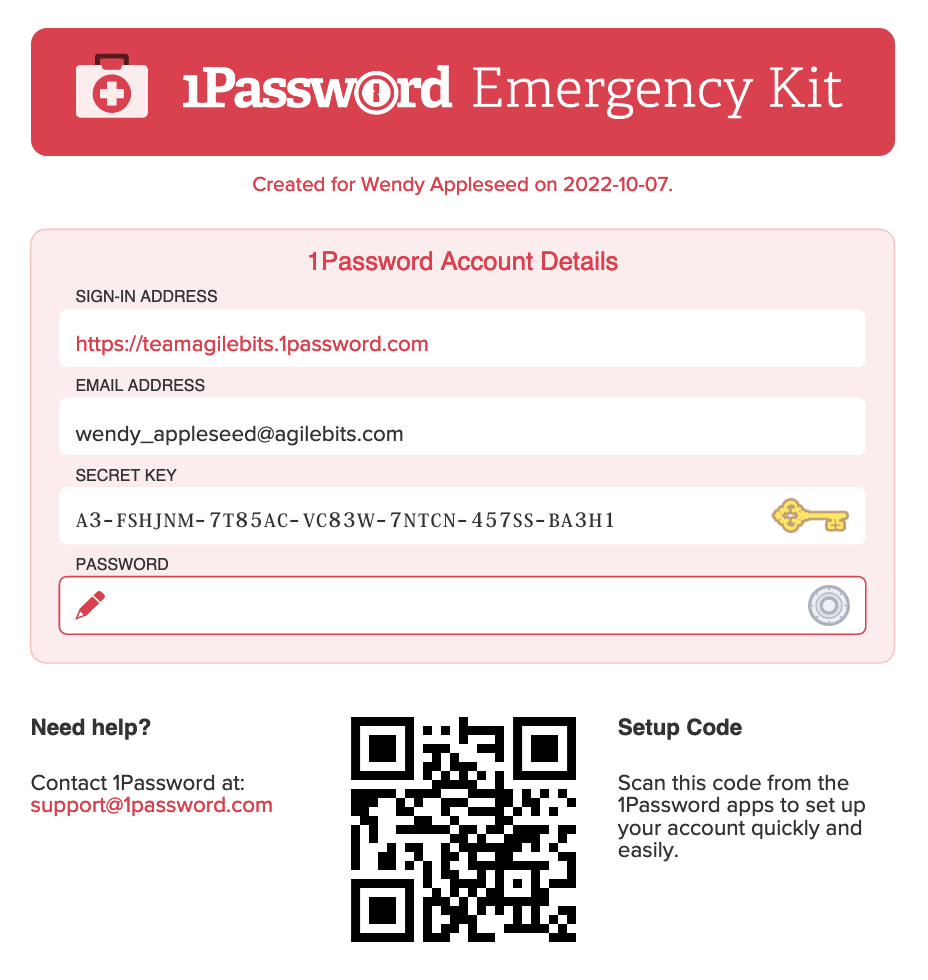
1Password emergency kit is pretty well-designed, all things considered. It's a neat, single-page PDF with all the necessary information[0] (URL to login, email address/password, and the security key as text or QR Code for easy setup). I guess a link to a sort of tutorial/guide of how to use it to recover the account would be a welcome addition, but I find the format to be pretty solid.

It's pretty hard to find information on lastpass version of the feature. What does it look like? According to their documentation of the "Emergency Access" feature, it claims to be a one-time access[1]? What happens after that access, do you just lose your access forever? That seems much worse than the 1password emergency kit!

[0]: https://i.1password.com/media/1password-emergency-kit.png [1]: https://www.lastpass.com/features/emergency-access

Re: What’s in a PR statement: LastPass breach explained

#80
post #70

Earlier quoted context omitted.

I have a small script that does hash(key + masterPasswd). key is usually just the site's domain name. I have the script and a few of the important passwords (eg my email) written down on paper in case my drive dies. It works fine for me.

You just exposed all your passwords to bruteforcing attacks. Unless “hash” in this case is something like scrypt with sane parameters. Originally (before I started writing my own password manager) I also thought that this is a safe method of password generation. And then I realized that it isn’t. Wrote about it here: https://palant.info/2016/04/20/security-considerations-for-p...

Assuming you have the password and key, you'd need to brute force hash and masterPasswd. Seems hard.
Post reply on HN