Live data from Hacker News

Raspberry Pi 400 Desktop PC

raspberrypi.org

611–620 of 776 posts

Re: Raspberry Pi 400 Desktop PC

#611

Earlier quoted context omitted.

E-waste is a massive problem nowadays. Why not assemble the lab out of "old" computers? They might take a bit more electricity to run, but, at least in the US, you can get truckloads of computers that were destined for the scrapyard, for free. One local school here threw away 50+ small dell quad-core i5's in their quest to make sure they spend their money wisely. I've assembled a small lab, with many computers, laser…

> One local school here threw away 50+ small dell quad-core i5's in their quest to make sure they spend their money wisely. I think broad computer illiteracy in the general population has convinced people that you "need" a new, powerful computer. In reality, 95% of the population can get away with any decent computer from the last 10 years. Grandma isn't training a neural net, she's checking Facebook. I continue to u…

> I continue to use a 2nd generation i3 desktop as a "daily driver" for a lot of my computing/server needs, without issue.

+1 for i3. Been using my Thinkpad W510 with i3 non-stop since 2010 and it's still working like a charm. For the past months, though, I've had to use a Dell XPS 13 for work. Now that I've equipped it with i3, as well, it's merely using 3.5W while I'm doing ordinary computer work and some coding, meaning that I can get 15 hours of battery life easily, and often even 20h. Absolutely mind-blowing.
Re: Raspberry Pi 400 Desktop PC

#612
post #282

Earlier quoted context omitted.

I’d rather have a miniPC-sized Raspberry Pi computer like an Intel NUC or Mac Mini* mounted on the back of a monitor instead of an all-in-one. Monitors have a much longer useful life so all-in-ones (e.g. iMac) eventually become paperweights or e-waste. If they go the all-in-one route they should include an external HDMI port and a switch to choose between it and the internal Raspberry Pi. *: But upgradeable and repai…

Exactly, this is what the VESA mount on the back of your monitor is for. For an almost no effort solution, you can zip tie a pi to the mount bracket and screw it in (some monitors may even be able to power it via usb). Integrating into the monitor's electronics makes no sense.

You can also get pre-built mounts and cases to attach a pi to the VESA mounts, e.g. https://shop.pimoroni.com/products/omnivesa

Re: Raspberry Pi 400 Desktop PC

#613

Earlier quoted context omitted.

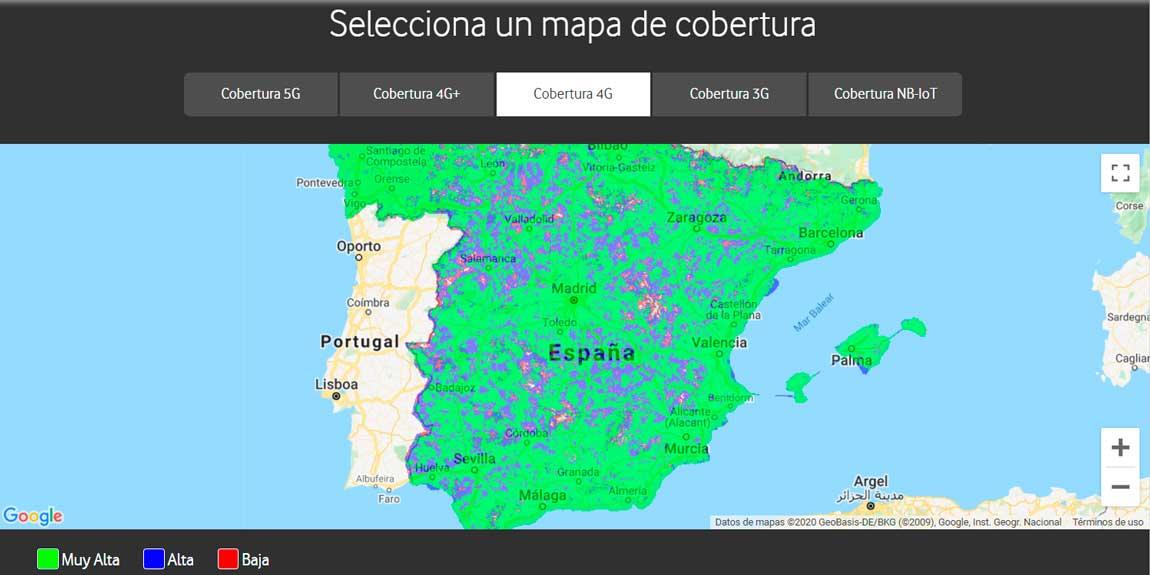
For people without internet in rural areas, cell data probably isn't a solution. Unless you live in a very flat area, being too far from civilization to get wired internet significantly correlates with being too far to get good cell reception. I recently moved out of the bay area to a my house in relatively rural Oregon. I can't actually work from home though, I had to rent a second house in a nearby town because the…

Jorge is in Spain it seems, where they have more density and cellular competition.

Correct, you can get 3G almost anywhere: https://www.adslzone.net/app/uploads-adslzone.net/2020/08/Ma...

Re: Raspberry Pi 400 Desktop PC

#614

Earlier quoted context omitted.

1) You can hook this up to a TV. 2) Webcam isn't strictly necessary: You'll be able to "see" your teacher, type in chat, virtually raise your hand, etc. 3) This enables more advanced STEM (The "T" portion, really) not because it's a desktop but because of the built-in 40-pin connector opening it up to the massive catalog of projects that exist for the Pi platform already. 4) Perfect is the enemy of the good: You're c…

That 40 pin connector is a big STEM deal. First peripheral I would sell is an add on breadboard station with lots of good sensors, lights, input controls, motor drivers and such that is buffered to prevent damage and start producing education kits.

It's also Linux based on a properly supported distro that is maintained specifically for the rpi. You can do real hacking, not "try to get this to run" hacking.

Re: Raspberry Pi 400 Desktop PC

#615
post #601

This blows my mind. I know, it's much more incremental than it is revolutionary, but I think the form factor achieves a much greater degree of access for many people than a typical Pi whose bare hardware may be a lot more intimidating. Now, it's "just" a computer, which happens to expose a 40-pin connector for the standard Pi hardware fun. And unlike other options you might find, this has the massive built-in communi…

I wish it had a trackpoint device in the middle instead of a separate mouse. That way everything would be in one box. One less thing to carry around.

Are there patent reasons this can’t be the case?

Re: Raspberry Pi 400 Desktop PC

#617

Earlier quoted context omitted.

1) You can hook this up to a TV. 2) Webcam isn't strictly necessary: You'll be able to "see" your teacher, type in chat, virtually raise your hand, etc. 3) This enables more advanced STEM (The "T" portion, really) not because it's a desktop but because of the built-in 40-pin connector opening it up to the massive catalog of projects that exist for the Pi platform already. 4) Perfect is the enemy of the good: You're c…

> 2) Webcam isn't strictly necessary Not in our school district (Mass), students are required to have cameras on and showing most of their face.

The US is only a small potion of the world.

Re: Raspberry Pi 400 Desktop PC

#619
post #273
post #203

Earlier quoted context omitted.

How is the keyboard? It looks, uh, cheap, so I'm curious if typing on it is an ok experience.

Apple made the chiclet keyboard cool again. It might be OK. Gen-x who remember the TRS80 MC10 and its keyboard remember chiclet keyboards as not much better than membrane keyboards (Consider the ZX81 Spectrum) But decades later Apple started shipping chiclet-appearing keyboards that actually worked, so the style has been somewhat revitalized. That said, yeah they could be shipping a 1980s quality chiclet keyboard or…

> Apple started shipping chiclet-appearing keyboards that actually worked

Sony was already using that style of keyboard at the time, so although Apple contributed to the momentum, they didn't start the trend.

Re: Raspberry Pi 400 Desktop PC

#620

This is so good, I work from home and I've been eyeballing products like this for a while but until now its all been 3rd party. What would really take the cake for me is if they made a version of this but with a battery and wireless charging, then this really would be an exceptional portable desktop pc.

I'm curious how you plan to use it wirelessly if you need to plug it into a monitor anyway? Do you also have a mobile monitor?
Post reply on HN