Live data from Hacker News

AMD Unveils Ryzen 9000 CPUs for Desktop, Zen 5

anandtech.com

61–70 of 297 posts

Re: AMD Unveils Ryzen 9000 CPUs for Desktop, Zen 5

#61
post #25
post #18

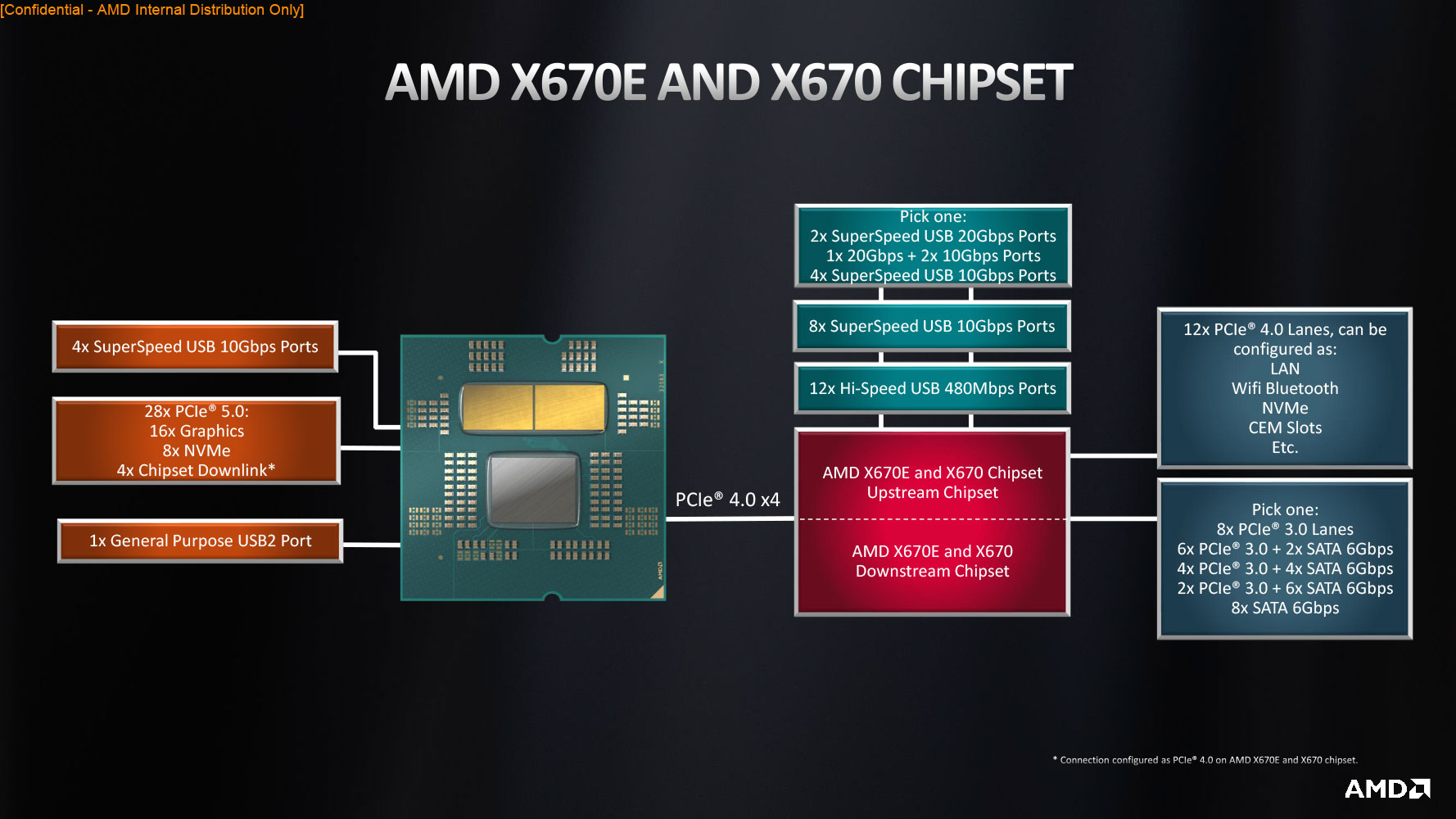
How are the 24x PCIe 5.0 lanes (~90GB/s) of the 9950X allocated? The article makes it appear as: * 16x PCIe 5.0 lanes for "graphics use" connected directly to the 9950X (~63GB/s). * 1x PCIe 5.0 lane for an M.2 port connected directly to the 9950X (~4GB/s). Motherboard manufacturers seemingly could repurpose "graphics use" PCIe 5.0 lanes for additional M.2 ports. * 7x PCIe 5.0 lanes connected to the X870E chipset (~28…

It's usually x16/x4/x4 for GPU/M.2/Chipset. You can check the diagrams from the current x670 boards for info.

Siena would make a very practical HEDT socket - it's basically half of a bergamo, 6ch DDR5/96x pcie 5.0. It's sort of an unfortunate artifact of the way server platforms have gone that HEDT has fizzled out, they're mostly just too big and it isn't that practical to fit into commodity form-factors anymore, etc. a bigass socket sp3 and 8ch was already quite big, now it's 12ch for SP5 and you have a slightly smaller one at SP6. But still, doing 1DPC in a commodity form factor is difficult, you really need an EEB sort of thing for things like GENOAD8X etc let alone 2 dimms per channel etc, which if you do like a 24-stick board and a socket you don't fit much else.

https://www.anandtech.com/show/20057/amd-releases-epyc-8004-...

2011/2011-3/2066 were actually a reasonable size. Like LGA3678 or whatever as a hobbyist thing doesn't seem practical (the W-3175X stuff) and that was also 6ch, and Epyc/TR are pretty big too etc. There used to exist this size-class of socket that really no longer gets used, there aren't tons of commercial 3-4-6 channel products made anymore, and enthusiast form-factors are stuck in 1980 and don't permit the larger sockets to work that well.

The C266 being able to tap off IOs as SAS3/12gbps or pcie 4.0 slimsas is actually brilliant imo, you can run SAS drives in your homelab without a controller card etc. The Asrock Rack ones look sick, EC266D4U2-2L2Q/E810 lets you basically pull all of the chipset IO off as 4x pcie 4.0x4 slimsas if you want. And actually you can technically use MCIO retimers to pull the pcie slots off, they had a weird topology where you got a physical slot off the m.2 lanes, to allow 4x bifurcated pcie 5.0x4 from the cpu. 8x nvme in a consumer board, half in a fast pcie 5.0 tier and half shared off the chipset.

https://www.asrockrack.com/general/productdetail.asp?Model=E...

Wish they'd do something similar with AMD and mcio preferably, like they did with the GENOAD8X. But beyond the adapter "it speaks SAS" part is super useful for homelab stuff imo. AMD also really doesn't make that much use of the chipset, like, where are the x670E boards that use 2 chipsets and just sling it all off as oculink or w/e. Or mining-style board weird shit. Or forced-bifurcation lanes slung off the chipset into a x4x4x4x4 etc.

https://www.asrockrack.com/general/productdetail.asp?Model=G...

All-flash is here, all-nvme is here, you just frustratingly can't address that much of it per system, without stepping up to server class products etc. And that's supposed to be the whole point of the E series chipset, very frustrating. I can't think of many boards that feel like they justify the second chipset, and the ones that "try" feel like they're just there to say they're there. Oh wow you put 14 usb 3.0 10gbps ports on it, ok. How about some thunderbolt instead etc (it's because that's actually expensive). Like tap those ports off in some way that's useful to people in 2024 and not just "16 sata" or "14 usb 3.0" or whatever. M.2 NVMe is "the consumer interface" and it's unfortunately just about the most inconvenient choice for bulk storage etc.

Give me the AMD version of that board where it's just "oops all mcio" with x670e (we don't need usb4 on a server if it drives up cost). Or a miner-style board with infinite x4 slots linked to actual x4s. Or the supercarrier m.2 board with a ton of M.2 sticks standing vertically etc. Nobody does weird shit with what is, on paper, a shit ton of pcie lanes coming off the pair of chipsets. C'mon.

Super glad USB4 is a requirement for X870/X870E, thunderbolt shit is expensive but it'll come down with volume/multisourcing/etc, and it truly is like living in the future. I have done thunderbolt networking and moved data ssd to ssd at 1.5 GB/s. Enclosures are super useful for tinkering too now that bifurcation support on PEG lanes has gotten shitty and gpus keep getting bigger etc. An enclosure is also great for janitoring M.2 cards with a simple $8 adapter off amazon etc (they all work, it's simple physical adapater).
Re: AMD Unveils Ryzen 9000 CPUs for Desktop, Zen 5

#62

Earlier quoted context omitted.

I would love to quote a compiler comparison, but I don't know a good and accepted compiler benchmark. What would you use as a compiler benchmark? (Preferably Go, but I assume Rust would be better, as it is much slower, so the differences are bigger) (corrected my c&p mistake with the mini, thanks)

Think chromium compile is widely used

Can you point me to a comparison site? Didn't find a M3/M2/7950/... comparison site for chromium compile times :-(

(Even phoronix is scares and mostly focuses on laptops - I have no laptop)

Re: AMD Unveils Ryzen 9000 CPUs for Desktop, Zen 5

#63
post #24
post #18

How are the 24x PCIe 5.0 lanes (~90GB/s) of the 9950X allocated? The article makes it appear as: * 16x PCIe 5.0 lanes for "graphics use" connected directly to the 9950X (~63GB/s). * 1x PCIe 5.0 lane for an M.2 port connected directly to the 9950X (~4GB/s). Motherboard manufacturers seemingly could repurpose "graphics use" PCIe 5.0 lanes for additional M.2 ports. * 7x PCIe 5.0 lanes connected to the X870E chipset (~28…

These processors will use the existing AM5 socket, so they fundamentally cannot make major changes to lane counts and allocations, only per-lane speeds. They're also re-using CPU's IO die from last generation and re-using the same chipset silicon, which further constrains them to only minor tweaks. Typical use cases and motherboards give an x16 slot for graphics, x4 each to at least one or two M.2 slots for SSDs, and…

Thanks for the description. The article was confusing as to whether the CPU's stated 24x PCIe 5.0 lanes included those required for the chipset. Given that the same AM5 socket is used and X870E is similar to the X670E, this appears to not be the case, and instead the 9950X would have 28x PCIe 5.0 lanes, 4 of which are connected to the daisy-chained chipset and 24 then remain available to the motherboard vendor (nominally as 16 for graphics, 8 for NVMe). I also hadn't realised the CPU would offer 4x USB 4.0 ports directly.

Block diagram for AM5 (X670E/X670): https://www.techpowerup.com/review/amd-ryzen-9-7950x/images/...

Block diagram for AM4 (X570): https://www.reddit.com/r/Amd/comments/bus60i/amd_x570_detail...

Re: AMD Unveils Ryzen 9000 CPUs for Desktop, Zen 5

#64
post #49

Earlier quoted context omitted.

> I would stick to SPEC and Geekbench. I will repeat: "On Geekbench I gave up after scrolling a few pages." SPEC doesn't seem to have easily browsable results, but we can find the Cinebench 2024 ones easy and guess what? Apple isn't at the top. Not even close: https://www.cgdirector.com/cinebench-2024-scores/

Geekbench has a seperate page for each "instruction set". For Apple you need to go to https://browser.geekbench.com/mac-benchmarks Then compare numbers by hand I assume. Though what I would love is compile-time vs. $ (as mentioned, I'm a software developer). The 7950x is $500 and a very fast SSD is $400, fast 64gb is $200, very good board is $400 so I get a very fast dev machine for ~$1700.

Ah right; that's confusing! Seems that the AMD and Intel chips are much faster though, consistent with other benchmarks.

Speed vs. $ is of course a different story than pure speed; kinda hard to capture in a number I guess.

Most Go projects compile more than fast enough even on my 7 year old i5, although there are exceptions (mostly crummy hyper-overengineered projects).

Re: AMD Unveils Ryzen 9000 CPUs for Desktop, Zen 5

#65

Earlier quoted context omitted.

Geekbench has a seperate page for each "instruction set". For Apple you need to go to https://browser.geekbench.com/mac-benchmarks Then compare numbers by hand I assume. Though what I would love is compile-time vs. $ (as mentioned, I'm a software developer). The 7950x is $500 and a very fast SSD is $400, fast 64gb is $200, very good board is $400 so I get a very fast dev machine for ~$1700.

I compiled a few previously. Sorry for the formatting: ASUS ROG Zephyrus G16 (2024) Processor: Intel Core Ultra 9 185 Memory: 32GB Cargo Build: 31.85 seconds Cargo Build --Release: 1 minute 4 seconds ASUS ROG Zephyrus G14 (2024) Processor: AMD Ryzen 8945HS / Radeon 780M Memory: 32GB Cargo Build: 29.48 seconds Cargo Build --Release: 34.78 seconds ASUS ROG Strix Scar 18 (2024) Processor: Intel Core i9 14900HX Memory: 6…

@aurareturn really appreciate the comparison and your effort (upvoted). As I no longer use a laptop (don't need it, too expensive, breaks, no upgrades, but that is just me), browsing through that channel looks like he focuses on laptops.

Would love to see a 7950x/64gb/SSD5 comparison, perhaps (see https://www.octobench.com/ for SSD impact on Go compilation) he will create one in the future (channel bookmarked). But would I still need to use a laptop, I would probably switch back to Apple (have an iMac Pro as decoration standing in the shelf, was my last Apple dev machine).

The $5000 16 Pro looks great as a machine. When still working at eBay, the nice thing was one always got the max specced machine as a developer back in the days - so that would probably be it. Real nice one.

[Edit]

Someone suggested looking at Geekbench Clang, which brought some insights for my desktop usage:

(it looks like top CPUs are more or less the same, ~15% difference)

"Randomly" picking

    M2 Ultra   233.9 Klines/sec
    7950x      230.3 Klines/sec  
    14900K     215.3 Klines/sec  
    M3 Max     196.5 Klines/sec

Re: AMD Unveils Ryzen 9000 CPUs for Desktop, Zen 5

#66
post #24
post #18

How are the 24x PCIe 5.0 lanes (~90GB/s) of the 9950X allocated? The article makes it appear as: * 16x PCIe 5.0 lanes for "graphics use" connected directly to the 9950X (~63GB/s). * 1x PCIe 5.0 lane for an M.2 port connected directly to the 9950X (~4GB/s). Motherboard manufacturers seemingly could repurpose "graphics use" PCIe 5.0 lanes for additional M.2 ports. * 7x PCIe 5.0 lanes connected to the X870E chipset (~28…

These processors will use the existing AM5 socket, so they fundamentally cannot make major changes to lane counts and allocations, only per-lane speeds. They're also re-using CPU's IO die from last generation and re-using the same chipset silicon, which further constrains them to only minor tweaks. Typical use cases and motherboards give an x16 slot for graphics, x4 each to at least one or two M.2 slots for SSDs, and…

Cheap small computers with Intel Alder Lake N CPUs, like Intel N100, allocate frequently a single PCIe lane for each SSD slot.

However you are right that such a choice is very unlikely for computers using AMD CPUs or Intel Core CPUs.

Re: AMD Unveils Ryzen 9000 CPUs for Desktop, Zen 5

#69

I'd love to replace my 2950x, but most desktop motherboards still don't support 128gb of memory.

I can’t speak for all motherboards but I’m comfortably running 128GiB of DDR4 on a 5950x and x570s platform.

Good to know, maybe I should look again... thanks

Re: AMD Unveils Ryzen 9000 CPUs for Desktop, Zen 5

#70

I'd love to replace my 2950x, but most desktop motherboards still don't support 128gb of memory.

I just had a look and the comparison website I use says there are 113 motherboards that support 128GB or more memory for AM5. (in my local market. so the US probably has even more)

128GB isn't exactly a lot, so that would surprise me if it wasnt supported.

Post reply on HN