Earlier quoted context omitted.
It is for your left hand since most gamers use the WASD keys for movement. Here's a video of a similar design being used to play Quake. https://www.youtube.com/watch?v=xyVSANPnLlg [EDIT] The Azeron comes in both right- and left-handed versions so that's why some images show a right hand. The Azeron works similarly to one half of a DataHand keyboard. This old infomercial shows how they're used https://www.youtube.com/…
Thanks. > most gamers use the WASD keys for movement What are they doing with their right hand? (Hm, something tells me I'm going to be sorry I asked ;-)
Sherbet: An Ergonomic Gaming Keypad
61–70 of 85 posts
Re: Sherbet: An Ergonomic Gaming Keypad
#62Saw this alternate entry device announced at CES: https://www.charachorder.com/ SelfieType, using a camera to watch your fingers, looks even more futuristic: https://www.androidauthority.com/samsung-selfie-type-demo-vi...
Isn't the latter basically just a projection keyboard? https://en.wikipedia.org/wiki/Projection_keyboard So, futuristic from the 90s, was available already and flopped (because it is much more uncomfortable than actual keys).
You could do more than just tap, for example.
Pinch and zoom, scroll up scroll down, Next page,…
You could also create chords with two hands.
Re: Sherbet: An Ergonomic Gaming Keypad
#63Very glad these kinds of devices are gaining attention. At worst, a better gaming experience. At best, tackling RSI and allowing us to type/game for longer.
Re: Sherbet: An Ergonomic Gaming Keypad
#64Wish I could improve my electrical skills enough to actually make one of these from scratch.
Re: Sherbet: An Ergonomic Gaming Keypad
#65This is a pretty novel use of the low-profile Choc switches. I like it. QMK supports ARM very strangely, but the more I think about it, the more I like it. They use ChibiOS as an RTOS to basically schedule USB code alongside QMK, and then they get ChibiOS's USB support for free. (Note that on many of these ARM chips, the USB is actually handled in hardware; you just need to get the right bytes into the right memory a…
> The model of flashing firmware to change the key layout also seems crazy to me, in an era where you can easily enumerate as a flash drive and just drag a JSON-encoded keymap onto it to adjust the layout. (Or just edit it live, a la CircuitPython.) Are there any keyboards that have that functionality? I know Logitech allows you to save macro key info to the hardware. However, last I saw that was only for specific ma…
QMK does already save some things into "EEPROM" (more realistically, flash on the MCU), like whether you've enabled NKRO, which LED pattern is selected, etc. Because it's opaque, it ends up just being another trap for the inexperienced. "I pressed a key and now my keyboard doesn't work." Yup, that can happen thanks to the magic of persistent storage.)
I think the reason QMK doesn't use flash for keymaps is because it was simply designed before that was within the capabilities of the hardware it ran on. My Ergodox firmware just barely fits in the 32k of available flash on the 32u4, for example. But a STM32F103 has twice or 4x that much flash, so there is much more room to breathe and add creature comforts.
(You can also use USB mass storage to flash devices, see UF2: https://github.com/microsoft/uf2. It's so much better than DFU or all the hacks Arduino uses.)
Re: Sherbet: An Ergonomic Gaming Keypad
#66Earlier quoted context omitted.
I imagine it must be not too hard to learn to use either hand. I started a new job and got given a shit mouse which caused me wrist pain and I found I was able to use the left hand until I went and got my own mouse. It was a bit awkward at first but after a few hours I felt I was 90% as good as I was with the right hand.
I remember many OS had "mouse button handedness: right/left" option in the 90s while there never were "left handed keyboard" in the history.
I don't see any with the Enter key to the left of A.
There are still left-handed mice, and OSs still include the option to switch around the buttons. I have a mouse on either side (on Linux), with the one on the left using flipped buttons.
Re: Sherbet: An Ergonomic Gaming Keypad
#67Nice use of Kailh's Choc switches. I wish there were other keycap options out there for them though. It's such a shame that injection moulding is so expensive to get off the ground.
Weirdly enough, there's a groupbuy closing out soon for PBT Choc keycaps. It's taken forever but it's getting there. [0] [0] https://www.gboards.ca/product/mbk-group-buy
Re: Sherbet: An Ergonomic Gaming Keypad
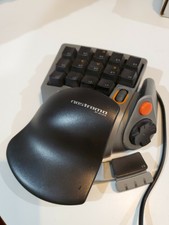
#68I tried the Razer Nostromo a while ago, while the idea looked nice, I couldn't get used to it and it ended up collecting dust somewhere
Turns out the one I had - a Belkin Nostromo N52 - was at some point replaced by an equivalent from Razer, but 'made betterer' ( https://support.razer.com/gaming-keyboards/razer-nostromo/ ).
Your one looked a lot better than my one, covered in dust somewhere as they both now are!
(image of Belkin Nostrom N52:) https://i.ebayimg.com/images/g/tBsAAOSwvgheGmiG/s-l225.jpg
Re: Sherbet: An Ergonomic Gaming Keypad
#69Saw this alternate entry device announced at CES: https://www.charachorder.com/ SelfieType, using a camera to watch your fingers, looks even more futuristic: https://www.androidauthority.com/samsung-selfie-type-demo-vi...
Re: Sherbet: An Ergonomic Gaming Keypad
#70I tried the Razer Nostromo a while ago, while the idea looked nice, I couldn't get used to it and it ended up collecting dust somewhere
Huh. Your comment resonated with me, but confused me a bit as I had a 'Nostromo' Gaming Keypad too, but I knew it wasn't from Razer, so had to go check... Turns out the one I had - a Belkin Nostromo N52 - was at some point replaced by an equivalent from Razer, but 'made betterer' ( https://support.razer.com/gaming-keyboards/razer-nostromo/ ). Your one looked a lot better than my one, covered in dust somewhere as they…
I was gifted one because I asked for a separate keypad for gaming. Problem is, I am left-handed and the model I got is for normal people. Yet it was quite convenient, I have been using it for years, as testifies its poor state. A few years ago, some games couldn't handle keypad keys properly (facking normies...), so the fully configurable keys of the Nostromo did the trick. I simply couldn't use the directional pad and the other thumb operated buttons as-is (used them for rarely used stuff instead - it's still better than reaching out for the keyboard).