> 2020
> using 1080p monitor
c'mon now
Time to Upgrade Your Monitor
541–550 of 1001 posts
Re: Time to Upgrade Your Monitor
#542Earlier quoted context omitted.
FWIW, switching between resolutions in my favorite desktop environment, Xfce, is two steps: # This affects every GTK app. xfconf-query -c xsettings -p /Xft/DPI -s 144 The second step is going to about:config in Firefox, and setting layout.css.devPixelsPerPx to a higher value than 1.0. I really need to write an extension to do that in one click. What is really tricky, though, it's having two monitors with different DP…
Even Win10 struggles when you move windows between different DPI domains. Apps will slide in HUGE or tiny until you get past the midway point. And when the system goes to sleep everything can go to hell. You can come back to small message windows being blown up to huge sizes or windows crushed down to a tiny square. You can forget about laying out your icons perfectly on your desktop too, they'll get rearranged all t…
Logically having your OS maintain a consistent UI size makes sense until you try it without.
I'm running a couple medium high density monitors alongside one of the highest density ones available. I don't scale the HIDPI monitor at all, which means when I drag windows to it they are tiny. Instead it works in two ways, as a status screen for activity monitors/etc and as a text/document editing screen. AKA putting adobe acrobat, firefox or sublime/emacs/etc on the high DPI screen and then zooming in gives all the font smoothing/etc advantages of high DPI without needing OS support.
So the TLDR is, turn off dpi scaling, and leave the hidpi screen as a dedicated text editor/etc with the font sizes bumped to a comfortable size. Bonus here is that the additional effort of clicking the menu/etc will encourage learning keyboard shortcuts.
Re: Time to Upgrade Your Monitor
#543I still use a CRT, because features I want are still ludicrous expensive in newer tech (although they are getting cheaper over time). 1. Arbitrary resolutions, great to run old software and games, even better to run new games at lower resolution to increase performance. 2. Arbitrary refresh rates. 3. Zero (literally) response time. 4. Awesome color range (many modern screens still are 12bit, meanwhile silicon graphic…
3. 60hz CRT refresh rate is 16.67 millseconds of delay. Interestingly, I connected a VT220 to my 56' 4k Samsung TV via a BNC-to-RCA cable, and by comparing the cursor blinking on both screens there's a very noticeable and visible delay, like a 1/4 second. 4. CRTs are analog. It's as many bits as your output hardware can make up. 5. CRT is still supreme for contrast (at least over LCD) despite all the tricks and such…
> CRTs are analog. It's as many bits as your output hardware can make up
Actually the horizontal resolution of a CRT is limited by: the dot pitch of the colour phosphors, the bandwidth of the amplifiers, and the electron beam spread.
The vertical resolution is limited by a combination of: electron beam scan rate, delay for horizontal flyback/retrace, delay for vertical flyback, desired refresh rate, and electron beam spread.
There are more details for the resolution limitations, but I think I covered the main ones.
Re: Time to Upgrade Your Monitor
#544Earlier quoted context omitted.
I've just switched to a an LG "5K2K" ultrawide [1]. 5120 x 2160 and fairly reasonably priced. [1] https://www.lg.com/us/monitors/lg-34WK95U-W-ultrawide-monito...
Thanks for this idea. The product page says it is 218 PPI, but I don't see how that is possible given it is 34" wide. Pixensity says teh actual PPI is 163.44. Can you confirm the PPI on this monitor? https://pixensity.com/list/lg-34wk95u-w-39631/
It's 163. I think the 218 you got from a Cmd-F and picked up the SEO blurb for the 5k ultra fine in the footer).
I cannot tell the difference between the LG and my MacBook's retina screen at my normal viewing range, but this may just be my eyes.
I also use a non integer scaling factor on both screens as I find it has the right combo of resolution and real estate for me, and I don't notice artefacts.
Re: Time to Upgrade Your Monitor
#545Earlier quoted context omitted.
It's just a different stylistic choice. A lot of font nerds prefer the OSX choices because they try to stay true to the original font spacing without regard to the pixel grid.
Missing sub-pixel antialiasing is plain technical deficiency, not a stylistic choice. I agree arguments can be had about hinting and aligning the glyphs to the pixel grid, but not much beyond that.
It's still there, you just have to go turn it on.
But yes, I didn't know that they ripped out subpixel rendering in late 2018 by default.
Re: Time to Upgrade Your Monitor
#546The technical details are all right (or seem right to me, anyway), but this is too opinionated for my liking. No, you do not need a 4K monitor for software development. Some people might like them, some won't. [edit/clarification: someone rightfully pointed out that nobody will actively dislike a 4K monitor. I was unclear here: I meant "some people won't need them" more than "dislike them"] This sounds like when Jeff…
Hello! Person who actively dislikes 4k here. In my experience: 1. No matter what operating system you're on, you'll eventually run into an application that doesn't render in high dpi mode. Depending on the OS that can mean it renders tiny, or that the whole things is super ugly and pixelated (WAY worse than on a native 1080p display) 2. If the 4k screen is on your laptop, good luck ever having a decent experience plu…
I agree with all your points, however I’ve found the mac is extremely variable DPI friendly. I think the games with custom UIs (Europa Universalis IV comes to mind) are the only things that haven’t adapted and it’s hardly a problem if you set the scaling to “large text” or whatever, just a little pixelated like you would see on a 1080p screen.
Re: Time to Upgrade Your Monitor
#547The technical details are all right (or seem right to me, anyway), but this is too opinionated for my liking. No, you do not need a 4K monitor for software development. Some people might like them, some won't. [edit/clarification: someone rightfully pointed out that nobody will actively dislike a 4K monitor. I was unclear here: I meant "some people won't need them" more than "dislike them"] This sounds like when Jeff…
I use a 55" curved 4k TV as my monitor. It's not pixel density that's important for reading text, but contrast. The best thing for coding is a high contrast bitmapped font with no smoothing. My monitor is still available at Walmart for $500. It's like an actual desktop when you can spread out all your stuff.
My personal requirement though is 4:4:4 color. Too many TVs will only accept 4:2:2 or 4:2:0 chroma, and colored text on black will look horrid.
Re: Time to Upgrade Your Monitor
#548Earlier quoted context omitted.
43" seems rather large--how far away do you sit? If it were as close as a more "normal" sized monitor (~2-3 feet), wouldn't you be craning your neck all day trying to see different parts of the screen?
Nah. I have a 49" curved 1440p monitor. Things you look at less often go to the sides. You can fit 4 reasonable sized windows side by side. Code editor holds over 100 columns at a comfortable font size for me 40 year old eyes. It's the best monitor setup I have ever had. You can spend less and get the exact same real estate with two 27" 1440p monitors. Either way, it is a fine amount of real estate and not at all cum…
Which model is your 49"?
Re: Time to Upgrade Your Monitor
#549The technical details are all right (or seem right to me, anyway), but this is too opinionated for my liking. No, you do not need a 4K monitor for software development. Some people might like them, some won't. [edit/clarification: someone rightfully pointed out that nobody will actively dislike a 4K monitor. I was unclear here: I meant "some people won't need them" more than "dislike them"] This sounds like when Jeff…
Hello! Person who actively dislikes 4k here. In my experience: 1. No matter what operating system you're on, you'll eventually run into an application that doesn't render in high dpi mode. Depending on the OS that can mean it renders tiny, or that the whole things is super ugly and pixelated (WAY worse than on a native 1080p display) 2. If the 4k screen is on your laptop, good luck ever having a decent experience plu…
To each their own but it's mindblowing to me that one cannot see a massive different in text quality of 4k or higher monitors compared to ancient sub 4k resolutions.
Re: Time to Upgrade Your Monitor
#550The other direction is to use a high resolution 1x monitor, without anti-aliasing. Crisp, legible text, even at very small sizes: https://www.jefftk.com/xterm-vs-gnome-terminal-4x.png
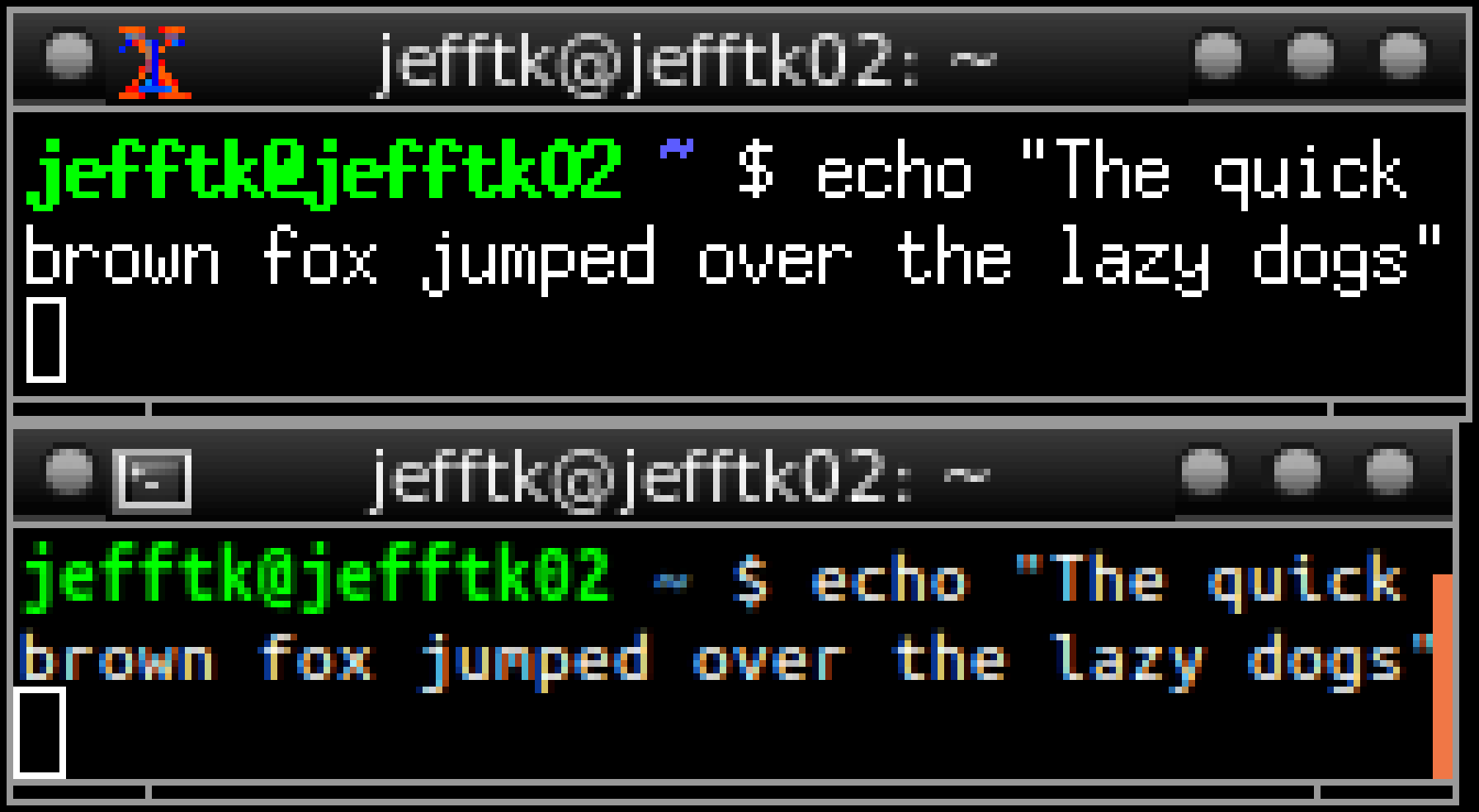
I'm currently using a 27" external monitor at 2560x1440 ("QHD") and this is wide enough for five terminals side-by side at 83 columns each. (Monaco 10pt, anti-aliasing off, iterm2)