Live data from Hacker News

An accessible one-handed keyboard, inspired by FrogPad

kianryan.co.uk

51–60 of 61 posts

Re: An accessible one-handed keyboard, inspired by FrogPad

#51

I have experience with both the FrogPad and the Matias Half Keyboard (I paid $95; now $595). The Frogpad never caught on with me. https://matias.store/products/half-keyboard The Matias Half Keyboard is based on a theory that our minds mirror each hand, so by holding the space bar to access the missing half keyboard, we already know what to do. I was skeptical. Recognizing that we're modal (do we even recognize that t…

Another anecdata. I had a bike accident which took my left hand out of commission for a while. It was after the Matias keyboard became so expensive, and I was broke. But I was motivated enough to try the concept that I hacked together a software implementation that behaved more or less the same way on a standard full size keyboard by swapping to a mirrored system keyboard layout while holding the spacebar for a short…

> It was after the Matias keyboard became so expensive, and I was broke.

I was once emailing with a customer and saw their email signature included apologies for typos, on account of a broken bone/arm/shoulder. As the customer lived nearby, I asked if by chance he had broken his right side, but could use a Matias left-handed keyboard I had laying around (from the days when it was cheap). I loaned it to him for the rest of the semester. I hope to loan it out again someday, to someone else in need!
Re: An accessible one-handed keyboard, inspired by FrogPad

#52
post #17

There is no better keyboard and mouse than no keyboard and mouse. Does anyone knows a solution that allows to provide input without the need to move your arms and/or fingers? I have heard about brainwave detection but apparently it's hard to learn, slow and have a high latency. Any ideas?

There's many accessibility focused input devices that lets you use your mouth/tongue. There's also foot pedals, voice activation software etc.

Re: An accessible one-handed keyboard, inspired by FrogPad

#53
A couple of years ago I had to undergo some serious wrist surgery and the recovery period was going to be several months as well. I was worried and didn't want to be out recovering without working, so I started looking into all sorts of alternative ways to type with my left hand. I looked into FrogPad, chorded keyboards, custom keyboards, etc.

In the end, I found a blog post about someone who just built a customized Karabiner-Elements bindings, where the keyboard layout is all the same for the "left-handed keys", but if you hold the spacebar the "right-handed keys" get mirrored to the left making it acessible to your left hand. Releasing the spacebar without a second key just inputs the spacebar as usual.

I customized that a little bit more to get some other keys in the places I wanted and set out to practice. Within a week I was typing at 60wpm comfortably when measuring at Type Racer. I normally type at around 120wpm, so I was pretty happy with the result. In my IDE I also have been using VIM bindings since a decade, so moving around it wasn't any trouble. I adapted myself to use the mouse with my left hand which wasn't also too difficult.

It cost literally zero and I only needed to "re-learn" typing the mirrored letters, and even then, it wasn't as hard because it's just mirrored and your brain quickly adjusts. No need to learn a complete new layout.

Edit: Here's the Karabiner-Elements customized binding I used as a base: https://github.com/qubist/mirrorboard-mac?tab=readme-ov-file

Re: An accessible one-handed keyboard, inspired by FrogPad

#54
post #49

Earlier quoted context omitted.

Having seen this but not yet having gotten to building it - is it wildly impractical? It looks a little slow (and obviously there's a learning curve) but it seems like it would work nicely in a number of cases where a normal keyboard wouldn't. (Ex. I bet I could use it on an exercise bike)

To be honest, I've only used it twice. It was fine, really, there's just a big learning curve and it can only do 32 characters. I imagine that, with some good autocorrect, it might be fairly usable.

Something like a t9 dictionary might be useful for it, even if you'd probably need the other device to handle the dictionary unless you wanted it hacky as all hell.

Replacing the thumb button with some kind of clicky D-pad (D-pad mounted on a microswitch) would be a somewhat easy way to add more buttons. (my first thought was going with two per finger by adding one around the side or to a strap on the outside of your fingers)

Re: An accessible one-handed keyboard, inspired by FrogPad

#55
post #49

Earlier quoted context omitted.

To be honest, I've only used it twice. It was fine, really, there's just a big learning curve and it can only do 32 characters. I imagine that, with some good autocorrect, it might be fairly usable.

Something like a t9 dictionary might be useful for it, even if you'd probably need the other device to handle the dictionary unless you wanted it hacky as all hell. Replacing the thumb button with some kind of clicky D-pad (D-pad mounted on a microswitch) would be a somewhat easy way to add more buttons. (my first thought was going with two per finger by adding one around the side or to a strap on the outside of your…

The T9 dictionary is for a keypad of 10 digits, I don't see how it can be used here. I see many people say T9 when they mean "autocorrect", and I'm not sure where the confusion stems from.

Re: An accessible one-handed keyboard, inspired by FrogPad

#57
I really hate chords. I just don't have the mental memory for it. Besides shift for capitals, things just need their own buttons. I always hate fighting games with 20 different combos on the gamepad to remember.

So 80% and less keyboards also don't work. I use a huge keyboard with numpad, the keys of which I remap to very common functions so I don't have to use combos for them :)

I wonder if I'm just weird or if this is a common thing.

Re: An accessible one-handed keyboard, inspired by FrogPad

#58

I really hate chords. I just don't have the mental memory for it. Besides shift for capitals, things just need their own buttons. I always hate fighting games with 20 different combos on the gamepad to remember. So 80% and less keyboards also don't work. I use a huge keyboard with numpad, the keys of which I remap to very common functions so I don't have to use combos for them :) I wonder if I'm just weird or if this…

There is also one-handed keyboards like that, for example the one from Maltron: http://www.maltron.com/store/p19/Maltron_Single_Hand_Keyboar...

Re: An accessible one-handed keyboard, inspired by FrogPad

#59
post #17

There is no better keyboard and mouse than no keyboard and mouse. Does anyone knows a solution that allows to provide input without the need to move your arms and/or fingers? I have heard about brainwave detection but apparently it's hard to learn, slow and have a high latency. Any ideas?

If you don't mind using other limbs, there's a whole ton of products aimed at musicians who have their hands full but still want to be able to manipulate another device. For example, the organ, guitar pedals, and much, much more. Big variety of pedal setups generally, but musicians have been dealing with the "no hands" input problem for a very long time. There are also a number of existing eye tracking input systems,…

That is one amazing video and an utterly amazing musician. I had no idea such an instrument exists. Really, you kind of blew up my musical world. That definitely lands on my Things That Went Right Today list. Thanks!!

Re: An accessible one-handed keyboard, inspired by FrogPad

#60
post #42

Earlier quoted context omitted.

Another anecdata. I had a bike accident which took my left hand out of commission for a while. It was after the Matias keyboard became so expensive, and I was broke. But I was motivated enough to try the concept that I hacked together a software implementation that behaved more or less the same way on a standard full size keyboard by swapping to a mirrored system keyboard layout while holding the spacebar for a short…

Sounds like something you could also do with half of a keychron Q11 and some reprogramming via QMK?

Yes, easily.

I came out of the mechanical keyboard rabbit hole with multiple Leopold FC660C Topre switches (there's no going back to any mechanical switch) and Hasu replacement controllers that support QMK.

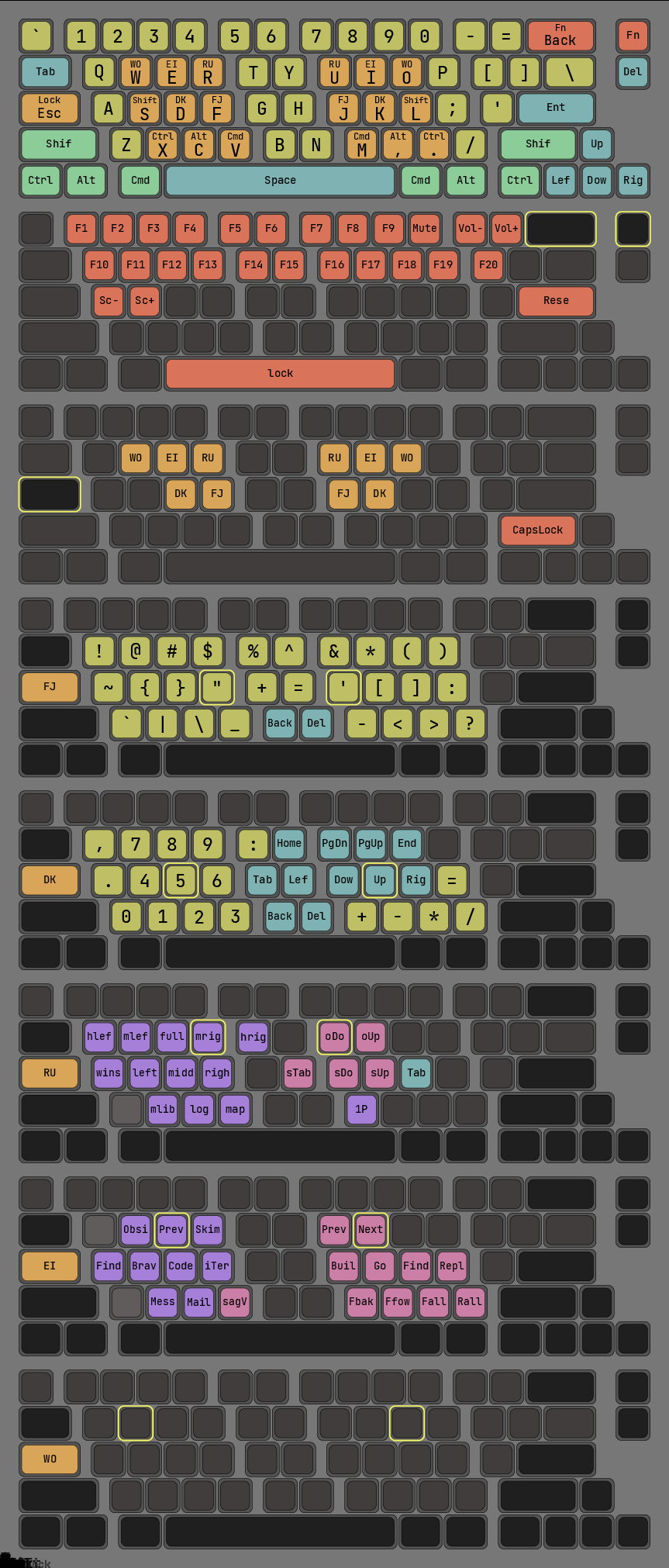
Here's an out-of-date version of my layout, heavily using tap-hold to access multiple layers:

https://raw.githubusercontent.com/Syzygies/log_folders/maste...

Chording never took for me, but one-finger-each-hand concentrated near home row is such an obvious way to quadratically expand the address space. The Matias space bar was certainly an inspiration for this, though everyone uses QMK tap-hold for purposes like this.

Post reply on HN