Live data from Hacker News

Q: Run SQL Directly on CSV Files

harelba.github.io

51–60 of 102 posts

Re: Q: Run SQL Directly on CSV Files

#51
post #17

Earlier quoted context omitted.

Ah, I thought you were going to link to the fascinating skunkworks Log Parser tool https://www.microsoft.com/en-us/download/details.aspx?id=246... Wonder if it still runs on Windows 10?

If you need a UI, don't forget the tool: Log Parser Lizard ^^ http://www.lizard-labs.com/log_parser_lizard.aspx

Good of you to also accomodate the disabled.
Re: Q: Run SQL Directly on CSV Files

#53

Another trick along these lines is to cut out the middleman (middleprogram? middleware?) and use SQLite to do it: $ sqlite3 sqlite3> .mode csv sqlite3> .import foo.csv foo sqlite3> SELECT * FROM foo WHERE bar = 'baz'; -- you get the gist... (a bunch of rows) Q seems to be much easier to use (and certainly easier to remember), but I've always found it handy to have the full power of SQL at my fingertips when needing t…

I think the csvkit CLI tool, csvsql, provides this functionality, too.

Re: Q: Run SQL Directly on CSV Files

#54
post #12

Real-world CSV files generally contain some or all of the following horrors: - some strings enclosed in speechmarks, but some not - empty fields - speechmarks within strings - commas within strings - carriage returns within strings How does Q do up against a CSV file with those traits?

All of your “horrors” seem...correct? Its comma delimited, so anything that is between two commas should be parsed without issue; if it’s a string with a comma in it, and unquoted, you simply have a broken csv file. If its quoted, than anything until the next (unescaped) quote is fine, including commas Unless you’re trying to parse csv files with regexes, none of those should be difficult, or even unexpected, to hand…

If you need to read to import CSV from someone else, there are tons of ambiguities. Do you interpret an empty field as an empty string or a NULL? If you've treated a column of unquoted digits as numbers so far, do you parse the first row with a non-number in that column as a NaN, NULL or string? If string, do you reinterpret all the previous column values as strings?

Many people are not in the position to just return the file to the client/boss and tell them they have a "broken csv file". (They'll tell you they saved it in Excel and it reads back fine, so the problem must be on your end. E.g.: https://stackoverflow.com/questions/43273976/escaping-quotes...)

Re: Q: Run SQL Directly on CSV Files

#55

“Any file is a database if you awk hard enough.” —Bryan Horstmann-Allen https://twitter.com/neilkod/status/914217352564137984 Furthermore, no thread on CSV files can be complete without mentioning this infamous bit of fact-trolling: the ASCII standard has had unit- and record-delimiters baked into it from the beginning. https://ronaldduncan.wordpress.com/2009/10/31/text-file-form...

Usability suffers, if you can't type the delimiters easily.

Re: Q: Run SQL Directly on CSV Files

#58
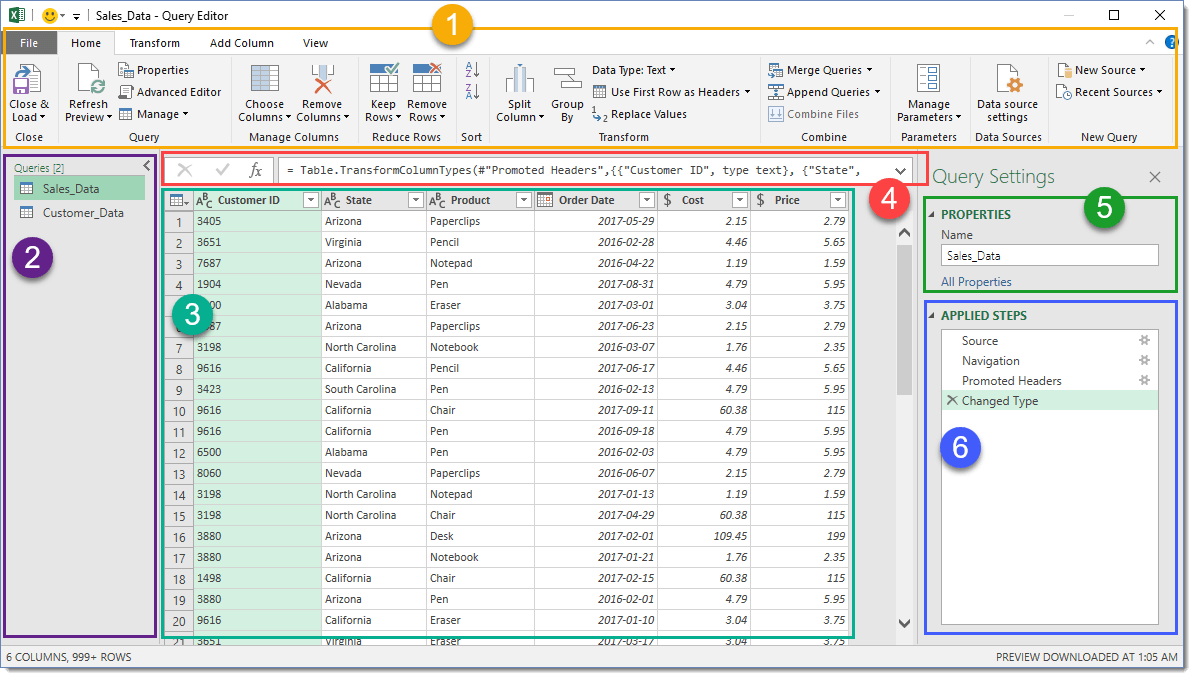
Excel has a lot of this stuff builtin as well in the PowerQuery editor [0] which supports CSV, JSON and XML data sources. Albeit not SQL, it allows you to do almost everything SQL can do, but in a GUI.

After you're done preparing your data in PowerQuery you can run PowerPivot on it for aggregations.

[0]: https://cdn-5a6cb102f911c811e474f1cd.closte.com/wp-content/u...

Re: Q: Run SQL Directly on CSV Files

#60
We've had this for ages now: the F# type provider gives strongly types access to CSV files, and the resulting object heiarchies are LINQ compatible. There's even support for applying units of measure.

Veeeery nice for data munging :)

http://fsharp.github.io/FSharp.Data/library/CsvProvider.html

Post reply on HN