Align your windows near the middle ok your display. Displays are always in wide shape and if you maximize windows size of any app, you'll be looking to the left quite a lot. What I do is I just narrow every window, so the left edge starts from a little bit left of the center of the display, so if I'm reading a page on a web, my neck would mostly be moving around the center of my natural facing position. You can put o…
Ask HN: What are your favorite developer-efficiency tips?
461–470 of 532 posts
Re: Ask HN: What are your favorite developer-efficiency tips?
#462Learn to touch-type properly. I'm not a shit hot typist or anything, but it does make hours on a keyboard more pleasant. And (hate me) I do judge other devs on it. If someone can't be bothered to invest a few tens of hours on such a key productivity enhancement then what does that say?
I'd love to subthread hear from people if alternate keyboard layouts have made a difference. ?
Re: Ask HN: What are your favorite developer-efficiency tips?
#463I usually comment with the same thing on these tip threads. And that is learn to rebind your keyboard. Make each key programmable modifier. Open apps, run scripts/macros instantly. My Karabiner config: https://github.com/nikitavoloboev/dotfiles/blob/master/karab... I go as far as binding keys to instantly type `console.log()` or `fmt.Println()` or the other language equivalent with my dot modifier key. Plus typing th…
Holy shit... that wiki and alfred workflow is INSANE. I am so jealous. Do you find that you're able to discover what you're looking for pretty instantaneously? Any general tips for organizing (sorry if you cover this in the wiki, haven't dived into it yet, but i'm going to!)? also, huge fan of keyboard remapping. I use karabiner, kinesis advantage, and a couple kinesis foot pedals (had some rsi issues, but all this o…
Plan to write some more things and do videos to explain my workflow & wiki setup in more detail.
Re: Ask HN: What are your favorite developer-efficiency tips?
#464I love continuous feedback. I set up automation in my development to run quick tools like code formatting, linting, and unit tests together. I'll use tmux to split my terminal into an editor window on the right, and on the left, I'll have a tool like watchman or entr watching for changes to my code, and running those tools e.g. find . -name "*py" | entr make continuous I also have some conventions about my tmux windo…
Re tmux: I have a function in my fish config (used to be zsh) that runs when I changed directories; if there is a `.tmux` script in the new directory, the function looks for a tmux session by the name of the directory, attaching if it exists, and, if it does not, creating a new session by running `.tmux`, which creates a handful of windows with my file watchers, build runners, container managers, etc etc. So all I have to do to boot up a project environment is move into the src directory, and poof — all the scripts that build source, run containers, and restart things on various config file changes get booted up immediately.
Re: Ask HN: What are your favorite developer-efficiency tips?
#465Things I like to use:
- org-mode for structured note taking (debug sessions, wip tasks, architecture, rubber ducking, other team details, scratch buffer is like a giant clipboard manager, used to use notes for tracking time on tasks and starting + ending the day too but now only do if there's a crunch)
- isolated testing envs where I can test apps
- automated e2e tests via Sauce Labs + WebDriver with emails for catching regressions
- adding APM tools like email alerts when prod goes funky
- quokka + wallaby.js + personal development setup for interactive programming (yes proprietary but super helpful)
- personal scripts for automating work (little stuff like: run triage steps while debugging, control tools that have bad UIs, add git hooks so I don't do as much dumb stuff, etc.)
- using code formatting like prettier, stylelint, eslint (other teams contribute code to us so breaking their work locally saves us time in the PR later)
- pay attention to where you get stuck, optimize
- pay attention to what you burn large amounts of time on, optimize
- lots of little debugging things like look for adjacent problems after finding a new issue (9 debugging rules book is a good starter)
- thinking about Rich Hickey talks (lol)
- get unstructured time everyday to just hang out with other developers on your team and talk about issues or new tools to try out (favorite part of my work). Other people are really smart and come up with good ideas!
Things I want to get:
- source maps for all frontend scripts pulled in only for my browser, works for all envs at work
- full source code search across the company at work (large group, thousands of projects)
- automated a11y and performance tests to catch regressions early
- automating small code changes across hundreds of projects
- somehow get rid of webpack's complexity (pipe dream, yeah right)
Edit: list formatting whitespace
Re: Ask HN: What are your favorite developer-efficiency tips?
#466This is a bit of a departure from the question you asked, but I'm always amazed how much people tend to hyper-tune their dev environments, when in reality, most of my time is spent thinking how not to write code. I get just as much work done on a completely vanilla macbook with VS code installed on it as my editor-obsessed peers with obsessively optimized setups can. How much actual code are you writing? I'd be reall…
If I am 'riding shotgun' and say stuff like "look up that definition" or "find all the implementations of that method" or "go to ABC" and they just look at me like a deer in the headlights, or start clicking through the file tree, or do "find text in project", then they are going WAY slower than they could be going.
So if "obsessively optimized" includes learning your tools, then it returns rewards.
Re: Ask HN: What are your favorite developer-efficiency tips?
#467Earlier quoted context omitted.
Respectfully, I've never understood this viewpoint. If the configuration options are importable from some external repository (as the vast majority of dotfiles are), "as fast as possible" simply becomes "how quickly can I install git (or my VCS of choice) and pull down my configuration options?" For keyboards and other physical hardware, sure, you can't remap on the fly. But I'd wager the the vast majority of product…
As always, it depends on what you do. On your machines, sure. On customer machines, no, quickly installing a VCS and pulling some repository is often not an option.
Re: Ask HN: What are your favorite developer-efficiency tips?
#468The things I've benefited from most are not tools but practices. - Question the work Always be questioning whether the thing you're doing really needs to be done. Is there a way to not do it? Is there a way to do something better instead? - Park downhill Before putting a project or incomplete task away, make notes of what the next thing was that you were going to work on. This lets you bypass that 10 minute orientati…
Regarding the todo list, I find that having a text-format todo list for the current day can provide structure and sense of accomplishment (especially at the end of the day). After completing a task I would put a checkmark emoji in front of it. Such a list can also bring me back on track after a lunch or a mentally-demanding task. If I know that I won't be able to do a certain task today, I put it in advance for the n…
Re: Ask HN: What are your favorite developer-efficiency tips?
#469Write meaningful git commit messages, always. Even in stupid side projects that don't matter. Because then when you're at work, it will be second nature to write good messages, and your colleagues will absolutely appreciate it. I've been following the keywords here: https://github.com/joelparkerhenderson/git_commit_message
Re: Ask HN: What are your favorite developer-efficiency tips?
#470Earlier quoted context omitted.
Good question. I guess I'll never know for sure. I believe it has been worth it for me, as there are several things I can do now that I'm not sure whether I'd have been able to achieve by customizing them (unless you include "rewriting their source code extensively" as customizing them; but at that point I think I'd be roughly doing the same as what I did?). I'll give three examples: 1. Being able to run edge -view=a…
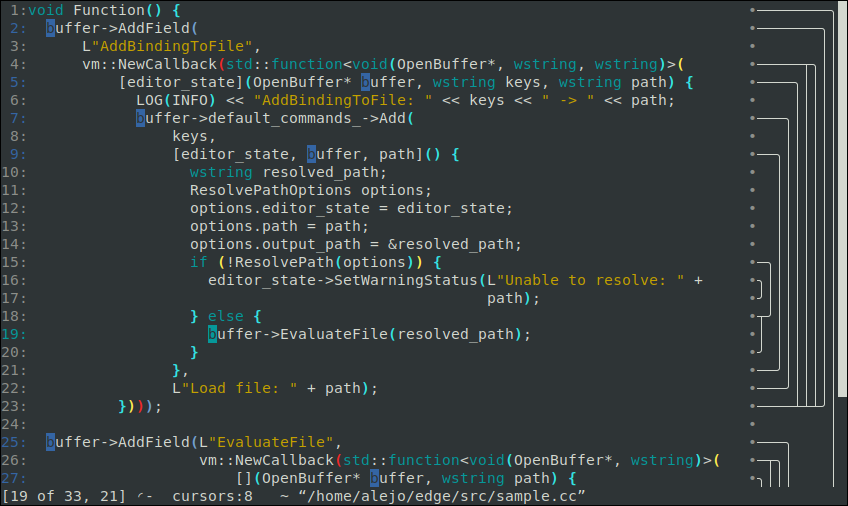
Those are some super cool screencasts, thank you for sharing! What are you showing on the right side gutter of your editor, visible at 20 seconds on https://asciinema.org/a/es4O4UdxPzB0vl7Tr88TKlq9N ? It looks like the function or loop scope? What are you using to generate/output that information? What languages does it work in? How hard is it to add support for new languages?
Yeah, what you see there corresponds to the syntax tree of the file being edited. You can see it fairly clearly in this screenshot (which has the advantage of showing how this really looks in an actual terminal, without some noise from asciinema): https://raw.githubusercontent.com/alefore/edge/master/screen...
In this screenshot, the very last column is just a scrollbar. Right next to it you see a representation of a subset of the syntax tree. It is a subset because I deliberately drop from it any subtrees that don't span more than a single line.
In the recording you also see something on the right of the scrollbar. The things shown on the left of the scrollbar correspond to the lines currently shown on the screen; the parts on the right are a representation of the tree for the entire file.
The syntax parsing is a bit dumb: just just based on things like parenthesis, comments, quotes, and brackets and such, not really aware of high semantic concepts (like classes or methods). For C++ (and other C like languages such as Java) this is implemented here: https://github.com/alefore/edge/blob/master/src/cpp_parse_tr... (if it seems too complex, part of it is because I cache previous states, as an optimization, since this runs every time you type a character into the file, refreshing the tree; I want this to work with very large source files, where most of the time you type a character the vast majority of the previous outputs can be reused).
I have two other parsers, for Markdown and diff (patches). It should be easy to add more parsers, but I want to clean up the API used by them.
Anyhow, you just have to generate a representation of the syntax tree (in this structure https://github.com/alefore/edge/blob/master/src/parse_tree.h). I've been considering integrating this with clang or vscode but haven't gotten around to it.
Once you have the ParseTree, the editor will display this information about the scopes (the logic that does that is a bit complex but lives here: https://github.com/alefore/edge/blob/master/src/buffer_metad..., function DrawTree, which returns a string with the characters for a given line).
I probably gave you more information than you wanted. :-P Thanks again for your comment.