Live data from Hacker News

USB-C hubs and my slow descent into madness (2021)

overengineer.dev

411–420 of 530 posts

Re: USB-C hubs and my slow descent into madness (2021)

#411

Earlier quoted context omitted.

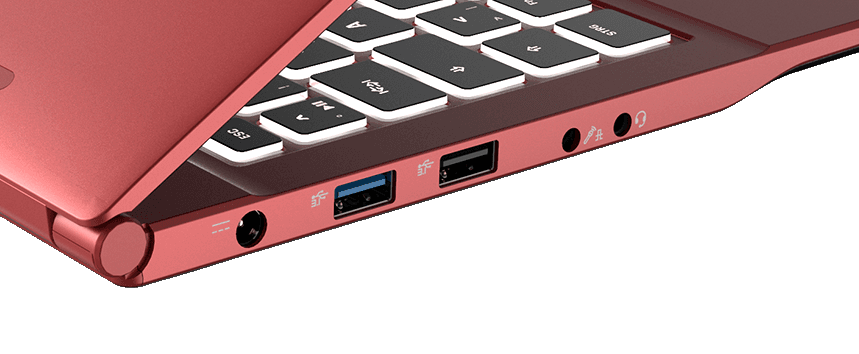
The back edge is more than twice as thick as a USB C opening, which is 2.65mm. Unless this picture is wrong, that should be visibly thicker than an A plug... But whatever, whether it fits or not with the current molding, the laptop does not need to be thicker to fit those ports. It just needs to change the curve near the back. Look how thick the middle is between the ports it has. That's way more than enough. Thickne…

> Unless this picture is wrong, that should be visibly thicker than an A plug... Just re-measured with a USB flash drive and an actual MacBook Air M1 (which I'm actually typing this comment on), and it's not. Do you want a photograph with a caliper? > But whatever, whether it fits or not with the current molding, the laptop does not need to be thicker to fit those ports. It just needs to change the curve near the bac…

I don't understand what your first picture is supposed to show.

But let's go back to the side view you first linked. Would you really say that this distance is too shallow for a USB A port? https://i.imgur.com/OtqDMh1.png It's more than a centimeter.

Re: USB-C hubs and my slow descent into madness (2021)

#412

If you want a decent dock you have to spend a bit of money. I went through this pain before accepting the cost and buying a CalDigit Thunderbolt 4 Element Hub[1]. Run's two 4k displays at 60Hz, any peripheral and charges my laptop. So good I bought a second. 1. https://www.caldigit.com/thunderbolt-4-element-hub/

No Ethernet? I would stick to the TS3 plus. I love mine.

Re: USB-C hubs and my slow descent into madness (2021)

#413

Earlier quoted context omitted.

I’d just like to chime in with the Kensington SD5700T [1]. I’ve tried a CalDigit TS3 Plus, an Anker PowerExpand 13-in-1, and the Kensington has by far been the most reliable. It doesn’t have built-in HDMI/DisplayPort out, but it’s easy to buy the appropriate cable to connect to your monitor (I recommend Club3D [2]). Especially if you’re trying to use an HDMI 2.1 or DisplayPort 1.4 display, as I’ve found most built-in…

I've had really bad luck with TB3 docks including the OWC and CalDigit. It seems that having a stiff TB cable on a non-locking port isn't that great of an idea. I ended up rigging up some cardboard and lots of tape to reinforce and stabilize the dock side of the connection on the OWC, and connecting to it would work only about half the time, and even then my dual external monitors would usually be swapped L/R. The be…

My caldigit came with the flimsiest TB3 cable I’ve ever used. No issues at all. Even my much stiffer Apple TB cable works fine.

Re: USB-C hubs and my slow descent into madness (2021)

#414
post #5

If you use a laptop with an external monitor, a better idea is to get a premium monitor which handles charging, video, and data transfer of USB devices connected to the monitor for you. This allowed me to get rid off the wonky USBC hubs, but before my employer got me a Dell monitor I didn't know that a single USBC connection can deliver all three.

These are great if you just have a laptop. I use the Dell S2719DC and I love being able to just get everything by plugging in one cable. However, I switch between a laptop and desktop, so I wound up buying a separate USB switch for peripherals, and it gets kinda confusing: KB/mouse -> switch -> desktop/monitor Monitor laptop (usb-c) Desktop -> monitor (HDMI) The downsides are that it only supports 45W charging, and y…

I switched to a 32:9 ultra wide instead of 2 monitors and it really works nicely for having multiple computers. Like you, I also use the monitor itself to switch inputs. I use software (barrier) instead of a KVM though.

Depending on my needs I can run one of my computers using the full width, or run 2 at half width each.

Re: USB-C hubs and my slow descent into madness (2021)

#415

I have one of those Anker x-in-one hubs and it works well, minus the Ethernet which it capped at 300Mbps due to [checks notes] a USB 2.0 interconnection. Why?!? I ended up getting a separate sub $20 USB-C to Ethernet adapter from a random Amazon brand called Uni. Get full gig, every time despite it having a Realtek 8153 chip in it. So, there might be more to it.

Many laptops can't handle more than USB 2.0 when outputting display over the same port. Those that can need a certain protocol (too lazy to look up). There's a better protocol that allows both, but now you're in the $100+ range of hub/docks that can handle it.

I'd guess that this might be related to USB A (2.0) being only rated for 2.5 W (up to 7.5 W for the "Battery Charging" specification), while USB C needs to support at least 15 W (up to 240 W) ?

Re: USB-C hubs and my slow descent into madness (2021)

#416

Earlier quoted context omitted.

I’d just like to chime in with the Kensington SD5700T [1]. I’ve tried a CalDigit TS3 Plus, an Anker PowerExpand 13-in-1, and the Kensington has by far been the most reliable. It doesn’t have built-in HDMI/DisplayPort out, but it’s easy to buy the appropriate cable to connect to your monitor (I recommend Club3D [2]). Especially if you’re trying to use an HDMI 2.1 or DisplayPort 1.4 display, as I’ve found most built-in…

Can second this recommendation for an M1 Pro MBP. Expensive, but I've been very happy with mine. A single cable in and out of my laptop to cover power (at a full 95W) plus monitors, USB-A peripherals, network, and everything else, super amazing.

If you were to install monitor control, can you adjust the brightness of both monitors or just one?

Re: USB-C hubs and my slow descent into madness (2021)

#418
post #347

Earlier quoted context omitted.

There have been a couple of firmware updates over my couple years of ownership. I had a couple of issues with the dock simply not connecting to the non-Lenovo computer, but this was fixed with the fw update early last year.

These issues were with the firmware updates early last year (I think the last update I tried was from April 2021). I see that they finally provided a new firmware update March this year. Too late \o/.

And hence the slow descent into madness!

Re: USB-C hubs and my slow descent into madness (2021)

#419

If you want a decent dock you have to spend a bit of money. I went through this pain before accepting the cost and buying a CalDigit Thunderbolt 4 Element Hub[1]. Run's two 4k displays at 60Hz, any peripheral and charges my laptop. So good I bought a second. 1. https://www.caldigit.com/thunderbolt-4-element-hub/

To note, “a bit of money” is 250$ on amazon right now. Two of them would buy a complete Ryzen mini-PC, which could be another way to convey how hard it must be to make a “decent” thunderbolt dock.

>how hard it must be to make a “decent” thunderbolt dock.

I’d been thinking about this and want to add to the evidence that even though MacBooks were USB-C only for years and years Apple never shipped a dock they only shipped single port dongles.

No way would Apple not sell a $500-$800 dock that could “solve the usb-c problem” unless there was a good reason and I think the reason is this solution is inherently janky for some unsolvable engineering reason and only single port cables are reliable to the level Apple was happy with.

Re: USB-C hubs and my slow descent into madness (2021)

#420

Earlier quoted context omitted.

> Unless this picture is wrong, that should be visibly thicker than an A plug... Just re-measured with a USB flash drive and an actual MacBook Air M1 (which I'm actually typing this comment on), and it's not. Do you want a photograph with a caliper? > But whatever, whether it fits or not with the current molding, the laptop does not need to be thicker to fit those ports. It just needs to change the curve near the bac…

I don't understand what your first picture is supposed to show. But let's go back to the side view you first linked. Would you really say that this distance is too shallow for a USB A port? https://i.imgur.com/OtqDMh1.png It's more than a centimeter.

The first image I shared is an underside of an M1 MacBook Air, cover removed. I attached it to show how insanely cramped inside.

The machine reaches that thickness under the keyboard. Around the middle Torx screw holding the screen hinges on the top of the image.You can of course carry the thickness like the MacBook Pros to the edge, but there are other problems.

USB-A ports are a bit thicker than the opening themselves. A proper, high quality port has some spring loaded shielding pressing towards the port opening and it flares out, Also, 90 degree ports have some distance between the port body and contacts, since you need to fix the port to the board via quite a few pins (9 pins on electronic side, plus at least two for retention, unless you clamp in down via a retainer, which needs screws, etc).

All of this "machinery" adds quite a space required to implement a USB-A port on a board. As you can see in the article itself, the hubs themselves use "through the board, unflared" ports to minimize space use as much as possible, and none of them are very slim.

The slimmest USB 3.0 hub I've seen is from Anker [0][1], which I also use almost daily. As you can see, you need to have that slack around that port. Same port on a laptop needs same amount of slack around [2][3]. My older MacBook Pro also has similar amount of slack around its USB-A ports.

All in all, a MacBook Air doesn't have the thickness and space to include that port, in its current form. We're always talking about thickness, but insertion depth is at least 15%-20% greater for USB-A too. Plus you need the depth required for supporting the pins on the plug side. That needs to be taken into account, too.

[0]: https://cdn.shopify.com/s/files/1/0493/9834/9974/products/An...

[1]: https://cdn.shopify.com/s/files/1/0493/9834/9974/products/A7...

[2]: https://www.anandtech.com/show/16131/a-15inch-thin-laptop-fo...

[3]: https://images.anandtech.com/doci/16131/2.png

Post reply on HN