Live data from Hacker News

Don't close your MacBook with a cover over the camera

support.apple.com

401–410 of 990 posts

Re: Don't close your MacBook with a cover over the camera

#401

Earlier quoted context omitted.

This has been the case for quite some time (10 years or so). I've torn apart two Macbooks to specifically test this and the LED is enabled when the camera receives power. It's impossible to disable with software. You can modify the Macbook of course, which is why the paranoid type will still use tape. Some attacks I've seen will take a photo with the camera as fast as possible so you might not notice, but the light w…

> It's impossible to disable with software. > iSeeYou ( 2008 ) Which is it?

> This has been the case for quite some time (10 years or so).
Re: Don't close your MacBook with a cover over the camera

#402

Earlier quoted context omitted.

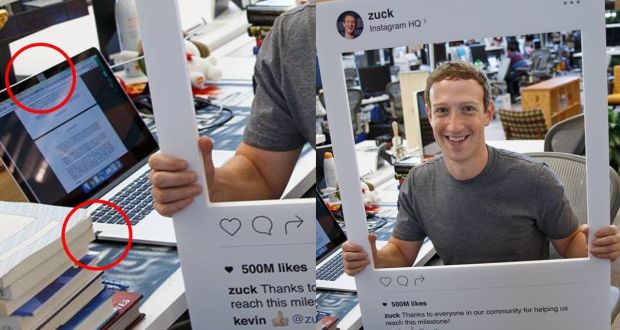
There's a reason Zukerberg's laptop has its mic and camera tapped up. It doesn't matter what device you use unless there's a physical switch to disconnect it'll never be safe. Software can ALWAYS have zero days, just because it hasn't been exploited yet doesn't mean it can't be.

But can't you specifically wire the indicator light to always be lit if the camera has power? I don't see Apple claiming they've done that but a correct design would make the indicator light work that way and be related to software at all. Meaning you could only disable the indicator light by physically modifying the device.

The important thing isn't whether the indicator will be lit or not.

The point is whether you will be able to prevent the camera from taking a video/picture you don't want it to.

Unless you can physically disconnect or block the camera, there's not guarantee that a piece of software can't record.

The best Apple can offer here is that you will know the recording was done (assuming you are looking at your computer, and not looking away or in another room) .

Re: Don't close your MacBook with a cover over the camera

#403
post #286

Earlier quoted context omitted.

How would you handle the microphone? I don't know any hardware way to make sure my microphone's not hearing me if I can't trust the software.

Plug in a headphone cable that has the wire to the microphone cut. There’s also pre-made plugs on Amazon too (search “microphone blocker”).

Wikipedia says that doesn't work for smartphones: https://en.wikipedia.org/wiki/Microphone_blocker#Smartphone_... . If a smartphone can override it in software, then couldn't a computer also do so?

Re: Don't close your MacBook with a cover over the camera

#404
post #313

Earlier quoted context omitted.

it was hacked in the past - that's the point of the above comment No guarantee it can't be hacked again.

There is a guarantee because there’s no way to bypass the wiring to the light to power the camera.

That's not what Mark Zuckerberg, the CEO of Facebook says: https://www.irishtimes.com/polopoly_fs/1.2742701.1470151986!...

Re: Don't close your MacBook with a cover over the camera

#405

Earlier quoted context omitted.

> because the clearance between the display and keyboard is designed to very tight tolerances. Sounds like engineering excellence to me. But I agree with you that there should perhaps be some kind of physical block/switch built in.

My Acer Chromebook 15, a budget laptop, enjoys similarly tight tolerances. I think engineering excellence would be to incorporate a camera cover and physical microphone switch while maintaining these tolerances.

Or why play into the mindless paranoia?

Re: Don't close your MacBook with a cover over the camera

#406
post #191
post #24

The alternative, the led, is not that good. Even if it's 100% hardware controlled, just a brief flash is enough to take a picture of you.

You should try this on a recent (last 4-5 years or so) Macbook! There is a hardware timer that forces the LED on for at least 3 seconds even if the camera only grabs a single frame.

I meant that by the time you notice the led, if you do, the picture was already taken and probably sent over the wire.

Re: Don't close your MacBook with a cover over the camera

#407

Earlier quoted context omitted.

>2013: iSeeYou: Disabling the MacBook Webcam Indicator LED https://jscholarship.library.jhu.edu/handle/1774.2/36569 ... applies only to older Mac notebooks from like 2008 period which are long since obsolete according to Apple's announced support policy. >2016: Your Mac’s Camera Can Be Hacked https://www.intego.com/mac-security-blog/your-macs-camera-ca... . ... refers specifically the exploit above. >2016: Former NSA…

There's a reason Zukerberg's laptop has its mic and camera tapped up. It doesn't matter what device you use unless there's a physical switch to disconnect it'll never be safe. Software can ALWAYS have zero days, just because it hasn't been exploited yet doesn't mean it can't be.

Seeing that pic was eyeopening for me. I believe he had other ports taped over as well.

At the same time, he's going to be an exclusive target for myriad actors big and small, up to and including entire nations, so extra paranoia is probably warranted.

Re: Don't close your MacBook with a cover over the camera

#408

Earlier quoted context omitted.

It's not that simple, what voltage and current need to held on that wire to light the LED and the camera? It's not uncommmon to find a situation where a chip doesn't technically have the right power on it's power rails, but is instead drawing power on the input ports. It's non-trivial to prove this is or isn't happening.

No, I think it is that simple. The camera module likely needs either 3.3v or 5v. The LED can also be powered at either 3.3 or 5v by simply using a series resistor. You just hook the camera and LED to the supply in parallel. > a chip doesn't technically have the right power on it's power rails, but is instead drawing power on the input ports. What does this mean? The data lines of camera modules are generally differen…

All I'm saying is that I have literally worked with systems that have drawn power over differential pairs and it's fucked with our power measurements. So don't rule it out.

Re: Don't close your MacBook with a cover over the camera

#410
post #403

Earlier quoted context omitted.

Plug in a headphone cable that has the wire to the microphone cut. There’s also pre-made plugs on Amazon too (search “microphone blocker”).

Wikipedia says that doesn't work for smartphones: https://en.wikipedia.org/wiki/Microphone_blocker#Smartphone_... . If a smartphone can override it in software, then couldn't a computer also do so?

Depends on the laptop hardware in question, just as it does on which smartphone you’re using, as your link indicates.

If your laptop (or iPad, in the case of the latest gen) is an Apple T2 equipped device, this is somewhat relevant (“somewhat” as it’s not directly related to my original reply)

https://support.apple.com/en-gb/guide/security/secbbd20b00b/...

Post reply on HN