Live data from Hacker News

Stack Exchange for Emacs

github.com

41–50 of 53 posts

Re: Stack Exchange for Emacs

#41
post #37

Earlier quoted context omitted.

> The potential of Emacs comes from the huge number of excellent third-party extensions Yes, but you wouldn't have that many excellent extensions without Emacs being a great Elisp IDE. I recently compared PyCharm (I had to purchase it for work) with Emacs and the number of plugins for the former is negligible in comparison. I think that this is because writing extensions/plugins for PyCharm is so much harder than for…

Docview is great, but not enough. He mentioned pdf-tools: https://github.com/politza/pdf-tools , that enhances doc-view with outline for table of contents and annotations.

Wow, very nice! Thanks, I don't deal with pdfs very much so I never felt the need for something more than DocView, but this looks nice :)
Re: Stack Exchange for Emacs

#42
post #28

Earlier quoted context omitted.

Emacs also has that preview feature when you move the highlighter to a selection. However, I feel it annoying because screen keeps changing while I narrow to a file or a set of files, and luckily it is off by default. How about other thing? Like switch between source and header files without configuring anything? Or Jump to any file I see instantly, even without full filepath and you only have just a name and without…

> How about other thing? Like switch between source and header files without configuring anything? Yes (ctrl+alt+up). > Or Jump to any file I see instantly, even without full file path > and you only have just a name and without typing the filename? I'm not sure I understand. I mentioned fuzzy completion before, the way it works is that it matches even subparts of the paths and/or filename, with the only requisite of…

If you want image display, there Emacs has it eons ago, and people write plug-ins for it, like this one: https://github.com/josteink/wsd-mode

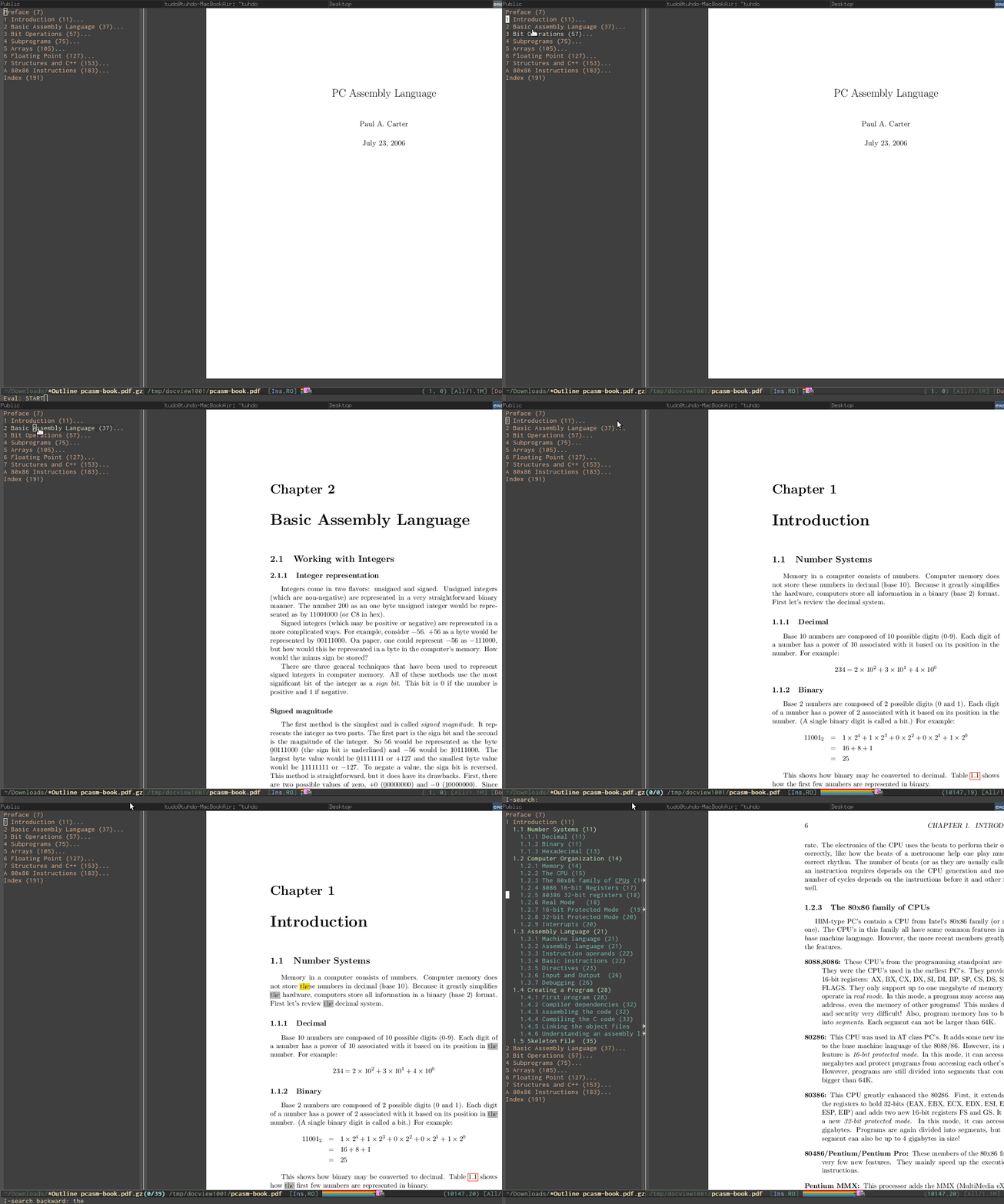
Emacs is also a fine PDF reader. I can search text in the PDF file with highlighting and a table of content side by side. All can be controlled with the keyboard: https://tuhdo.github.io/static/emacs-read-pdf.gif. I never use Evince again.

Re: Stack Exchange for Emacs

#43
post #28

Earlier quoted context omitted.

Emacs also has that preview feature when you move the highlighter to a selection. However, I feel it annoying because screen keeps changing while I narrow to a file or a set of files, and luckily it is off by default. How about other thing? Like switch between source and header files without configuring anything? Or Jump to any file I see instantly, even without full filepath and you only have just a name and without…

> How about other thing? Like switch between source and header files without configuring anything? Yes (ctrl+alt+up). > Or Jump to any file I see instantly, even without full file path > and you only have just a name and without typing the filename? I'm not sure I understand. I mentioned fuzzy completion before, the way it works is that it matches even subparts of the paths and/or filename, with the only requisite of…

> is a paradigm shift [...] very hard to replicate

Well, that's true, and Atom deserves recognition for replicating it...

http://www.emacswiki.org/emacs/EmacsXWidgets

Re: Stack Exchange for Emacs

#44
post #37

Earlier quoted context omitted.

Docview is great, but not enough. He mentioned pdf-tools: https://github.com/politza/pdf-tools , that enhances doc-view with outline for table of contents and annotations.

Wow, very nice! Thanks, I don't deal with pdfs very much so I never felt the need for something more than DocView, but this looks nice :)

You can view the demo here: https://tuhdo.github.io/static/emacs-read-pdf.gif

Re: Stack Exchange for Emacs

#45
post #5
post #3

This is Yet Another Example of the amazing utility of being able to easily and stably extend one's environment. emacs is just a text editor, but this project is changing it into a Stack Exchange client. That's useful!

Emacs certainly is not just a text editor. Emacs is just a big REPL, a REPL with a powerful text editor instead of minimal command line interface. Right on the homepage: http://www.gnu.org/software/emacs/ , it is written that: "GNU Emacs is an extensible, customizable text editor—and more. At its core is an interpreter for Emacs Lisp, a dialect of the Lisp programming language with extensions to support text editing.…

> Emacs certainly is not just a text editor.

I know. But it was written as just a text editor—but an extensible one, and so it has grown to be a lot more. Which is really pretty awesome.

Re: Stack Exchange for Emacs

#46
post #45
post #5

Earlier quoted context omitted.

Emacs certainly is not just a text editor. Emacs is just a big REPL, a REPL with a powerful text editor instead of minimal command line interface. Right on the homepage: http://www.gnu.org/software/emacs/ , it is written that: "GNU Emacs is an extensible, customizable text editor—and more. At its core is an interpreter for Emacs Lisp, a dialect of the Lisp programming language with extensions to support text editing.…

> Emacs certainly is not just a text editor. I know. But it was written as just a text editor—but an extensible one, and so it has grown to be a lot more. Which is really pretty awesome.

> But it was written as just a text editor

No it's not. It is really a big REPL optimized for text processing. You compare Emacs to the like of Python, not just some random editor. Unlike other editors that have an optional extension language, if you remove Emacs Lisp, effective you remove Emacs. Even file opening is written in Emacs Lisp.

Re: Stack Exchange for Emacs

#47

Earlier quoted context omitted.

> How about other thing? Like switch between source and header files without configuring anything? Yes (ctrl+alt+up). > Or Jump to any file I see instantly, even without full file path > and you only have just a name and without typing the filename? I'm not sure I understand. I mentioned fuzzy completion before, the way it works is that it matches even subparts of the paths and/or filename, with the only requisite of…

> is a paradigm shift [...] very hard to replicate Well, that's true, and Atom deserves recognition for replicating it... http://www.emacswiki.org/emacs/EmacsXWidgets

Well, that's the basic technological point, then you need the commands to make it useful for writing code at production speed, and not just a gimmick.

Re: Stack Exchange for Emacs

#48
post #42

Earlier quoted context omitted.

> How about other thing? Like switch between source and header files without configuring anything? Yes (ctrl+alt+up). > Or Jump to any file I see instantly, even without full file path > and you only have just a name and without typing the filename? I'm not sure I understand. I mentioned fuzzy completion before, the way it works is that it matches even subparts of the paths and/or filename, with the only requisite of…

If you want image display, there Emacs has it eons ago, and people write plug-ins for it, like this one: https://github.com/josteink/wsd-mode Emacs is also a fine PDF reader. I can search text in the PDF file with highlighting and a table of content side by side. All can be controlled with the keyboard: https://tuhdo.github.io/static/emacs-read-pdf.gif . I never use Evince again.

No, I don't want image display. I want to replicate Atom's inlining editing features. Did you look into that? This is one example: https://discuss.atom.io/t/expand-css-rules-inline-html/12437

Re: Stack Exchange for Emacs

#49
post #40

Earlier quoted context omitted.

> How about other thing? Like switch between source and header files without configuring anything? Yes (ctrl+alt+up). > Or Jump to any file I see instantly, even without full file path > and you only have just a name and without typing the filename? I'm not sure I understand. I mentioned fuzzy completion before, the way it works is that it matches even subparts of the paths and/or filename, with the only requisite of…

> Yes (ctrl+alt+up). Does it work in the source as large as the linux kernel that shows you every possible files? i.e I have a file named `fpu.c`, I want all `fpu.h` in Linux. And Emacs does not work with only C/C++, but work for any languages that users define two lists of pairs of file extensions to switch to. i.e. you can switch between Gemfile Gemfile.lock, .h .js... > I'm not sure I understand. I mentioned fuzzy…

I agree that Emacs has many nice features that come with 30 years of development, but I also thing that those features have a bias towards older paradigms/languages of programming, and thus the advantages reduce a lot and/or there are deficiencies if you move into newer technology stacks.

Morevoer, even if Emacs is a LISP machine, it doesn't give it any super-power that can't be replicated in other editors; I mean, it of course gives it flexibility to use it as a mail reader, that's true, but within the editor itself, there's nothing game-changing. I showed features that are either very close, or a bit worse, or a bit better, made with an editor which is not a LISP machine. I think we can agree that anything that you mentioned can be implemented in Sublime as a plugin; if it's not there out of the box, point taken that the ecosystem is more mature, but it doesn't show an inherent gap that can't be filled, it only shows where development effort is being focused on. For Sublime, surely it's not C/C++.

Re: Stack Exchange for Emacs

#50
post #42

Earlier quoted context omitted.

If you want image display, there Emacs has it eons ago, and people write plug-ins for it, like this one: https://github.com/josteink/wsd-mode Emacs is also a fine PDF reader. I can search text in the PDF file with highlighting and a table of content side by side. All can be controlled with the keyboard: https://tuhdo.github.io/static/emacs-read-pdf.gif . I never use Evince again.

No, I don't want image display. I want to replicate Atom's inlining editing features. Did you look into that? This is one example: https://discuss.atom.io/t/expand-css-rules-inline-html/12437

i think skewer-mode is close enough: https://github.com/skeeto/skewer-mode for live editing.

I don't think that inlining feature really help much. Generally, if you want to access a css element in Emacs, you jump in, edit and jump back in an instant to see your result.

See also web-mode: http://web-mode.org

Post reply on HN