Live data from Hacker News

Fix macOS 26 (Tahoe) exaggerated rounded corners

github.com

41–50 of 51 posts

Re: Fix macOS 26 (Tahoe) exaggerated rounded corners

#41

The title is misleading: this only modifies the desktop rounded corners, not the app window corners (heavily discussed recently at HN and elsewhere). The blog post about this is slightly interesting, but mostly feels like a candidate’s position paper on rounded corners, rather than an newsworthy or technical explanation: https://medium.com/@makalin/reclaiming-the-screen-a-develope... The core innovation is the ctx.fi…

The linked article on medium was also written by AI, which immediately disqualifies it from being interesting or useful. "And the worst part? Apple didn’t provide a switch to turn it off." Now see, this is AI. A normal human being would write, "Apple didn't even provide any way to switch off this non-feature" - for example. AI always , for reasons that are likely neither interesting nor especially illuminating, write…

Is this the new em dash witch hunt?

I sometimes write like that because I noticed for regular people, they tend to pay more attention if some things are written a specific way. It’s like an FAQ.

I’ll continue to use bolded titles and bullet points when writing for a regular audience.
Re: Fix macOS 26 (Tahoe) exaggerated rounded corners

#42
post #33

Earlier quoted context omitted.

The linked article on medium was also written by AI, which immediately disqualifies it from being interesting or useful. "And the worst part? Apple didn’t provide a switch to turn it off." Now see, this is AI. A normal human being would write, "Apple didn't even provide any way to switch off this non-feature" - for example. AI always , for reasons that are likely neither interesting nor especially illuminating, write…

And to be honest? It’s really annoying indeed.

I like it. A lot of times I just skim, so sentences like this let me know when to pay more attention to some point the author is trying to make.

Re: Fix macOS 26 (Tahoe) exaggerated rounded corners

#44
post #30

I have no idea what this is fixing. > Note: This does not change the rounded corners of individual app windows. It only restores the straight silhouette at the edges of your display. My display does not have rounded corners. I am on macOS Tahoe using external monitors. I know that newer macbooks have rounded display corners, but those are rounded at the hardware level afaik, those corner pixels simply don't exist. An…

thank you for actually including a fricking screenshot!

Re: Fix macOS 26 (Tahoe) exaggerated rounded corners

#45
post #18

Earlier quoted context omitted.

Yeah I really thought (and actually still think) the rounded corners on the top left and right of the new(-ish) MacBook Pro are hardware. I know for sure they pre-date Tahoe!

They are hardware. There's software like Top Notch if you want to make the bottom corners rounded also.

TopNotch also solves the problem this app targets I think: the rounded corners are not visible when the menubar is black.

Re: Fix macOS 26 (Tahoe) exaggerated rounded corners

#46
post #30

I have no idea what this is fixing. > Note: This does not change the rounded corners of individual app windows. It only restores the straight silhouette at the edges of your display. My display does not have rounded corners. I am on macOS Tahoe using external monitors. I know that newer macbooks have rounded display corners, but those are rounded at the hardware level afaik, those corner pixels simply don't exist. An…

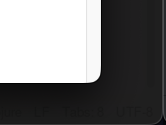
I had not noticed the rounded corner in the edge of my screen until now because I use a dark background and usually have some window maximized. This is a screenshot without this tool:

https://stuff.art-core.org/2026/osx_corner.png

This screenshot shows the bottom right corner of my left monitor and a small slice of my right monitor. The light thing is the rounded corner of my browser window.

Re: Fix macOS 26 (Tahoe) exaggerated rounded corners

#47
post #46
post #30

I have no idea what this is fixing. > Note: This does not change the rounded corners of individual app windows. It only restores the straight silhouette at the edges of your display. My display does not have rounded corners. I am on macOS Tahoe using external monitors. I know that newer macbooks have rounded display corners, but those are rounded at the hardware level afaik, those corner pixels simply don't exist. An…

I had not noticed the rounded corner in the edge of my screen until now because I use a dark background and usually have some window maximized. This is a screenshot without this tool: https://stuff.art-core.org/2026/osx_corner.png This screenshot shows the bottom right corner of my left monitor and a small slice of my right monitor. The light thing is the rounded corner of my browser window.

[dead]

Re: Fix macOS 26 (Tahoe) exaggerated rounded corners

#48
post #29

I think this project is best described by one of my favorite quotes from Top Gear: “an ingenious solution to a problem that should never have existed in the first place”.

The problem does exist, but the tool is solving none of it

[dead]

Re: Fix macOS 26 (Tahoe) exaggerated rounded corners

#49

Earlier quoted context omitted.

> I'm super confused. My Macbook desktop has no rounded corners. Both the menu bar and content against the bottom edge are sharp-cornered. Is this only for external screens? Running an Apple Studio Display here, and no rounded corners at any edges. So, just for non-Apple monitors?

Not even that. I have both Apple and non-Apple monitors, and my Mac only rounds the top edges on the MacBook’s screen, as intended. Not sure what this tool’s function is supposed to be, given that the rounded corners only appear on screens that are actually rounded. Why would you want to straighten that out on a physically-rounded screen?

It’s more than that, the screen is rounded at the hardware level, there are no pixels to show anything here. What the OP software is supposed to “fix” CANNOT be fixed!

Re: Fix macOS 26 (Tahoe) exaggerated rounded corners

#50
post #49

Earlier quoted context omitted.

Not even that. I have both Apple and non-Apple monitors, and my Mac only rounds the top edges on the MacBook’s screen, as intended. Not sure what this tool’s function is supposed to be, given that the rounded corners only appear on screens that are actually rounded. Why would you want to straighten that out on a physically-rounded screen?

It’s more than that, the screen is rounded at the hardware level, there are no pixels to show anything here. What the OP software is supposed to “fix” CANNOT be fixed!

[dead]
Post reply on HN