Live data from Hacker News

Thunderbird: Fluent Windows 11 Design

github.com

41–50 of 156 posts

Re: Thunderbird: Fluent Windows 11 Design

#41
post #17
post #12

Earlier quoted context omitted.

People don't maximize their windows? I have a 16:9 4k monitor and I maximize everything (browser, IDE, image editor, terminal, mail client) except for the rare occasion when I need something viewed side by side (editor+browser, terminal+browser, 2 file browsers, etc.).

Is the web not a terrible experience in 16:9? My main browser window is closer to 1:1, and even then I have tabs on the left.

One of my monitors is 9:16 - I've rotated it 90°. It's terrific for reading PDF documents, web pages, a terminal, and the IDE.

The only thing it's not really good for is the email client, video, and pictures. For those I have another monitor in the standard landscape configuration.

Re: Thunderbird: Fluent Windows 11 Design

#42
post #39

Earlier quoted context omitted.

This isn't Thunderbird. This is a Thunderbird theme. Normal Thunderbird still gets two to three dozen email subject lines on the screen. I absolutely love it, I've been using it for over 20 years through the rough and through the good. We're in a good period now, and it's been a good period for quite some time.

Not a fork of thunderbird. It's custom CSS that renders the thunderbird "chrome".

Corrected, thanks.

Re: Thunderbird: Fluent Windows 11 Design

#44
> Also, note that some areas of ThunderBird are rendered outside of the influence of userChrome.css in a "Shadow DOM" - as such, it is not possible to fully theme all elements of Thunderbird.

With some limitations it is possible to restyle Shadow DOM elements. It is just a lot harder to select the right element if it is inside a shadow dom.

I found a workaround (don't remember where I found it) which I use extensively in my personal userChrome.css.

The basic concept (afair) is that you can write selectors which match inside the shadow dom as long as they do not need to "cross" the shadow dom "boundary".

A good starting point for me is often to select by tag and part attribute, e.g. image[part="icon"] { ... }

Now the trick to style a particular instance of a web component (shadow dom instance) is to use variables and defaults.

With a selector which targets the "root element" of the shadow dom I set variables for any value I want to change and with a selector which is fully inside the shadow dom I add styles using the variable (which is then only defined for that particular instance) or a default which effectively cancels my custom style anywhere else.

As concrete example the dialog to create new calendar events has a drop down box to select the calendar where each entry is prefixed with a dot with calendar color. The menulist has a shadow dom and the menupopup another. I styled those dots as squares (for fun and because I think the modern web is to round). So to set the variables on the "outside" I have:

  menulist#item-calendar {
    --parthack-boxmarker-radius: 0;
    --parthack-boxmarker-image-size: 1em;
    --parthack-boxmarker-border: inset 0 0 0 1px color-mix(in srgb, black 20%, transparent);
  }
and to apply it

  menuitem.menuitem-iconic > hbox.menu-iconic-left > image.menu-iconic-icon {
    border-radius: var(--parthack-boxmarker-radius) !important;
    width: var(--parthack-boxmarker-image-size, revert-layer) !important;
    height: var(--parthack-boxmarker-image-size, revert-layer) !important;
    box-shadow: var(--parthack-boxmarker-border, none);
  }
(the variable prefix "parthack" has no special meaning; it just evolved because I initially used it to hack styles onto shadow dom elements over the part attribute)

Now this will change only the icons only in the menulist with id 'item-calendar' and leave others unchanged. Whether I use revert-layer as default or something else depends on what style the element has by default and try and error.
Re: Thunderbird: Fluent Windows 11 Design

#45
post #27
post #13

Earlier quoted context omitted.

1. There is no better open-source alternative for Windows for mail/calendar/contacts client.

There really isn't even if you don't need all the bells and whistles. I want my email client to be as simple and minimal as possible and Thunderbird seemed like the last candidate for this. Surprisingly it's the only one I could theme and strip down enough to meet my need.

Plain and simple is why I like macMail but it's a bit too simple and really mostly useful if you use iCloud email primarily.

macMail is _okay_ with fastmail

Re: Thunderbird: Fluent Windows 11 Design

#46

> Also, note that some areas of ThunderBird are rendered outside of the influence of userChrome.css in a "Shadow DOM" - as such, it is not possible to fully theme all elements of Thunderbird. With some limitations it is possible to restyle Shadow DOM elements. It is just a lot harder to select the right element if it is inside a shadow dom. I found a workaround (don't remember where I found it) which I use extensivel…

Would it be possible to make a PostCSS plugin for this?

Re: Thunderbird: Fluent Windows 11 Design

#47
post #17

Earlier quoted context omitted.

Is the web not a terrible experience in 16:9? My main browser window is closer to 1:1, and even then I have tabs on the left.

One of my monitors is 9:16 - I've rotated it 90°. It's terrific for reading PDF documents, web pages, a terminal, and the IDE. The only thing it's not really good for is the email client, video, and pictures. For those I have another monitor in the standard landscape configuration.

I used to have a similar setup, but I replaced the dual head setup (24" 9:16 and 30" 16:9) with one ultrawide one.

I suppose just as wide 16:9 display would have been even nicer, but it's fine. There are some benefits in window placement in having just a single screen, even if window managers could work better for this use (e.g. have a "second screen" region where there are separate workspaces).

Re: Thunderbird: Fluent Windows 11 Design

#48

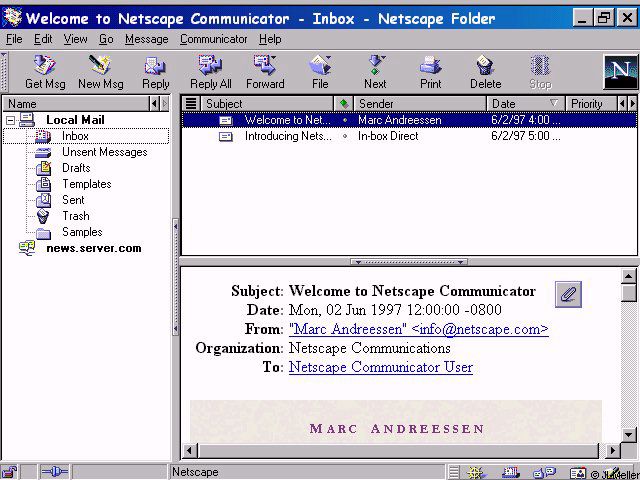
Had you told me back in 1995, that in 30 years we'd have 4K screens and I would only be able to see 10 emails in my inbox at one time... Netscape 2.02 or Microsoft Mail client from back then looks amazing by comparison.

Did he say it was Thunderbird?

Re: Thunderbird: Fluent Windows 11 Design

#49

Had you told me back in 1995, that in 30 years we'd have 4K screens and I would only be able to see 10 emails in my inbox at one time... Netscape 2.02 or Microsoft Mail client from back then looks amazing by comparison.

I'm to young for Netscape, but do you mean this [^1] interface, that's truncating the subject and hiding the body?

Also, which use-cases do you have where you need to see 20 emails at once?

[^1]: https://www.pixelbeat.org/docs/netscape_email/ns_4_email.jpg

Re: Thunderbird: Fluent Windows 11 Design

#50
post #4
post #2

I understand that search bar position is not changeable by theming, it's a Thunderbird team's decision, but it irks me to see it take up so much premium space. It was the same with browsers, it took many years and iterations to get where we are now (tabs on top, no wasted space) and I think those lessons should be carried over.

> where we are now (tabs on top, no wasted space) Tabs at the top is wasted space, I much prefer my tabs on the side instead, as most web content is taller than it is wide, and I have a widescreen monitor. I understand the choice of tabs on top when 640x480 was the most common resolution, but for desktop usage today? Tabs on top seems like an outdated layout choice.

Not if you're using side-by-side windows.
Post reply on HN