Live data from Hacker News

The Linux audio stack demystified (and more)

blog.rtrace.io

41–50 of 136 posts

Re: The Linux audio stack demystified (and more)

#41
post #28

Pipewire has pretty much unified the userland linux audio stack (+ supports video as well as bonus). Kernel side it has always been alsa. There's TinyAlsa so you don't have to use libasound to interface with the kernel alsa. (userland alsa is quite PITA)

> Kernel side it has always been alsa.

Well you probably didn't mean it in a literal sense, but it was OSS up to kernel 2.4 and 2.6 had both OSS and ALSA

Re: The Linux audio stack demystified (and more)

#42
post #24

I hear many complaining (even here) about "the mess" of linux audio. First, in the article, [1] shows in one single diagram where the complexity is coming from; the audio system has to handle a good deal of different hardware on many different systems and also provide extra functionality for multiplexing, network features, wireless headsets and their codecs, etc. All this: open source. Second: linux is the only platf…

That's the very first time I read "sanely-working-out-of-the-box" about Linux audio. I have a very different experience of course, such as "why do my BT headphones suddenly play everything at 8000hz sampling rate while I never asked for this and why the UI won't let me switch it back to 24khz ?".

Re: The Linux audio stack demystified (and more)

#43
post #6

Earlier quoted context omitted.

Pipewire is a major development that's especially important for Wayland desktop. It was hard to miss unless you haven't used Linux in a long time.

I don't know what Pipewire is as well. I've used Linux daily for 10+ years, but I've never bothered to use Wayland.

Pipewire ends up being used to paper over Wayland deficiencies in some areas, thus why it's important for Wayland desktop ;)

By itself it's essentially grand unification of audio servers that actually works better and is way less... opinionated about the only true way some things works, which was a problem with pulseaudio at times.

Re: The Linux audio stack demystified (and more)

#44
post #24

I hear many complaining (even here) about "the mess" of linux audio. First, in the article, [1] shows in one single diagram where the complexity is coming from; the audio system has to handle a good deal of different hardware on many different systems and also provide extra functionality for multiplexing, network features, wireless headsets and their codecs, etc. All this: open source. Second: linux is the only platf…

For me it's been nothing but problems. The primary reason is I'm probably doing things that (almost) nobody else is doing but I assume both countless people are and it should be working fine. Once I hook up some midi devices, want things to be recorded, run a synthesizer stack through pw-jack, expect the midi clock to go down the USB bus, etc, all kinds of interesting behavior starts happening. It even completely locked up my machine a few times. Like hard freeze. I had Audacity just nope right out. It somehow corrupted the local configuration and I had to blow it away to get it to start up again.

And then there's the whole new suite of programs you have to learn where their implementation is constantly in flux so the documentation isn't exactly accurate. pw-record for instance. That "--list-targets" option it tells you to use is long gone (that princess is now in the "wpctl status " castle). You gotta check the date of everything written online because the month it was written matters. It's still far from great.

I used an Amiga about 30 years ago to do similar things. Now that was something that genuinely just worked. People are still using it. That's how functional it was.

But like all these things, I should find the motivation to shutup the complaining and get to cracking on the code to make it suck less.

When it comes to linux and things are broken, your assumption on how many people have seen it and who is working on the section of code it's caused by is invariably an order of magnitude or two too high. That's why you can't find any fixes on the web. You're one the first to see it. Exciting, isn't it?

Re: The Linux audio stack demystified (and more)

#45
post #3

> ALSA is the core layer of the Linux audio stack. It provides low-level audio hardware control, including drivers for sound cards and basic audio functionality. > ... > Ulike PuleAudio and JACK, PipeWire does not require ALSA on a system, in fact if ALSA is installed the output of ALSA is very likely pushed through PipeWire I don't get this part. If ALSA represents the kernel level hardware drivers for audio, how do…

I was also confused by this bit. If ALSA is part of the kernel, how can it not be installed?

Well, you could compile your kernel without ALSA.

Re: The Linux audio stack demystified (and more)

#47
post #24

I hear many complaining (even here) about "the mess" of linux audio. First, in the article, [1] shows in one single diagram where the complexity is coming from; the audio system has to handle a good deal of different hardware on many different systems and also provide extra functionality for multiplexing, network features, wireless headsets and their codecs, etc. All this: open source. Second: linux is the only platf…

I’m trying right now to connect a BT speaker to a RPi, while using mpg123 as a player. At least from the command line, it is all but easy. And I do not think what I’m doing is not the most basic scenario.

Right now after coupling I have to restart mpg123.

Re: The Linux audio stack demystified (and more)

#48
Here's my background

1. I have to modify my audio settings every time I start a call in Teams on Linux because it keeps losing my audio device.

2. In my audio settings UI, half the time I switch my devices the speaker test doesn't work.

3. In my audio settings UI, whenever I switch my mic I hear myself. The mic feedback only disappears 30 seconds after I close the settings UI.

4. My work headsets have a robotic sound (likely caused by an incorrect bitrate or buffer size). I can only use work bluetooth headsets via their dedicated dongle.

This was my default experience on a popular debian based distro. And it mirrors the general experience I see online. Things are unstable and a mess.

I started reading this article and it's embelished with phrases like: "is a professional-grade audio server", "widely used in professional audio production environments", and general language that sounds like a sales pitch. This does not fit with anything I'm familiar with.

I would have preferred a neutral and semi technical approach, with 10% of the buzzwords. As written, I trust nothing.
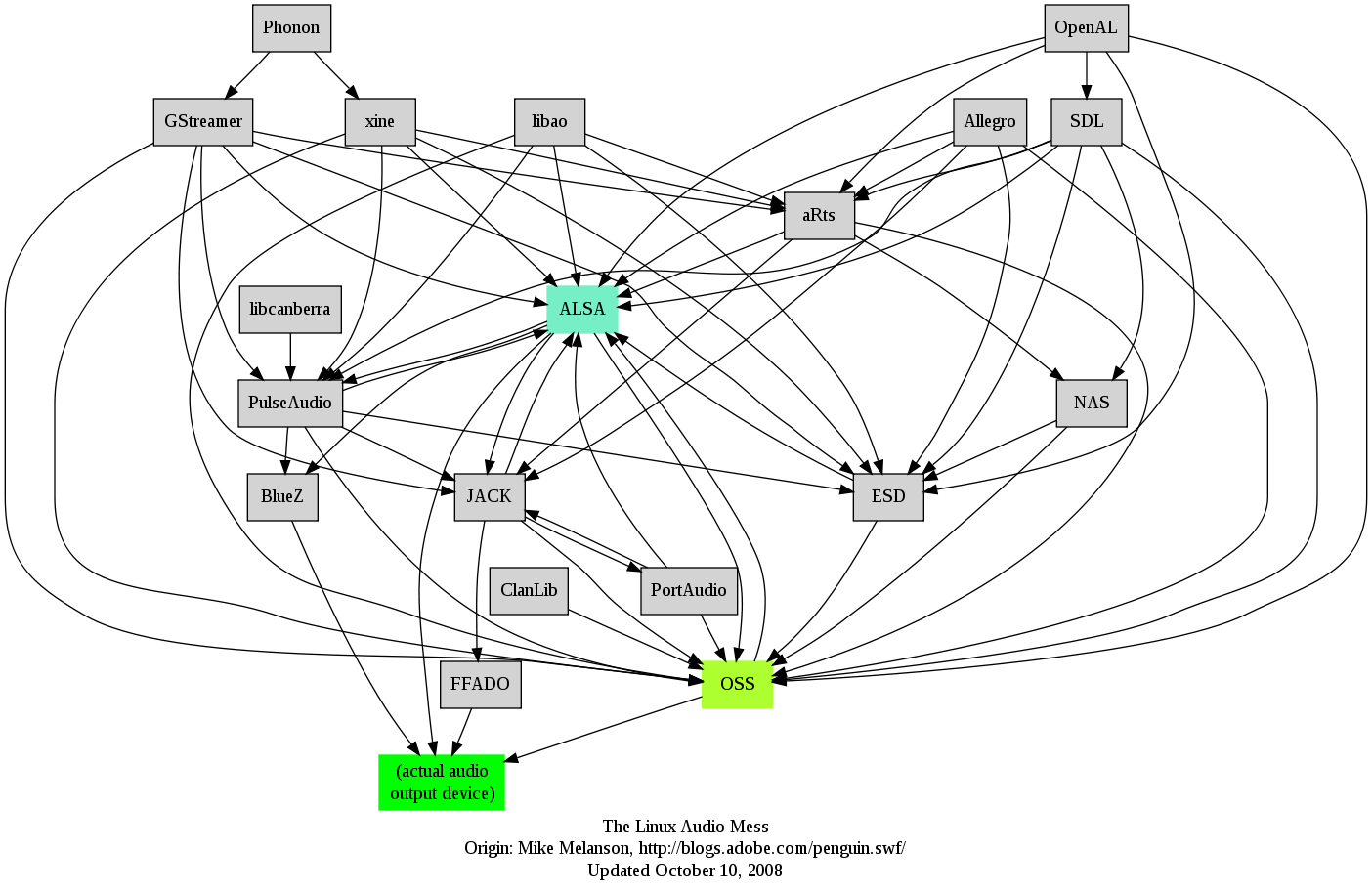
Re: The Linux audio stack demystified (and more)

#49
Whenever someone mentions Linux and Audio I always remember this image (made by Adobe I think) https://harmful.cat-v.org/software/operating-systems/linux/a.... It is missing Pipewire but it should be easy to add a dozen of new lines. This is the reason why I simply use plain ALSA without any sound daemons.

Re: The Linux audio stack demystified (and more)

#50

Here's my background 1. I have to modify my audio settings every time I start a call in Teams on Linux because it keeps losing my audio device. 2. In my audio settings UI, half the time I switch my devices the speaker test doesn't work. 3. In my audio settings UI, whenever I switch my mic I hear myself. The mic feedback only disappears 30 seconds after I close the settings UI. 4. My work headsets have a robotic sound…

1. Is a known Problem with Teams
Post reply on HN