Live data from Hacker News

The weight of the clipboard

kinduff.com

41–50 of 139 posts

Re: The weight of the clipboard

#41
post #25
post #21

To all of you who stopped worrying thanks to a clipboard manager, how do you handle sensitive contents in your clipboard? For example, I routinely copy-paste my passwords from KeePass, and I have disabled all clipboard management to avoid copies of my passwords lingering around.

If you copy your password then use it and then delete the item from the clipboard manager manually.

I seem to have drifted to the exact opposite: no clipboard manager, and when I want to cut/copy something and have it persist for longer, I just paste it in a notepad application.

I copy/paste passwords much more often than I require multiple clipboard entries alive together.
Re: The weight of the clipboard

#42
post #21

To all of you who stopped worrying thanks to a clipboard manager, how do you handle sensitive contents in your clipboard? For example, I routinely copy-paste my passwords from KeePass, and I have disabled all clipboard management to avoid copies of my passwords lingering around.

At least on MacOS "sensitive" contents copied to clipboard by apps can be marked as such, and won't be persisted by my clipboard manager.

I see this happening also with the default clipboard manager in windows and 1password - copied passwords do not show up in the clipboard menu (downside they are not pastable in VMs either)

Re: The weight of the clipboard

#43
post #40

I am using Maccy[0] for a while and I believe this app should be default feature in the all operating systems. [0] https://maccy.app/

Can you say a bit more about how it compares to other clipboard apps?

From a quick look over the website I see no feature to prefer it over included standard clipboard managers like klipper, glipper, parcellite,... (or any from https://wiki.archlinux.org/title/Clipboard#Managers) and whatever win+V on windows is called.

Re: The weight of the clipboard

#44
post #21

To all of you who stopped worrying thanks to a clipboard manager, how do you handle sensitive contents in your clipboard? For example, I routinely copy-paste my passwords from KeePass, and I have disabled all clipboard management to avoid copies of my passwords lingering around.

At least one keepass implementation has the option to clear the clipboard after a few seconds. Haven't been at my Windows PC for months, can't remember details. No idea how that would work with clipboard managers, though.

Re: The weight of the clipboard

#45
post #27

Under X, the clipboard is especially heavy: you have two ways to copy and paste (Ctrl+c/v versus selection and middle mouse button), and Ctrl+v doesn't work in terminals. It's confusing.

> It's confusing.

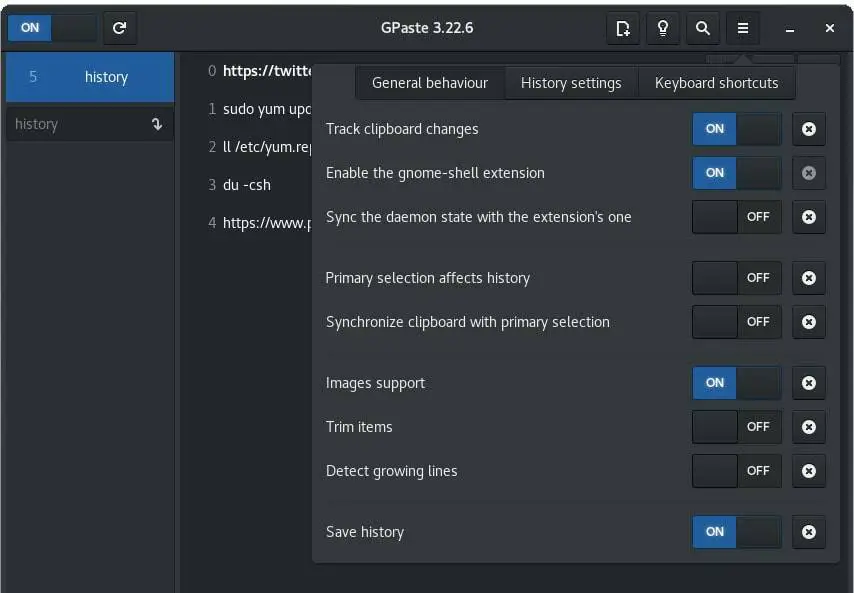
It is also very useful, but if you don't want it many clipboard managers have a simple checkbox to just have one clipboard.

For instance "synchronize clipboard" in this screenshot: https://www.putorius.net/wp-content/uploads/2019/12/gpaste-g...

Re: The weight of the clipboard

#46
post #21

To all of you who stopped worrying thanks to a clipboard manager, how do you handle sensitive contents in your clipboard? For example, I routinely copy-paste my passwords from KeePass, and I have disabled all clipboard management to avoid copies of my passwords lingering around.

I'm using Raycast on macOS. When I copy a password using 1Password, the copied text does not end up in Raycast's clipboard history. It might be possible that other password and clipboard managers do the same.

Re: The weight of the clipboard

#49
post #13

Earlier quoted context omitted.

If usually delete to another register to avoid that, "dd for example :)

Doesn’t dd delete the line under the cursor?

As a VIM noob for the past 7 years, I've learned many times over that dd is cut (like yy is copy), not delete, despite what people say.
Post reply on HN