I has been a decade since I used KDE. It was eating too much memory of slow computer. I always missed a desktop environment for power users, instead of one aiming for the average user. Kde always the best one with this objective
KDE Plasma 5.20
41–50 of 205 posts
Re: KDE Plasma 5.20
#42So how do I install it on Ubuntu?
KDE is probably too much of a core package to install, unless you are doing for the fun of it. The best way would be to wait until Ubuntu ships it in its next release.
Re: KDE Plasma 5.20
#43Earlier quoted context omitted.
KDE is quite good at customizing this stuff. You can pin documents and windows to Workspace or Activity. It even remembers this config between sessions.
Are you sure KDE is that good at customizing stuff? I hated the fact that it displays a huge speaker icon in the middle of the screen whenever adjusting volume, I know I adjust volume, I don't need to see it in the middle of the screen every time, this is a productivity computer, not a television. The only way I found to disable that behavior was to change some javascript code somewhere within KDE. But everytime I up…
Yes, it is great compared to alternatives.
Release linked here reworked on screen notifications. So that sound problem may be fixed. Otherwise you can change association for volume keys and use your own command.
You can uninstall nepomuk etc..
Re: KDE Plasma 5.20
#44>when you open several windows with the same application (like when you open several LibreOffice documents), the Task Manager will group them together. This is exactly the opposite of what I want. Why don't the designers of 21st-century desktop environments understand that my 3 PDF files have nothing to do with one another? The same goes for my terminals, my text buffers, my web pages.... Why group things that are in…
It is what I want. All depends on how you work. If I have several PDFs open at once, they're related. I'm not doing my taxes, reading hardware docs, and filing insurance forms at the same time.
Re: KDE Plasma 5.20
#45I see they still don't have any graphic designer.
That always comes up and I and many other KDE aren't bothered at all by it. That said, I guess Open Source as a whole could always need more talented artists as long as they don't try to insert themselves as arbiters of anything UX related, for example demanding to remove every configuration option or make everything work like in Mac/iOS. Edit, also: I guess they have multiple graphic designers/artists and if it was…
Yes we have many skilled designers and we are planning a big update of the default theme for Plasma 5.21 and a part of it is already in the master branch. Unfortunately it is often more complex to implement the mock-ups and we always need more manpower. See the mockups https://phabricator.kde.org/T10891
Re: KDE Plasma 5.20
#46I has been a decade since I used KDE. It was eating too much memory of slow computer. I always missed a desktop environment for power users, instead of one aiming for the average user. Kde always the best one with this objective
This is how I feel. But it's been more like 2 decades since I used KDE. Time to come back to it.
Re: KDE Plasma 5.20
#47Earlier quoted context omitted.
You probably know this already, but you can use KDE with your choice of WM, allowing you to swap out kwin for i3/sway or whatever else floats your boat/gives you tiling. Edit: Spelling
Only on X11 though, and you can only use X11 window managers.
Ah, thanks for the correction. Do you happen to know if this is on KDE's roadmap for Wayland?
Edit: A little bit of internet later, I found these:
    https://drewdevault.com/2018/04/28/KDE-Sprint-retrospective.html
    https://userbase.kde.org/Tutorials/Using_Other_Window_Managers_with_Plasma#cite_note-1
Re: KDE Plasma 5.20
#48Earlier quoted context omitted.
> Well maybe it's what everyone else wants. Could you give an argument for why someone would want it?
Because it takes up less real estate and I know what app I’m looking for. I don’t have separate windows for all my Firefox tabs even though you could consider them to belong to 5 or 6 different categories.
Why not let the application decide, like with browser tabs?
I absolutely hate it that the default for Gnome is to group all windows of the same application together under the same icon. When I have multiple terminals open, then they are in no way related. I want a specific one. Like writing code in an editor and a terminal for running the application or compiling, and then another one for some shell access.
Re: KDE Plasma 5.20
#49I've been using KDE for nearly 20 years and it just keeps getting better. Good stuff!
Re: KDE Plasma 5.20
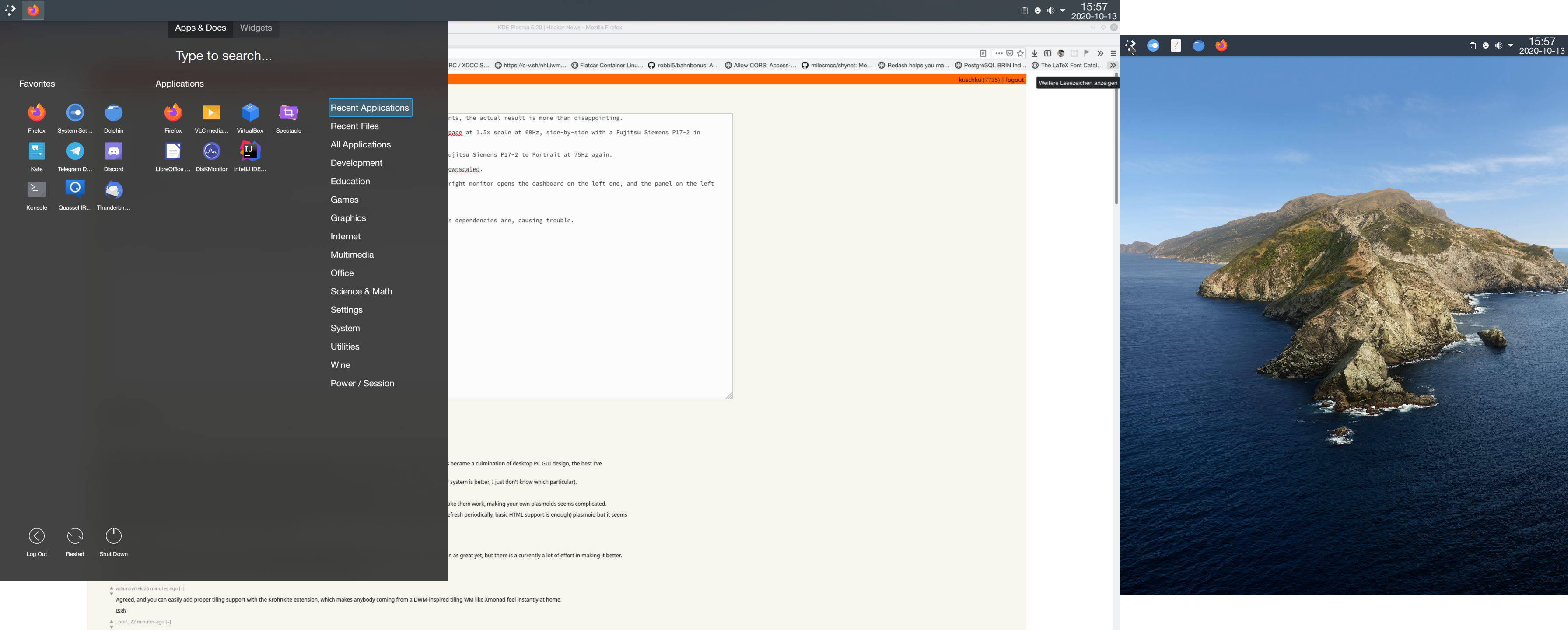
#50I’ve been using Plasma for years, but after this release talking so much about the wayland improvements, the actual result is more than disappointing.
First, to explain my setup: I've got a Dell UP2718Q in landscape, 3840x2160, 10-bit in DCI-P3 colorspace at 1.5x scale at 60Hz, side-by-side with a Fujitsu Siemens P17-2 in portrait, 1024x1280, 8-bit in sRGB colorspace at 1x scale at 75Hz
10-bit support isn’t there yet, color calibration support isn’t there yet either, but that’s something where I’ll just have to wait for the future. Discover currently fails to install due to mismatched dependencies, but this is also something the future will solve.
So far: KScreen still refuses to save changed settings, so on every boot I have to manually set my Fujitsu Siemens P17-2 to Portrait at 75Hz again.
The scaling somewhat works, but not properly, especially GTK applications are upscaled rather than downscaled. (See Firefox in the screenshot linked below)
The plasma panels overlap about half a virtual pixel at 1x, or 1 pixel at 1.5x, so the panel on the right monitor opens the dashboard on the left one, and the panel on the left monitor sometimes doesn’t even open a panel at all. Screenshot: https://i.k8r.eu/sEDfiQ.png
Overall it’s a good start, but still not quite there yet.