I noticed when reading through user reviews for the remarkable 2 that I can find several that are pretty critical of the product, but the rating of the reviewer is apparently 5 stars. https://remarkable.com/store/remarkable-2#user-reviews
ReMarkable Paper Pro
321–330 of 560 posts
Re: ReMarkable Paper Pro
#322I love my remarkable 2. Bought it before "Connect" was a thing, so I don't have a subscription. But I cannot recommend it to anyone. There are better alternatives out there and MyDeepGuide (youtube) has reviewed them all better than I ever could. The software is moving too slowly and often in a wrong direction. Especially since they released the keyboard folio most updates were around typing (which is supar on any ei…
Which device would work better than the remarkable for its intended purpose of note taking?
Re: ReMarkable Paper Pro
#323Instead it uses subtractive color mixing inside each pixel: It layers transparent cyan, magenta and yellow, and opaque white pigments, over each other. Which creates cyan, magenta, yellow and white as primary colors, and red, green, blue and black as secondary colors. Other shades are then created via dithering those eight base colors. So it works very similar to an inkjet printer.
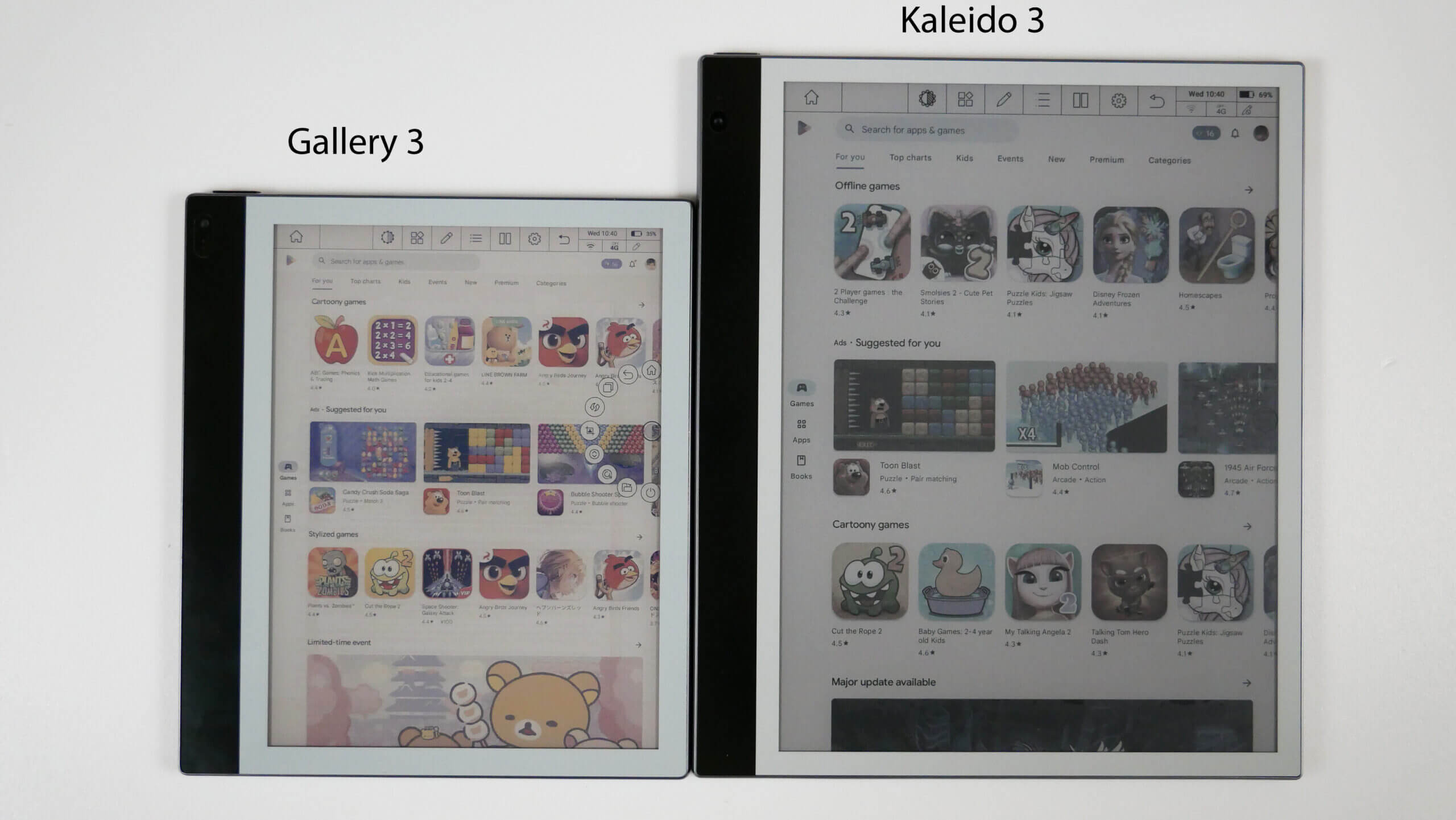
Since it doesn't use subpixels, the screen seems to have a similar brightness to greyscale E Ink displays, which is reasonably close to printed paper. However, the color saturation is clearly still not quite on the level of actual printed paper.
Here is a comparison shot between Gallery 3 and Kaleido 3 (the latter uses conventional subpixels to create colors): https://assets.goodereader.com/blog/uploads/images/2023/03/2...
And of course the reaction times are not as fast as LCD/OLED. As is well known, E Ink uses electrophoresis e-paper screens, where solid electrically charged pigments are moved around in a liquid, which is a slow process. It also still requires a "deghosting" refresh once the screen changes, but interestingly those refreshs are now only applied to the parts of the screen which actually have changed pixel values, which looks significantly less distracting in my opinion.
Re: ReMarkable Paper Pro
#324But it feels like they've been increasingly moving away from that, especially where the openness now competes with their cloud subscription.
Given the amount of love the open source community has shown Remarkable, I think they could let the community build some amazing software for them. This would be doubly beneficial because the software is the weak point currently for the Remarkable. If they were to open source the existing software, even with a CLA copyright assignment, I bet there'd be a huge influx of people contributing.
I hope with this new Paper Pro that they are moving in the direction of openness/hackability and not more closed like they did with the Remarkable 2. Would love to hear from people who have tried the Paper Pro about how that is.
Side note: If you haven't gotten the RCU utility application, you definitely should! It's a great tool[1]
Re: ReMarkable Paper Pro
#325With this one being $579 including the basic marker. The iPad Air with an 11" screen with the cheaper pencil is $678. iPad with an 11" screen and the cheaper pencil is $428.
If it is the screen feel, how does that compare to the paperlike screen protectors for iPad?
Some say a lack of distractions, but you can turn on do not disturb?
I am just really curious what this solves vs other tablets that I am missing here, especially at this price point. Or is there something I am really missing here?
Re: ReMarkable Paper Pro
#326I want to challenge the idea that drawing/writing on what feels like paper is subpar compared to a surface that have the pencil glide a bit more. I always thought writing on paper is something we have to deal with because paper is.. well, the physical medium we always used because it is cheap to manufacture.
How slippery/grippy you want things to be depends on the type of pen you use (gel, ink, pencil, brush,etc.) and to some extent also preference, but people generally agree that there are cases which work just badly: very slippery (e.g. glass) and much too rough (e.g. sand paper).
Re: ReMarkable Paper Pro
#327I love my remarkable 2. Bought it before "Connect" was a thing, so I don't have a subscription. But I cannot recommend it to anyone. There are better alternatives out there and MyDeepGuide (youtube) has reviewed them all better than I ever could. The software is moving too slowly and often in a wrong direction. Especially since they released the keyboard folio most updates were around typing (which is supar on any ei…
I have absolutely no idea why they went all in on keyboard input, when the whole freaking point of the tablet was that you could write on it like paper.
Re: ReMarkable Paper Pro
#328Earlier quoted context omitted.
I believe he has said the Supernote A5X is his favourite. There's a newer A5X2 coming out later this year to update it (though it has repeatedly been delayed)
Looking at the video there is a significant lag in the rendering. Is it noticeable when you're writing? Also looks like there is no pressure sensitivity so all the notes are come out in that ugly fat style. Maybe I'm just spoiled with my Wacom though!
Speaking from my experience with a remarkable, not on that device.
I think two factors contribute to this. One is that there are different rendering modes, and it uses a very fast one for updating pen strokes so there is less delay than you would guess by looking at larger updates. The other is that the stylus obscures the very end of the line anyways.
Re: ReMarkable Paper Pro
#329Looks like they still exist but they haven't done much in the last 15 years. They used to make these high-quality leather-bound notebooks but now it seems they only have cheap spiral-bound ones. Worse, the pen still costs about $200 so it's not in anyway competitive with remarkable.
I'm contemplating going to grad school and I might try to dig up my old livescribe pen if I can find it (I think I saw it a year or two ago in some box of assorted odds and ends) but the lack of high-quality journals is a disappointment and if I can't find my old livescribe pen I'd rather try out remarkable than spend 10x as much on a nearly-dead product that had far more potential but seems to be on life-support.
Wish livescribe would at least open-source their software if they no longer care about it.
Re: ReMarkable Paper Pro
#330Every time I see this device pop up, I really struggle to find out what exactly this has over something like an iPad with an Apple Pencil? With this one being $579 including the basic marker. The iPad Air with an 11" screen with the cheaper pencil is $678. iPad with an 11" screen and the cheaper pencil is $428. If it is the screen feel, how does that compare to the paperlike screen protectors for iPad? Some say a lac…