I'm kinda surprised that no-one has mentioned that languages other than English exist. Virtual keyboards, while a bit clunky, allow to easily switch input languages, and most of the world for whom English isn't their native language use this feature very very often. Physical keyboards for laptops solve this issue by having different keyboard layouts for different languages (and are usually geared towards that languag…
Exactly. At the extreme end, there are older Chinese users who often hand write Chinese on the screen to write a sentence, one character at a time. In the middle there are many things, like Latin but unusual layout such as French bepo, or Chinese input methods based on shapes, or Japanese kana, or the old T9 that I still see some people using (probably to have bigger letter targets). A touch screen really ease custom…
Clicks – Physical keyboard for iPhone
321–330 of 565 posts
Re: Clicks – Physical keyboard for iPhone
#322Re: Clicks – Physical keyboard for iPhone
#323This made me realise how much I'd love a physical keyboard on my phone. But not like this, this is too long and I don't think one will have a pleasant typing experience with this. I thought about this one for a few minutes, but I can't think of a good way to integrate a keyboard in a smartphone case, that will give you the experience of a blackberry or similar. The slide-out ones that you could use in horizontal orie…
Re: Clicks – Physical keyboard for iPhone
#324Earlier quoted context omitted.
The Palm Pre was my dream phone
that and the Sharp Zaurus! https://en.wikipedia.org/wiki/Sharp_Zaurus#/media/File:Zauru...
Re: Clicks – Physical keyboard for iPhone
#325Curious - do folks not use swiftkey-like onscreen keyboards? I feel like I'm legions faster using this style on a phone vs tapping. I get preferring a physical keyboard if you're tapping, but I can't imagine going back once I got used to swiping.
There’s a bit of a trope that people who want hardware keyboards in the era of touchscreens are idiots. I’m one of them. There’s a huge number, and therefore diversity of mobile users. Some of us have different preferences to the mainstream. I feel crippled typing on my iPhone. It takes ages to type and correct messages. I often can’t get my pass code right first time. And I remember that typing was never an issue on…
To be clear, I wasn't implying that in the slightest. I was just curious if folks who say they prefer physical keyboards have tried swipe typing. I didn't really like "tap on glass" typing either, but once I got used to swipe typing it was a "I'll never go back" moment for me.
Re: Clicks – Physical keyboard for iPhone
#326It’s incredibly rare that I can type even a single sentence correctly on the iPhone. In that one it came out ‘in’ and not ‘on’ for example. In that one I typed sample not example. I got that last one right! I see the arguments from both sides but it’s a real shame the design space of smartphones has become so conservative. Such intensely personal devices deserve to be more varied. If I thought I could build some sort…
You may know this and not like it, or find it doesn’t work for you, but on the off chance you don’t: just keep going. Autocorrect will often step in and correct things one or two words later when it works out that letters near where you tapped make a more plausible sentence than the ones you actually tapped.
I don't know what is better here but honestly per-word predictions were way better for my usecases.
Re: Clicks – Physical keyboard for iPhone
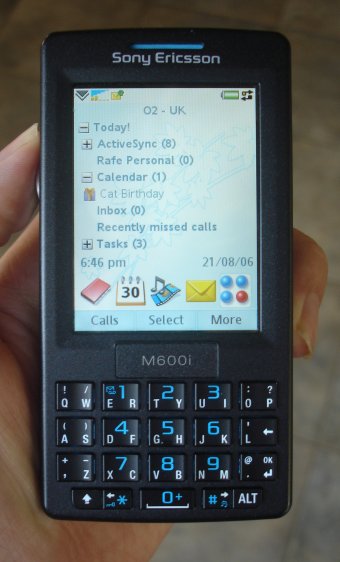
#327I want one for my 13 Mini, and (secondarily, even for normal sized iPhones) it should use the M600i/P1i keyboard
http://www.allaboutsymbian.com/images/reviews/m600/m600-fron...
QW is one key, you rock left for Q and right for W, or rather you tap on each side! It works amazingly well, especially with modern autocorrect id imagine, and makes it easier to hit the key.
Or you could the TouchPal approach and just do QW as one key entirely and use autocorrect for the rest of it
Re: Clicks – Physical keyboard for iPhone
#328Earlier quoted context omitted.
I don’t believe you. There’s no way you type faster with up to three taps needed per letter. What a disgusting monstrosity those things were.
i'd say predictive text/t9 was way faster than any other phone input method ever for texting. nothing else comes close imo, not even blackberry keyboards (unless you need more fine control over capitalisation and punctuation and stuff e.g work emails)
I wonder how many people actually experienced this keyboard in the world, perhaps only in the thousands?*
Seems they had a name for it, SureType:
https://en.wikipedia.org/wiki/List_of_BlackBerry_products#Fi...
edit: ah I see it was used on other more popular models, too. Blackberry Pearl users should chime in!
Re: Clicks – Physical keyboard for iPhone
#329Phones were sliding, folding, twisting. Then at some point everyone decided that a glass rectangle was the only way to go and that was it.