Earlier quoted context omitted.
Even with screen sharing, I've said "click the three dots" and then "no, not those, not that one, wait there's another one, no that's the wrong one ..."
But if we didn’t use ••• menus everywhere then some parts of the UI might be cLuTtErEd!!! The worst sin of computing. To think that we used to trust mere mortals - without even a signing certificate or developer membership - with the power to customize every toolbar in a Microsoft application, and to set every font and color for the whole UI of the system. People made their computer environments ugly in some cases. A…
Screenshots of Old Desktop OSes
311–320 of 407 posts
Re: Screenshots of Old Desktop OSes
#312Earlier quoted context omitted.
ToastyTech is wonderful but don't forget GUIdebook, which also is. https://guidebookgallery.org/
More: • https://ui.codexpanse.com/ > • https://history.vpon.me/ >
Re: Screenshots of Old Desktop OSes
#313Where did the author get a copy of pre-X-integration NeWS, I wonder (if indeed they did). I haven’t been able to locate one online after a lot of determined searching, but I also can’t bring myself to declare that there isn’t one because the name is so ungoogleable.
He also got Parallax p/NeWS in his collection, which is super rare. I also wrote a person who has a SunDew QIC cassette, and another that has various NeWS sources (including the portable REF tree of the 1.1 version). Unfortunately they haven't released them yet, because of the unknown copyright situation. Another person has the OpenWindows 1.0 binary tapes for Sun-3 and Sun-4, among other stuff. https://github.com/la…
> Unfortunately they haven't released them yet, because of the unknown copyright situation.
I’m guessing that’s a euphemism for “almost all software archival work[1] is, technically, illegal enough to ruin the life of everyone who touches it”. This includes stuff like the Space Cadet Pinball for Linux that was on the front page recently and had approving comments from the original programmers. (I believe pre-commercialization Unix is one of the rare exceptions, assuming you ignore the copyrights of everyone who sent their patches to Bell Labs unofficially, as both the authors of those patches and the Bell Labs folks did.)
And it’s fair and probably correct to be afraid here. I just want to point out that this is one of the places where “legal” and “ethical” unequivocally point in opposing directions, and waiting for the legal situation to become more favourable is pretty much equivalent to never doing it. Software has the misfortune of having happened after the advent of pervasive copyright, so there are no out-of-copyright old masters that we could legally base our art on.
Any chance of getting them to donate the code anonymously to one of the willing sacrifices^W^W well-known community figures like Jason Scott?
Re: Screenshots of Old Desktop OSes
#314Re: Screenshots of Old Desktop OSes
#315Earlier quoted context omitted.
But if we didn’t use ••• menus everywhere then some parts of the UI might be cLuTtErEd!!! The worst sin of computing. To think that we used to trust mere mortals - without even a signing certificate or developer membership - with the power to customize every toolbar in a Microsoft application, and to set every font and color for the whole UI of the system. People made their computer environments ugly in some cases. A…
The UI wouldn't be cluttered if the keys on the...keyboard...did stuff. Now that vibe-coding has broken me out of my decades-long irrational fear of GUI programming, I've recently been circling back on all the UI patterns I have just accepted. One missing one is all those F1...F12 keys. I remember those doing stuff in the DOS days. I fantasize about a computer where the menus are at the bottom of the screen and line…
Fkeys are arguably a huge tragedy, here we have keys, twelve of them, that could have been used for simple one-fingered operation, but they were put to use pretty sparingly for a long time (basically F2 and Alt-F4 were the only common ones most people used, with F1 for Help and F11 often used for Full Screen as honorable mention) so the laptop manufacturers reused them, leading to a world where they go from being the easiest and best keyboard shortcut keys, to one of the worst, since you probably need to teach people how to find and use a 'Fn' key to use them.
Re: Screenshots of Old Desktop OSes
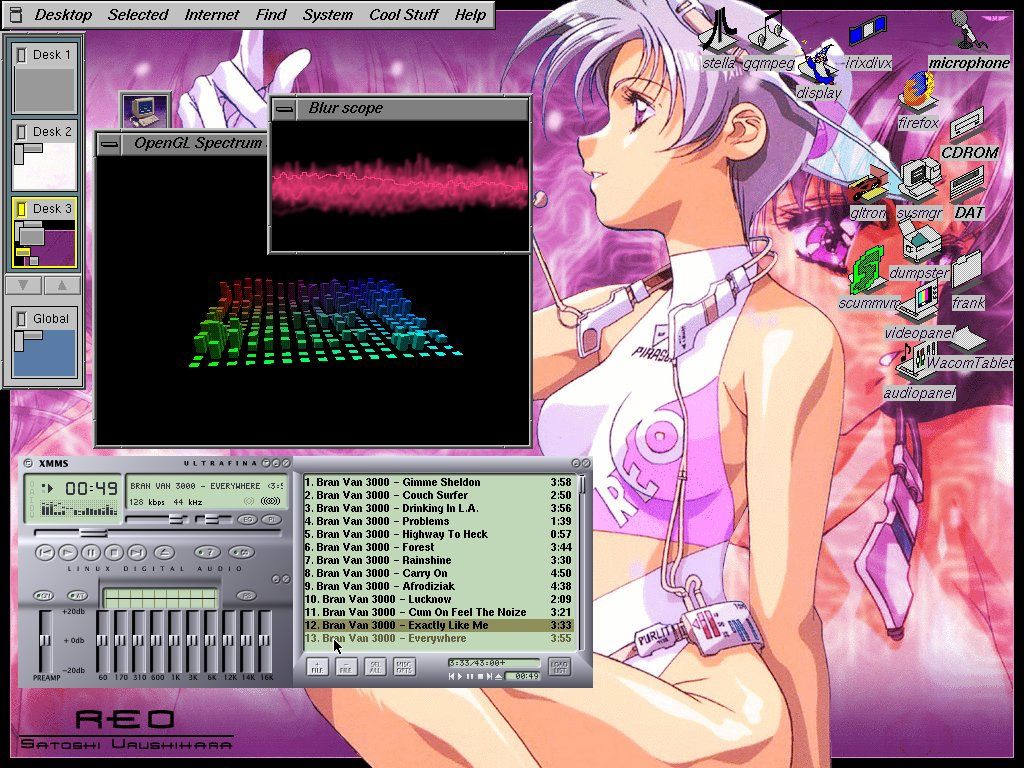
#316Amazing walk through memory lane, and super useful. One big omission though - starting in the early 1990s, we should be seeing some Linux desktops in there, but I didn’t see any through 1995 or so when I stopped browsing. Also, Irix would be nice to get — although I don’t recall if SGI had much in the way of custom vibes for their window managers, they certainly had amazingly cool 3D demos. A nice vibe coding project…
IRIX used the 4Dwm window manager, which is a lot more polished than other UNIX desktops. Few screens I found: https://deskto.ps/u/fathonix/d/3p6fkk https://files.catbox.moe/cognfj.jpg https://guidebookgallery.org/guis/irix/screenshots
Re: Screenshots of Old Desktop OSes
#317Earlier quoted context omitted.
But if we didn’t use ••• menus everywhere then some parts of the UI might be cLuTtErEd!!! The worst sin of computing. To think that we used to trust mere mortals - without even a signing certificate or developer membership - with the power to customize every toolbar in a Microsoft application, and to set every font and color for the whole UI of the system. People made their computer environments ugly in some cases. A…
It's not just what we've lost, it's an incredible disservice to "non-nerds" - old DOS programs may have been annoying and cluttered, but everything was right there and more importantly, it didn't change so you could learn what you needed and just work with it. We could go back and forth on things like "the ribbon" being better or worse, but the fact that it changes depending on window size is an incredible sin. Hello…
I look at retail for examples of this. If you watch an experienced cashier who interacts with a system all day, they have perfect muscle memory of the keyboard or keypad, and operate it so fast that you would have to ask them to slow down to understand what they're doing.
Now many of those have been replaced with touchscreens, which are noticeably worse -- since the UI is never fast, you have to stop and wait for the next UI to appear after many of the steps, instead of letting the keyboard buffer do it for you, which worked great on a decades-old system. But, I assume the companies who allowed that replacement believed it was worth it to be able to onboard a new cashier just a bit quicker, with a UI that looks just like the iPads that they were raised on, complete with big unlabeled icons and "three lines" or "•••" buttons.
Re: Screenshots of Old Desktop OSes
#318You might be looking at these old Unix GUIs thinking they're shit compared to now, but actually, at the time, they were shit too.
Re: Screenshots of Old Desktop OSes
#319Earlier quoted context omitted.
> It’s hard to understand just how different NeXTStep (Did I capitalize that correctly?) felt from Windows — part of it was refresh rates, but part of it was going from 800x600 to 1132x800-ish on the monitor. You can't really get it from these screenshots, but I'll give an example of what you're talking about. I remember GEM when it came out, and it simply looked terrible. Not just their color choice, but simply that…
RE: GEM, the Atari SM124 monochrome monitor was actually a super high quality monitor that was known at the time for producing a crisp comfortable image, and it was higher resolution (640x400) than the Mac (512x342). GEM on it actually looked really good. The problem was two fold: with the Atari you had the choice of one or the other (colour or mono), the colour was very low resolution, GEM looked squished and crappy…
For me Windows 3 (and especially 3.1) was the first time where you could work all day without having to drop to the DOS prompt to get work done. I was running Windows 3.1 when I first used the Mosaic browser on the then new world wide web and my life was never the same again.
Re: Screenshots of Old Desktop OSes
#320I can't help thinking about how much we have lost. Just finding the scrollbar nowadays can be a challenge. Not to mention if you want to resize a pane - in some applications they seem to have taken extra steps to make it difficult to find the line to grab.
One of my biggest bugbears is losing the OK/Apply/Cancel concept with dialog boxes or settings windows. If I have a window with lots of settings that I want to experiment with then I've no problem with that setting taking effect immediately, but please give me the ability to back out all the changes I've tentatively made via a Cancel button.