[deleted]
X to close
31–40 of 204 posts
Re: X to close
#32When we have completed a todo task we "cross it" to mark it done. i would say the x to close is intended to represent a "crossing out" not the letter x. It is pressed to signify a task has been completed.
Re: X to close
#33Earlier quoted context omitted.
Good find. That's clearly an [X] in the upper-right corner.
Yeah, but still more recent than Atari's Gem.
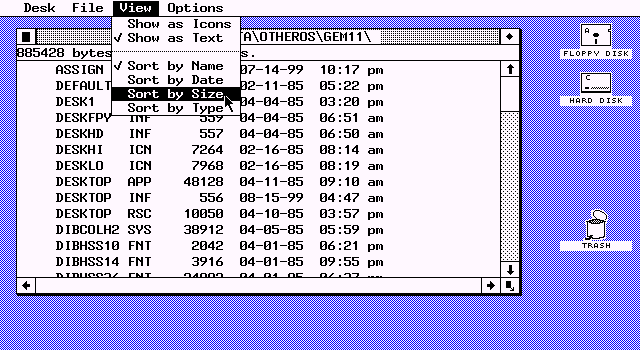
The Atari Gem thing is not an X, it's actually supposed to be a gem. It's just confusing because of the low-res image. Take a look at
Re: X to close
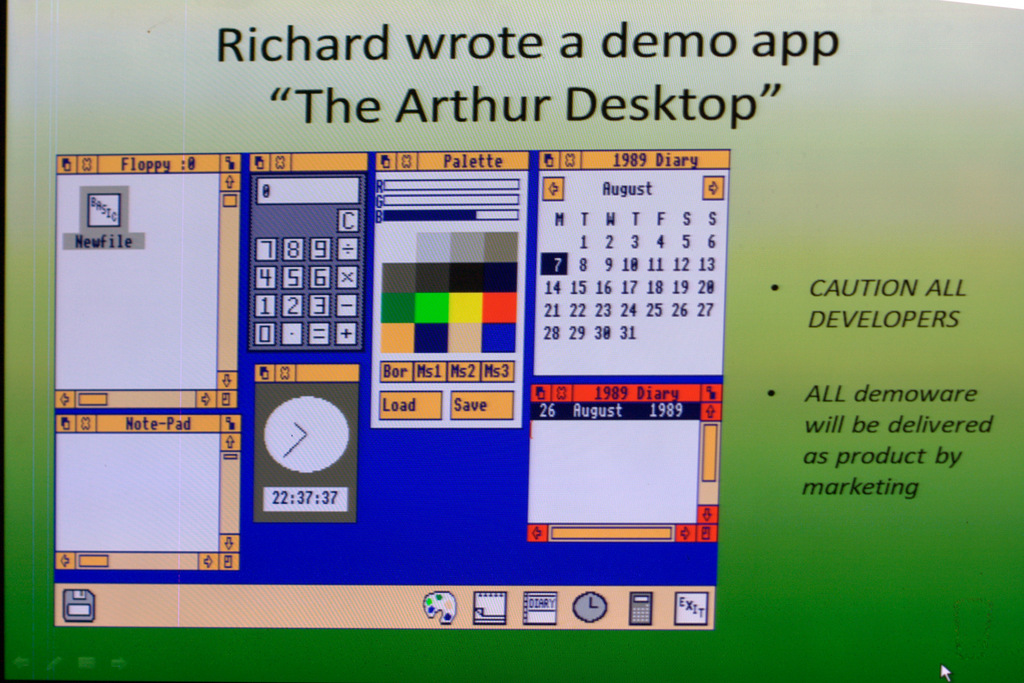
#34RiscOS had the x as well in the late 1980s
edit - Here's Arthur, the precursor to RiscOS in ~ 1986 - http://www.rougol.jellybaby.net/meetings/2012/PaulFellows/10... - It has nice x icons.
Re: X to close
#35In the Atari TOS screenshots, other icons such as arrows are black on white background. If the icons in upper left and right are also like that, then the upper left icon is actually four little triangles pointing inwards and not an X. The one on the right is four little triangles pointing outwards. (Or it could be an X)
Atari ST users seemed to see it as an X -- so whether or not it was intentional on the part of the designer, it's not that hard to see how one of these users could have then translated that misconception to the Windows 95 GUI. It's all about perception...
Re: X to close
#36In this early demo (Codename: Chicago), the minimize and maximize buttons have been redesigned, but the close button remains the same, and to the left as before.
I wonder where the author got the idea that the [-] button at the top-left was a close icon. It was the "Control Box", a menu icon. AFAIK it's still there, just invisible -- hit alt+space to open it.
Disclaimer: I'm currently unable to test that.
Re: X to close
#37I misinterpreted the title as "X Windows consortium to close."
Re: X to close
#38Perhaps it's not an icon, and was meant to indicate eXit. I know must use 'q' for quit, but I've seen a few programs that use 'x'
Re: X to close
#39They mention X and O on the PS controller but usually in games O is for no and X is for yes. Completely opposite of the batsu/maru, incorrent/correct they were discussing.
not always. western games tend to be bound that way, but Japanese games, espescially RPGs , were not. example : final fantasy 7 control bindings. http://www.cavesofnarshe.com/ff7/buttons.php
Interestingly the positioning of the two matches the common use of the nintendo buttons, A for confirm and B for cancel. The western Playstation games are really the exception to the rule.
Re: X to close
#40Earlier quoted context omitted.
Yeah, but still more recent than Atari's Gem.
The Atari Gem thing is not an X, it's actually supposed to be a gem. It's just confusing because of the low-res image. Take a look at http://toastytech.com/guis/gem11menu.png
That's not GEMTOS, that's GEM for DOS... big difference...