Brilliant break down.
Breaking down Amazon's mega dropdown
31–40 of 203 posts
Re: Breaking down Amazon's mega dropdown
#32This is what separates boys from men.
Re: Breaking down Amazon's mega dropdown
#33For comparison to native applications: - Firefox 19 uses the delay technique - GTK3 uses the triangle technique - Tk 8.6 does what bootstrap does - I can't figure out what Qt 4 does
Cocoa seems to be using the triangle technique + a delay, FWIW: a submenu will close instantly when navigating vertically or to the opposite direction, but there is a lot of leeway when navigating in the triangle towards the submenu (eyeballing it, seems to take more than half a second for the submenu to close). And interestingly, you can also "overshoot" the submenu, it will delay its closing quite a bit when moving…
>> - Tk 8.6 does what bootstrap does
>Which is?
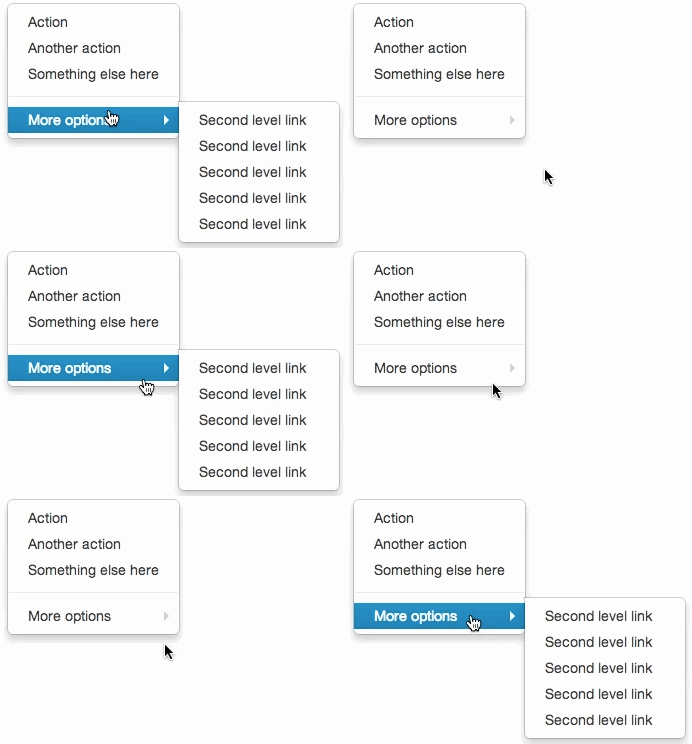
Per TFA: "... when you try to move your mouse from the main menu to the submenu, the submenu will disappear out from under you like some sort of sick, unwinnable game of whack-a-mole."
http://static.tumblr.com/9hgswys/iU1mj8c6y/bootstrap-bug.gif
Re: Breaking down Amazon's mega dropdown
#34This has always irked me about Windows's implementation of the auto-complete box. If I start typing, in the address bar for one example, and my mouse happens to be resting over where the auto-complete will soon appear (as is likely because I just had to move the cursor to the address bar to select it) when I hit "enter" it will go to whatever my mouse cursor was over rather than what I typed. The auto-complete box sh…
I didn't know there was a windows native auto-complete implementation? I thought it was up to individual devs to implement that functionality?
Re: Breaking down Amazon's mega dropdown
#35It's probably a great testament to its good design that I failed to notice how well it works when browsing Amazon. Everyone notices awful dropdown menus (and I really don't like Bootstrap's), but good ones like this often pass un-noticed because they work so well.
And then you have more time to focus on your shopping instead of distracting over the awful submenus.
Re: Breaking down Amazon's mega dropdown
#36For comparison to native applications: - Firefox 19 uses the delay technique - GTK3 uses the triangle technique - Tk 8.6 does what bootstrap does - I can't figure out what Qt 4 does
Unfortunately I don't think Qt 4 does anything. Submenus are one of the annoying misfeature of the toolkit.
Re: Breaking down Amazon's mega dropdown
#37Earlier quoted context omitted.
Cocoa seems to be using the triangle technique + a delay, FWIW: a submenu will close instantly when navigating vertically or to the opposite direction, but there is a lot of leeway when navigating in the triangle towards the submenu (eyeballing it, seems to take more than half a second for the submenu to close). And interestingly, you can also "overshoot" the submenu, it will delay its closing quite a bit when moving…
>> - Tk 8.6 does what bootstrap does >Which is? Per TFA: " ... when you try to move your mouse from the main menu to the submenu, the submenu will disappear out from under you like some sort of sick, unwinnable game of whack-a-mole. " http://static.tumblr.com/9hgswys/iU1mj8c6y/bootstrap-bug.gif
Ah I'd missed that part, thanks.
Re: Breaking down Amazon's mega dropdown
#38Really nice! Two questions: - What's the "cross-product magic Amazon uses to detect movement inside the 'blue triangle.'"? - How did you do those GIFs?
It's not magic, it's just math. The cross product [1] between the vector of the mouse movement and the vector of the mouse's location to the menu's top left corner tells you the relative orientation of the two vectors. Compare that to cross product in regards to the menu's bottom left corner and you can easily figure out that the mouse must be moving towards the menu. This is much easier than figuring out the boundin…
Are you sure about that? The dot product gives a measure of the orientation between two vectors, the cross product gives perpendicularity and is vector valued (kind of, the distinction matters more for physics than graphics). It also only makes sense in 3 and 7 dimensions without generalizing the concept of vector.
Re: Breaking down Amazon's mega dropdown
#39I seem to recall this same technique being used in the pre-OS X era of the Mac OS. Not sure exactly how far back, but I'd say at least into System 8 if not System 7.
You're right, mac has been using this technique for a while. Actually trying it out right now, it still does this, but you need to move it fast. If you move it fast enough within the triangle it'll stay, while if you move it at the same speed straight down, the menu goes away immediately.
You can also tell it doesn't seem to do it when you move the mouse back to the original menu item.
Re: Breaking down Amazon's mega dropdown
#40This has always irked me about Windows's implementation of the auto-complete box. If I start typing, in the address bar for one example, and my mouse happens to be resting over where the auto-complete will soon appear (as is likely because I just had to move the cursor to the address bar to select it) when I hit "enter" it will go to whatever my mouse cursor was over rather than what I typed. The auto-complete box sh…
I didn't know there was a windows native auto-complete implementation? I thought it was up to individual devs to implement that functionality?