Live data from Hacker News

Kivy – a cross platform Python UI framework

kivy.org

31–40 of 107 posts

Re: Kivy – a cross platform Python UI framework

#31
post #21

Earlier quoted context omitted.

Note that those are not stock widgets. And that's one of the main show stopper for me with kivy: it comes with very few built-in UI controls, so you have to code a lot of things yourself. I much prefer Python to JS, but things like react native win because of the community libs you can install save you tons of time, and produce a better result.

I prefer Python as a language but JS is much easier to package dependencies and ship a finished product. Python is a big fat conda-docker-shitshow because it doesn't provide a way to do import tornado==5.1.2 import torch==2.1.0 etc. while coexisting in the same shell environment as something else that wants different versions.

And it doesn't provide any way to use a link to any other package repository if you want to stick to vanilla pyproject.toml + build (the official build tool). So if you want to use the CUDA or rocm version of torch, for example, you have to add a direct link to the package. That means that you'd have to hardlink to a platform specific version of the package. There's no way to just make a package look at a non pypi repository to get the version you want otherwise.

So say you want to add pytorch, with GPU acceleration if it's possible on a platform. You want to make it multiplatform to some extent. You can't add another index if you want to use vanilla build, as that's not allowed. You can add a direct link (that's allowed, just not an index) but that's going to be specific to a platform+python version. Pytorch doesn't even provide CUDA packages on pypi anymore (due to issues pypi), so you need to be able to use another index! You'd need to manually create requirements.txt for each platform, create a script that packages your app with the right requirement.txt, and then do it again whenever you update. Otherwise, I think the most recent advice I've seen was to just make... the user download the right version. Mhmmmm.

The other option is to use poetry or something like that, but I just want to use "python build . "...
Re: Kivy – a cross platform Python UI framework

#33
post #25

Earlier quoted context omitted.

I think a lot of people dislike html/web-based apps, and they are not as responsive in some cases as well. I have seen some mobile browser implementations that explicitly put large delays (hundreds of ms) into their touch handlers for example. You can see a similar delay in a side-by-side comparison video here https://www.youtube.com/watch?v=Z4CwVN9RRbE

" I have seen some mobile browser implementations that explicitly put large delays (hundreds of ms) into their touch handlers for example." Why would they do that?

I think it was something to do with dealing with double taps. Either way, the delay has been removed for about as long as that videos been up.

https://trac.webkit.org/changeset/191072/webkit

Re: Kivy – a cross platform Python UI framework

#34
post #21

Earlier quoted context omitted.

I prefer Python as a language but JS is much easier to package dependencies and ship a finished product. Python is a big fat conda-docker-shitshow because it doesn't provide a way to do import tornado==5.1.2 import torch==2.1.0 etc. while coexisting in the same shell environment as something else that wants different versions.

This is especially true when you use a lot of tooling. I love jupyter, but installing it in a venv means pulling a lot of deps which will affect a lot what I can install. Fortunately the Python community is much more serious about making deps that work together than the JS community, and the fact it works at all given the cartesian products of all the python modules is kind of a miracle and a testament to that. Unfor…

I'm hopeful the uv will bring us closer to tooling on par with other language ecosystems. But it's very early on in the process.

Re: Kivy – a cross platform Python UI framework

#35
post #3

A) this is most European website I’ve ever seen. I couldn’t tell you exactly why… perhaps it’s the train subconsciously affecting me. 2) this is first time I’ve ever seen mobile included as part of “Cross-Platform”, that’s pretty awesome. We’re living in the future, friends! Tho it also makes me shudder at the thought of the phrase “QT app development”… III) At this point, why not just use web? What is a “truly cross…

I think a lot of people dislike html/web-based apps, and they are not as responsive in some cases as well. I have seen some mobile browser implementations that explicitly put large delays (hundreds of ms) into their touch handlers for example. You can see a similar delay in a side-by-side comparison video here https://www.youtube.com/watch?v=Z4CwVN9RRbE

This delay can be worked around by using the standard viewport meta tag, which any web app built for mobile will be using.

Re: Kivy – a cross platform Python UI framework

#36
post #30

Earlier quoted context omitted.

This is especially true when you use a lot of tooling. I love jupyter, but installing it in a venv means pulling a lot of deps which will affect a lot what I can install. Fortunately the Python community is much more serious about making deps that work together than the JS community, and the fact it works at all given the cartesian products of all the python modules is kind of a miracle and a testament to that. Unfor…

My ideal situation is that the system should maintain authoritative versions of every package and version that is ever requested, and they should not need to be shipped. Multiple versions of a package should coexist. /usr/lib/python3.12/torch/2.1.0/ /usr/lib/python3.12/torch/2.1.1/ /usr/lib/python3.12/torch/2.1.2/ When a package requests 2.1.1 it fetches it right out of there, installing from PyPI if it doesn't. The…

ML researchers might be thinking that their paper will be obsolete next month so why bother taking time to make their coding environment reproducible.

Re: Kivy – a cross platform Python UI framework

#37

I wrote one iOS app using Swift and SwiftUI. Has anyone written a Kivy iOS app and pushed it to the app store, if so, please share experiences.

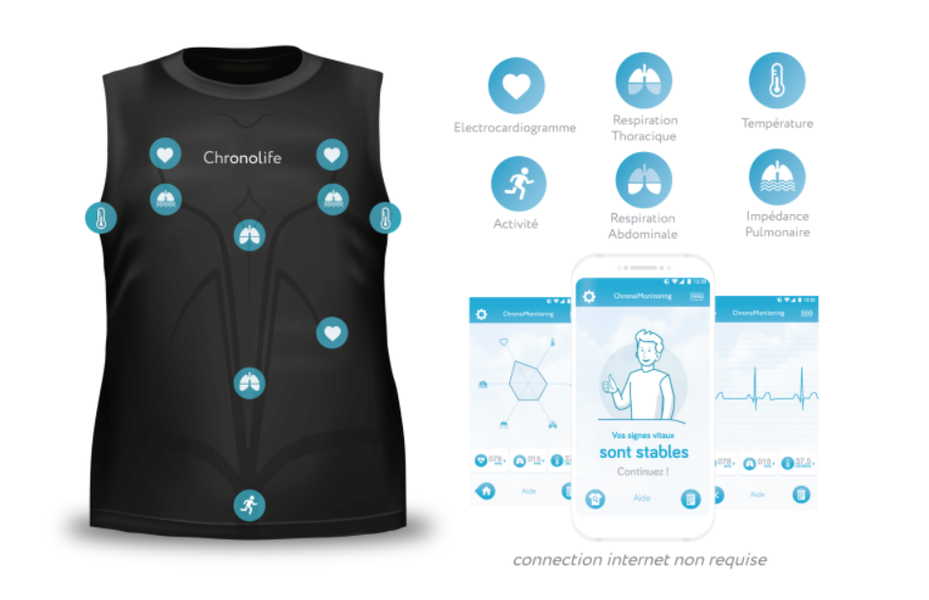
I wrote a app to communicate with a medical device in 2018. Was published on Apple AppStore and Android PlayStore

https://rvier.fr/images/chronomonitoring.png

Re: Kivy – a cross platform Python UI framework

#39
I've kept an eye on Kivy for quite a while and prototyped a bunch of projects over the years with it, and I'm not a big fan.

It feels like it's at the wrong level of abstraction for... basically everything.

The Pong game demo is an example of this: if you're writing a Pong clone (or most video games) where you're going to be operating on a canvas, you don't need all the widget infrastructure that Kivy offers--you're better-served by something like PyGame.

On the other hand, if you want to build a UI using standard widgets, the widgets they provide out of the box aren't particularly fully-featured or even good--you end up doing a lot of hand-coding of functionality that could be included, and the defaults aren't particularly desirable, so you end up having to configure a lot of, for example, visual display settings.

As another user pointed out, their default widgets don't support accessibility meaningfully, and there are many other features, such as dark mode/color scheme support, which modern users expect and which you'll have to code yourself. Realistically, a lot of clients aren't going to give you funding for accessibility features, so the defaults are what most projects will end up with, and if it's me developing it, I'm doing accessibility on my own time, so I'd want this to be configuring what's largely already there, as opposed to what Kivy has: implementing it from scratch. In 2024 I'd view failing to support accessibility reasonably out of the box, as almost a moral failing, and certainly this is enough to discount Kivy from being used for any product intended to go to production.

There IS a fairly vibrant ecosystem of 3rd-party widgets (flowers; there's a "garden" metaphor in their branding for the ecosystem). But this comes with all the problems of a 3rd-party ecosystem: Kivy itself is probably large enough that it won't become abandonware in the forseeable future, but 3rd-party projects aren't, and there are large security and reliability risks to pulling in a bunch of small packages maintained by developers of various talent, intention, and funding. These are risks you generally have to accept for something unusual, but you shouldn't have to accept these risks for your bread-and-butter widgets like buttons and dropdowns.

If you're embarking on a project that benefits from using pre-built widgets like this, the framework I'd recommend is Flet. My experience with it has been overwhelmingly positive, and I've entirely switched away from PyQt for any new projects. The one criticism I'd give is that it doesn't really support multi-window, but that's something I'd avoid for most projects because multi-window support can never really be cross-platform, since mobile platforms don't really support windows as such.

Re: Kivy – a cross platform Python UI framework

#40

Earlier quoted context omitted.

I believe Qt's offering of Qt for Python/PySide6 even uses python-for-android in their android-deploy utility[1]. [1] https://www.qt.io/blog/taking-qt-for-python-to-android

It's pretty new though, and it's a bit rough around the edges still. The other issue is that almost every single package/library for pyside6 only supports QtWidgets, not QML. Meaning you wouldn't be able to use tons of libraries that make up the python qt ecosystem (for example, pyqtwidgets or vispy). Not a huge dealbreaker but it's something to keep in mind.

Yeah, it seems pretty half-baked at the moment. It looks like QML is the intended target for mobile apps on the Qt side.
Post reply on HN