Why can't we design a GUI using GUI in 2023? I need to see which is which on the screen man!
PysimpleGUI
31–40 of 159 posts
Re: PysimpleGUI
#32What is the recommended modern way to write GUIs in Python? Assume I'm in Python 3.12 and have a Poetry project as my management solution and that I have general software and GUI experience. What do I use? My application might have lots of streaming data to be plotted, streaming images to be displayed, lots of buttons and other elements. Is it PyQt6 with PyQtGraph? I don't want it to look like a Python app.
What does “a Python app” even look like?
Re: PysimpleGUI
#33I have one comment, and I hope it's not rude: There is too much text. Everywhere where you can put text, the author put a lot of it. Sentence after sentence, rambling on. Coherently so, most of the time, sure, but just one after the other and not a single relevant screenshot for the first thousand words. Something is not right here. Either this is a joung enthusiastic coder, which is probably the case, or there is so…
> Either this is a joung enthusiastic coder, which is probably the case
From "About Me" [1]
I've been writing software since the 70s. The majority of my career was spent creating products in Silicon Valley
Re: PysimpleGUI
#34What is the recommended modern way to write GUIs in Python? Assume I'm in Python 3.12 and have a Poetry project as my management solution and that I have general software and GUI experience. What do I use? My application might have lots of streaming data to be plotted, streaming images to be displayed, lots of buttons and other elements. Is it PyQt6 with PyQtGraph? I don't want it to look like a Python app.
What does “a Python app” even look like?
I wouldn't want it to be clear it was made with Python with some vey Python-y library that makes things look a certain way. I want the app to look modern in a way that it could have been written in C# for all the user knows.
Re: PysimpleGUI
#35What is the recommended modern way to write GUIs in Python? Assume I'm in Python 3.12 and have a Poetry project as my management solution and that I have general software and GUI experience. What do I use? My application might have lots of streaming data to be plotted, streaming images to be displayed, lots of buttons and other elements. Is it PyQt6 with PyQtGraph? I don't want it to look like a Python app.
I have used PySide6: https://pypi.org/project/PySide6/ Looks fine, works fine, API matches the C++ docs... slightly unpythonic at times but at least it's well documented.
What is the sales pitch over PyQt? What's the difference? It seems it's more just direct bindings to Qt?
Re: PysimpleGUI
#36What's the solution for shipping a desktop Python app these days? I use Python a lot for small internal tools and always land up having to ship it as part of a web service and build a web UI for it so staff can use it as "set up conda, install the deps and run python ... " doesn't fly
Re: PysimpleGUI
#37I'm surprised that nothing has filled the void that VB6 left behind in the rapid application development space. The language wasn't great, but VB6's strength was the drag and drop GUI builder.
Re: PysimpleGUI
#38The examples look straight up taken from the 90s esthetically [0]. Don’t get me wrong, for prototyping/internal tools that need a GUI to be usable by people not tech savvy enough to use a CLI it’s perfect, but what about the cases where you want things to look good?
While native UI are always best for performance etc, I’ve always found them harder to style than a webpage.
What is the equivalent of components (listed of styled components that go together) in python GUI? Something like for Flutter or SwiftUI, that look slick without much effort.
[0] https://raw.githubusercontent.com/PySimpleGUI/PySimpleGUI/ma...
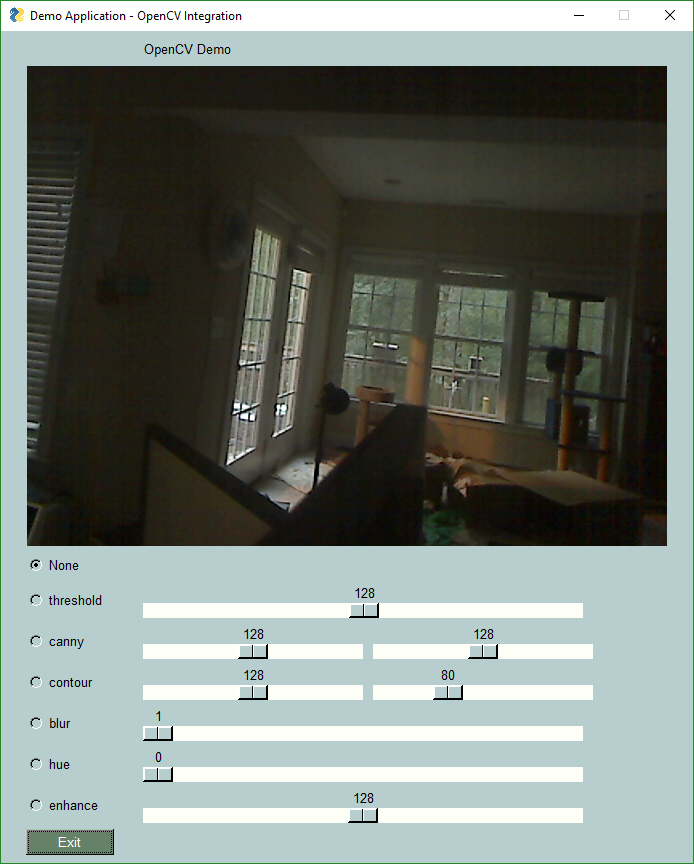
Re: PysimpleGUI
#39What is the recommended modern way to write GUIs in Python? Assume I'm in Python 3.12 and have a Poetry project as my management solution and that I have general software and GUI experience. What do I use? My application might have lots of streaming data to be plotted, streaming images to be displayed, lots of buttons and other elements. Is it PyQt6 with PyQtGraph? I don't want it to look like a Python app.
Tkinter is fairly basic but feels very native on every platform I’ve tried, and it’s easy to use. There are lots of extensions available too. I just wrote a comment about it:
If you’re interested in Python desktop apps, check out TKinter. I have a piece of boilerplate code I typically start with [0], and within an hour I can have a finished piece of software that runs in the native windows manager on any OS with no libraries or frameworks to manage. It’s not the prettiest code but it’s very easy to write and I love how native it is.
[0]: https://gist.github.com/kylenahas/a07f2ce8ced689975eae56d6ea...
Re: PysimpleGUI
#40[flagged]