Live data from Hacker News

Ubuntu 18.04 LTS Bionic Beaver Released

wiki.ubuntu.com

31–40 of 63 posts

Re: Ubuntu 18.04 LTS Bionic Beaver Released

#31
Great release, with great features, and still a really (really) bad UI. The new theme has so many inconsistencies and bad decisions made. And I find it really cringy for an LTS release to distribute this new theme as the default one.

I hoped hard the communitheme would be the official theme of this release, but no.

Examples:

- The active directory effect in Nautilus's sidebar makes me thing there were two sidebars with different purpose [1]

- Changing the background of every other rows in the settings look weird. The fact they are splitting settings by group do not help. I thought it was a theme glitch, and found out it was an actual feature [2]

I understand why people are interested in more serious theme (arc-theme) or even other Ubuntu-based distros (elementary...).
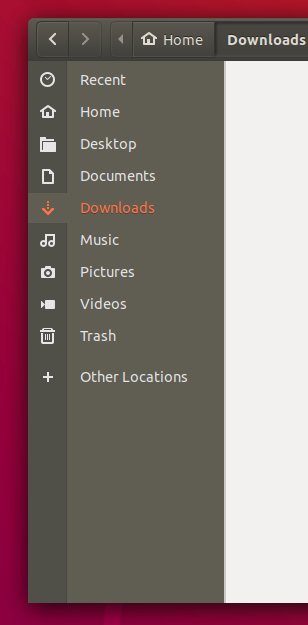
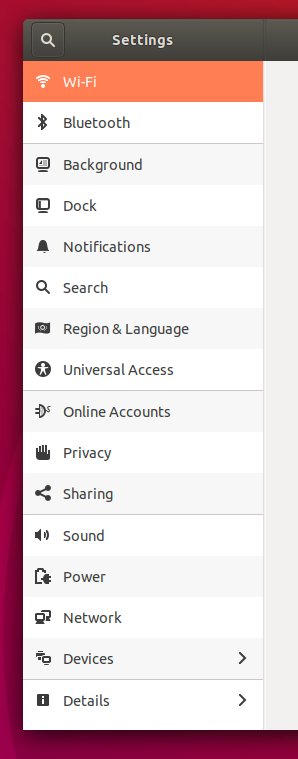
[1] https://pbs.twimg.com/media/Dbxn7TrV4AItn2f.jpg

[2] https://pbs.twimg.com/media/DbxoSISVwAAn1fV.jpg

Re: Ubuntu 18.04 LTS Bionic Beaver Released

#32
post #19

Earlier quoted context omitted.

No. And there are multiple reasons for this. One example: when Firefox decides to integrade a keylogger it is very unlikely you will find that release on your Ubuntu installation. But in my experience Firefox is updated very soon after official releases.

On the other hand the only users that predictively fall to browser exploits when we run end user targeted red-team ops are the devs and IT peeps that run Linux instead of OSX/Windows. In fact across the board Linux machines in many enterprises are more likely to run outdated and possibly vulnerable software.

This is because Ubuntu doesn't automatically install updates by default. On Fedora you can install updates when shutting down your computer, resulting in less people delaying it.

Re: Ubuntu 18.04 LTS Bionic Beaver Released

#33
post #5

Earlier quoted context omitted.

I would avoid running LTS unless you really need the stability. Otherwise, having the latest applications (and utilities like git) is going to be difficult.

It is worth noting Ubuntu comes with snap and flatpack support since latest two releases, and it works flawlessly for most of GUI applications. Sadly there isn't many CLI tools available to download like aforementioned git or zsh.

For many command line utilities you can use Linuxbrew: http://linuxbrew.sh/

Re: Ubuntu 18.04 LTS Bionic Beaver Released

#34
post #8

Earlier quoted context omitted.

To get the latest version of an app you can use snap-packages. E.g. to always get automatically the newest version of LibreOffice: sudo snap install libreoffice Don't forget to remove the preinstalled – and soon outdated – .deb-package version of LibreOffice :)

Wait... Do Linux apps (Firefox etc) not self update like Windows and MacOS?

* Traditional Windows Apps => bazaar, everyone does whatever they want

* Snap Apps => centralized, the snap-system updates the apps on a regular schedule

Traditionally on Linux there was only the system-package-manager to update the system and applications. Snaps are confined (unless declared --classic) and allow to have a stable base-system and up-to-date applications.

PS: Can't say much about how snaps compare to macOS.

Re: Ubuntu 18.04 LTS Bionic Beaver Released

#35
post #19

Earlier quoted context omitted.

No. And there are multiple reasons for this. One example: when Firefox decides to integrade a keylogger it is very unlikely you will find that release on your Ubuntu installation. But in my experience Firefox is updated very soon after official releases.

On the other hand the only users that predictively fall to browser exploits when we run end user targeted red-team ops are the devs and IT peeps that run Linux instead of OSX/Windows. In fact across the board Linux machines in many enterprises are more likely to run outdated and possibly vulnerable software.

It sounds like that's a failure of your IT team to handle updates. Either that or your sourceless claims are just to spread FUD.

Most distros have different update channels so that you can install security updates without feature updates. Tools like unattended-upgrades make it trivial to automatically install daily security updates. You can then manually install other updates at a later time if you're concerned with breakage.

https://wiki.debian.org/UnattendedUpgrades

Re: Ubuntu 18.04 LTS Bionic Beaver Released

#37
post #2

I plan to run LTS on my laptop from now on, so that I get a stable desktop environment. I used to be a sucker for running the latest and greatest, but I guess I'm too old for that now. I wonder how my applications will fare. I would like to have the latest version of Firefox, emacs, git, and so on. It's the desktop environment and OS itself I want to be as stable as possible. I'd also like to get the most recent kern…

You can always use something like the Nix package manager[1] to install Firefox, Git, and Emacs, and leave the rest to Ubuntu. Save for Firefox, which I install from a tarball and use auto-update, I have been doing that with Debian stable on my laptop, and it works well.

[1] https://nixos.org/nix/

Re: Ubuntu 18.04 LTS Bionic Beaver Released

#38

> Window control buttons are back on the right. Does anyone have a list of how this has evolved? Are we getting more or less stable on this, the ultimate bikeshedding issue?

https://www.omgubuntu.co.uk/2017/08/ubuntu-moves-window-cont... has some info about this.
Post reply on HN