Earlier quoted context omitted.
A programmer had a problem, so they decided to use threads. Now they have at least two problems.
> Now they two . at least problems have FTFY
Thank ve.ry you much
281–290 of 308 posts
One job doesn't really fit the button thing because a button has to do many things, only one of which is being clickable. Having feedback when clicked, feedback when hovered. A loading state, a disabled state, a mix of everything. That's also something I found very frustrating. Like if you take the example of a button that is tied to a service on the back end, clicking this button without any visual feedback doesn't…
buttons on simple hardware devices usually have many many functions.
this button has a function. but if you are powering up and hold it, it does a different function. press and hold this button and while holding it press another button for something else.
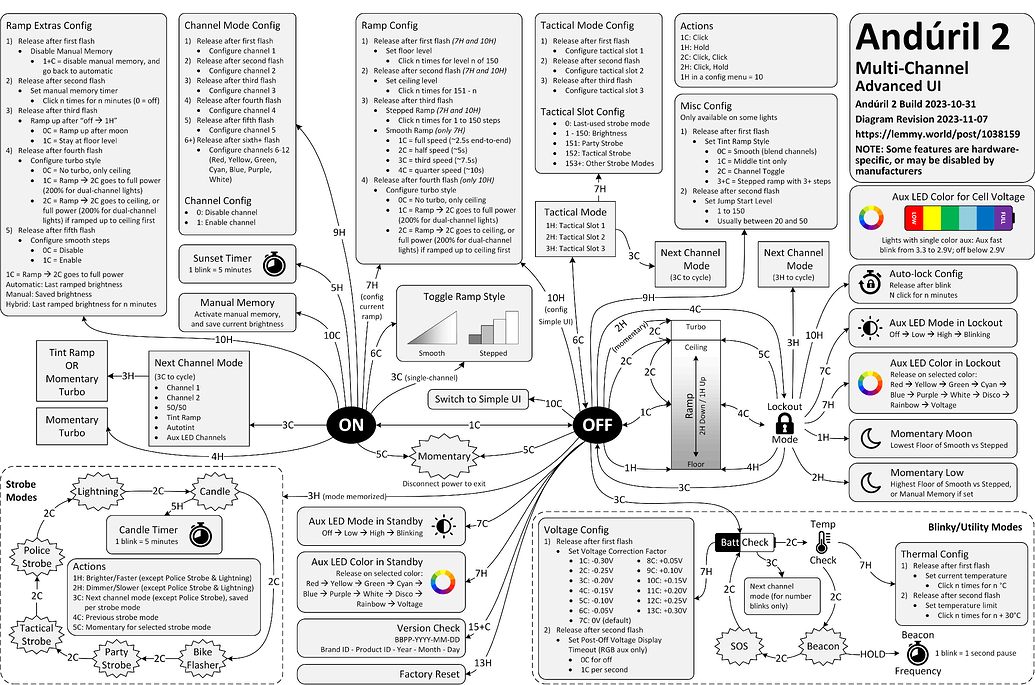
The most extreme example of this kind of thing I can recall is the anduril open-source flashlight firmware: an enormous number of functions on a one-button flashlight.
example: https://budgetlightforum.com/uploads/default/optimized/3X/e/...
or in text: https://ivanthinking.net/manuals/anduril2-manual/
Earlier quoted context omitted.
The correct action is to disable the button while the request is in flight so it can't be clicked a second time. Otherwise you won't see "user already logged in", because the user won't be logged in until the previous request returns (a race condition).
If you have a race condition, "correct action" is to solve that, because you shouldn't be papering over server-side bugs with client-side Javascript (and yes, it's a bug, because I shouldn't see an error page if I press the back button after logging in (and trying to navigate to what I was doing before logging in) either, which I still see quite often)
Earlier quoted context omitted.
a button that debounces requests should be disabled until the action is complete instead, so you can only click it once until it is ready to be clicked again. debouncing button clicks is a design failure (it makes more sense for things like requests that happen during typing, where you don't want to stop the feedback)
There always will be time between the first click and the time the button gets disabled and even more time before the visual representation of the button gets updated to reflect that. Keeping that time so short that it is impossible for a human to click the button again can be very hard. It would help if GUI elements had a property “automatically disable on click”, removing the need for the “on click handler” to disa…
If you're a button, you have one job: to transmit Morse code from the finger to the machine, Morse code representing a complicated POSIX shell command. And also to power down this entire one-button terminal with a 3 second press, power it up on any button press, with a firmware reset if powered up by a 30 second press.
Now I am imagining a typewriter with just two huge round buttons, next to each other horizontally, and a spacebar bellow them: *-----* *-----* | | | | | ● | | Ω | | | | | *-----* *-----* [================] A press of each round button rotates the typing ball accordingly, pressing the space prints the chosen letter and resets the ball to the neutral state. This whole thing should probably be electric lest you'd have t…
Screen recording here (lower frame rate due to the recording, there's no stutter in normal usage): https://photos.app.goo.gl/45PjSYMMvAc8fxA57
How about when users accidentally click too much, or they believe the first click didn’t register? I am still reminded of a keynote where Steve Jobs was demoing how much faster PDF documents would display on the newer macOS. So he had engineers put a button in for him to click that would scroll through the PDF on the screen, and he accidentally clicked it more than once. Steve wondered aloud if it would scroll all th…
> How about when users accidentally click too much, or they believe the first click didn’t register? I was really confused at their mention of accessibility, because my mind jumped to people with hand tremors who would double press when they intended only one press. And then, of course, there are the people that double-click every button. To handle that, disabling a submit button in the onclick is very common.
One job doesn't really fit the button thing because a button has to do many things, only one of which is being clickable. Having feedback when clicked, feedback when hovered. A loading state, a disabled state, a mix of everything. That's also something I found very frustrating. Like if you take the example of a button that is tied to a service on the back end, clicking this button without any visual feedback doesn't…
Just to go out on a wild tangent... buttons on simple hardware devices usually have many many functions. this button has a function. but if you are powering up and hold it, it does a different function. press and hold this button and while holding it press another button for something else. The most extreme example of this kind of thing I can recall is the anduril open-source flashlight firmware: an enormous number o…
Earlier quoted context omitted.
Apple keeps solving the same old problems. Why are we still talking about how well their buttons behave?
If anything it seems to be getting worse with each iteration for long time. I guess I'm cautiously optimistic they'll get back closer to their roots with some high-level change, but really don't care that much about it these days either...
Jobs had no problem calling BS on annoying behavior. Unfortunately we’ve completely lost that, and Apple is no longer the bastion of usability that it once was.