Live data from Hacker News

Android’s desktop interface leaks

9to5google.com

271–280 of 393 posts

Re: Android’s desktop interface leaks

#271

They ought to put the status bar at the bottom. All the designers using Macs probably forgot, but Chrome's tab interface was designed for Windows where it could be all the way at the top of the screen. And in general it's more common for desktop apps designed for mouse and keyboard to have frequently accessed UI elements at the top of the window than the bottom. So desktop apps would benefit from being able to use th…

Elements on the top of the screen have virtually infinite height, and elements in the corners have infinite height and width. You can't aim "too high" for something at the top of the screen. Status bars on top don't make sense if you have tabs on top. Now your tabs are infinitely smaller, and aiming at them requires a lot more effort. Mac's original design had the menubar on top, and its windows didn't have tabs, so…

I wonder how relevant Fitt's law is with bigger screens and the drastically changed ratio between mouse hand movement and cursor movement on screen. It used to be that you could reach a screen corner with a very simple flick of the mouse hand wrist. But that doesn't feel the same way anymore on modern hardware.
Re: Android’s desktop interface leaks

#272

They ought to put the status bar at the bottom. All the designers using Macs probably forgot, but Chrome's tab interface was designed for Windows where it could be all the way at the top of the screen. And in general it's more common for desktop apps designed for mouse and keyboard to have frequently accessed UI elements at the top of the window than the bottom. So desktop apps would benefit from being able to use th…

[deleted]

Re: Android’s desktop interface leaks

#273

Earlier quoted context omitted.

There is a growing trend among banks to keep the web app usable only for emergency purposes (notify bank that your phone got stolen or lost and authorize the installation of the bank on a new phone) and only allow functionality on their mobile apps.

I've seen that claim around, but I have yet to see a bank claim to have this obviously unworkable policy, or to see someone identify a bank that does have it.

I haven't seen any web apps that seem to be intentionally unusable, or any belonging to banks, personally at least. I don't think anybody is doing this as a publicly announced policy. But I have seen several websites for major institutions with major features totally unusable on their website, that should be found in a matter of minutes if they had even one QA person actually trying to use the website after updates. It's not announced, but it's hard to imagine it's not intentional.

For my most recent personal example, go onto State Farm's website and try to create an account. Goes to a blank page. It only seems to work right on their mobile app.

Re: Android’s desktop interface leaks

#275

They ought to put the status bar at the bottom. All the designers using Macs probably forgot, but Chrome's tab interface was designed for Windows where it could be all the way at the top of the screen. And in general it's more common for desktop apps designed for mouse and keyboard to have frequently accessed UI elements at the top of the window than the bottom. So desktop apps would benefit from being able to use th…

Elements on the top of the screen have virtually infinite height, and elements in the corners have infinite height and width. You can't aim "too high" for something at the top of the screen. Status bars on top don't make sense if you have tabs on top. Now your tabs are infinitely smaller, and aiming at them requires a lot more effort. Mac's original design had the menubar on top, and its windows didn't have tabs, so…

The linked article seems to imply that this remains a good design choice even today:

> The use of this rule can be seen for example in MacOS, which always places the menu bar on the top left edge of the screen instead of the current program's windowframe.

I guess now that the browser is the one app you probably spend the most amount of time in, it might make a little less sense? Android's lack of a menu bar system makes it make very little sense there.

Re: Android’s desktop interface leaks

#276

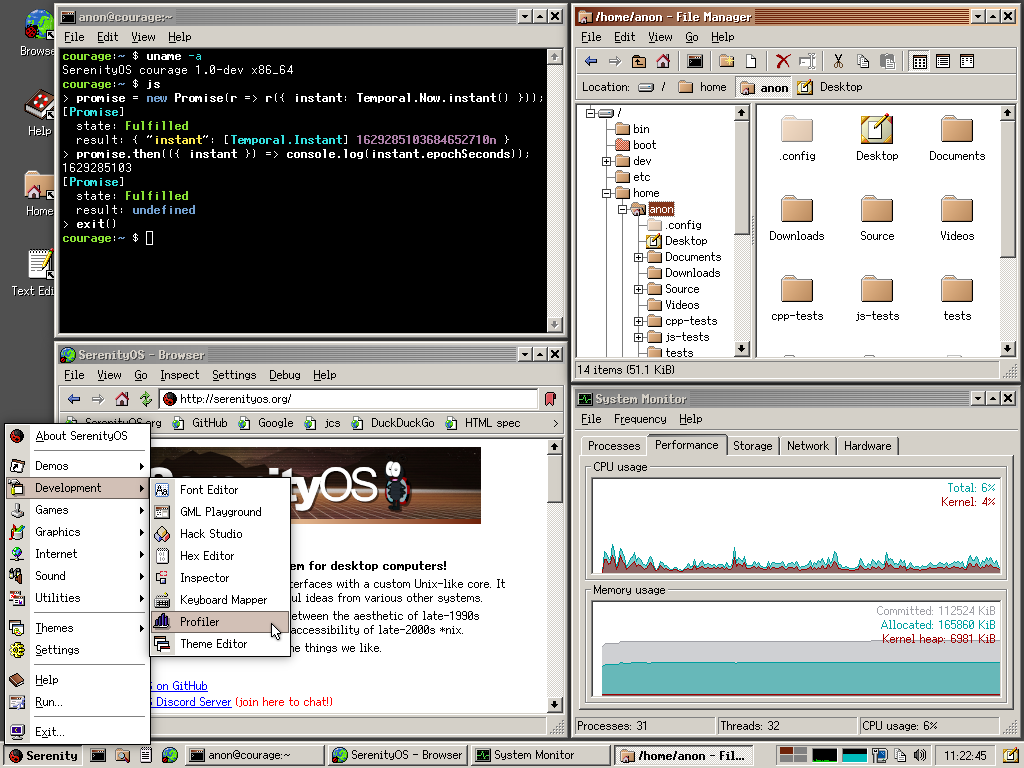
Essentially a clone of Windows 11, and those screenshots make me realise just how much I hate the rounded corners, borderless vagueness, and excess padding of "modern" UI. For contrast, this UI is more my style: https://serenityos.org/screenshot-b36968c.png

SerenityOS GUI is a dream

Re: Android’s desktop interface leaks

#277
post #131

Earlier quoted context omitted.

A root account violates principle of least priviledge. With proper design a root account should not be needed.

True but accessing your own files, pinging, network management etc aren't included in the things an Android terminal user can do. Hence the need for root.

/mnt/shared has access to your personal files and pinging just works.

This is as the default 'droid' user, but I also have a root user (but that's only root within the terminal)

Re: Android’s desktop interface leaks

#278

This looks like it will help a lot of students and families who are on a budget. If you can just plug your phone into a screen you do not need to buy a separate laptop anymore. The browser extensions are the most important part because that is what makes a computer useful. I am glad to see they are thinking about this.

What might have been...

Windows Phone was on this path ages ago, and looking really good.

I eagerly await one of two dreams (or both):

1. A phone which can seamlessly function as a desktop for my work.

2. A new clamshell Android phone ala Nokia e90, which is good enough for work stuff on the go.

Re: Android’s desktop interface leaks

#279

Essentially a clone of Windows 11, and those screenshots make me realise just how much I hate the rounded corners, borderless vagueness, and excess padding of "modern" UI. For contrast, this UI is more my style: https://serenityos.org/screenshot-b36968c.png

I too love that style, but it won't work today, because many apps today are Electron slop that disregards user preference and styles itself.

Re: Android’s desktop interface leaks

#280

Earlier quoted context omitted.

Isn't Pixel 10 the first one with fully supported desktop mode? I remember I was very confused when buying a Pixel 7 to replace my (then 3 year old) Huawei P30 Pro, and the inferior camera + lack of desktop mode made it feel like a net downgrade.

According to Google's help site, no Pixel has a desktop mode (like you can find at Motorola, Samsung and others). The latest Pixel models have DisplayPort, but their operating system only provides screen mirroring or app window mirroring on an external monitor. Unlike Pixel, the phones with a true desktop mode can display multiple windows on the monitor, and presumably they can have a selectable resolution for the mo…

> operating system only provides screen mirroring or app window mirroring on an external monitor

That's not true. It's probably written that way, because this is still an experimental feature so it is indeed not "supported", but it does work, you just have to toggle a few settings inside developer options.

And in this desktop mode it could make use of my 2k desktop screen, though it is quite buggy (it is a pixel 8 device, for reference)

Post reply on HN