Live data from Hacker News

On Password Managers

tbray.org

271–280 of 347 posts

Re: On Password Managers

#271
post #266

Password managers are the definition of "putting all your eggs in one basket". You need to compromise 1 (ONE) password to get access to EVERYTHING. They are a lot more convenient, but barely more secure than a plaintext notepad file. And some people actually storing bank accounts and credit cards info there. This is insane to me.

It is exponentially easier to practice good security hygiene for exactly one password than it is for the 200 or so passwords/sensitive numbers I keep track of in my password manager. Maybe you are extremely disciplined and can remember 200 unique passwords/passphrases each with 100+ bits of entropy and are (effectively) mutually independent, but alas I cannot, and neither can the billions of people who use the same 8 character password for every account. The best I can do is remember 1 high-entropy password that I change regularly, and have the password manager keep track of 200 other highly-entropic unique passwords.

My point is that having a single point of failure maybe theoretically isn't as good as having a bunch of passwords, but in practice nobody has the discipline to actually maintain good security hygiene, and thus it is practically more secure to use a password manager than it is to have a bunch of different passwords that are either the same or closely related.
Re: On Password Managers

#272

At our company we use keepass2 with a db file synced by dropbox. Works nicely. Keepass can save all sorts of stuff alongside passwords (like credentials, api-tokens...) and there is an app too (for android at least). Might get a bit clunky if lots of people change a lot of stuff all the time but for us it is not a problem.

Does anyone at your company use iOS? If so, how are they doing it?

On iOS I use KeePass Touch. It syncs with Dropbox, and allows you to unlock the database with your fingerprint. At the time I searched, it was one of the only apps that fit these two requirements. Still works fine.

Re: On Password Managers

#273

I'm glad to see this getting more attention because it has been brewing for months and 1Password is essentially doing what they promised they wouldn't - forcing users to the subscription/online model my phasing out support for local vaults. I'm not mad at the subscription. I'd pay them the few bucks a month happily for what is an excellent application cross-platform. I AM mad at the forced cloud sync. My current plan…

> KeePass is a close alternative, but nowhere near as polished at this point.

The story of a lot of open source projects.

Re: On Password Managers

#274
post #5

The 1Password situation is complicated, and is a lot less sketchy than Bray's summary would lead you to believe. 1Password has not in fact phased out their native applications or required people to use 1Password.com to store passwords (it would be insane for them to do so). There are four issues that I'm currently aware of with 1Password: 1. They've converted from flat to subscription pricing. 2. They're pushing peop…

@tptacek, isn't the fact that you can now no longer separate "developer" and "cloud provider" a security concern as well?

(You can no longer use other clouds than their own...?)

Re: On Password Managers

#275
post #195
post #5

The 1Password situation is complicated, and is a lot less sketchy than Bray's summary would lead you to believe. 1Password has not in fact phased out their native applications or required people to use 1Password.com to store passwords (it would be insane for them to do so). There are four issues that I'm currently aware of with 1Password: 1. They've converted from flat to subscription pricing. 2. They're pushing peop…

On what planet is this not a concern: >3. They're promoting cloud vaults and hiding local vaults, and the Windows version of 1Password has apparently never used local vaults. 1Password has absolutely used local vaults since its inception. They STOPPED supporting them in the latest version which is ridiculous, frustrating, and feels like a bait and switch. Had I known that was going to be their tactic going forward I…

I use 1Password on Windows 10 (and iOS) and "hanging for minutes at a time" has definitely not been my experience anywhere. It works well enough for daily use. The Chrome integration sometimes does stop working (about once a fortnight or so) but Help > Restart 1Password Helper takes care of that.

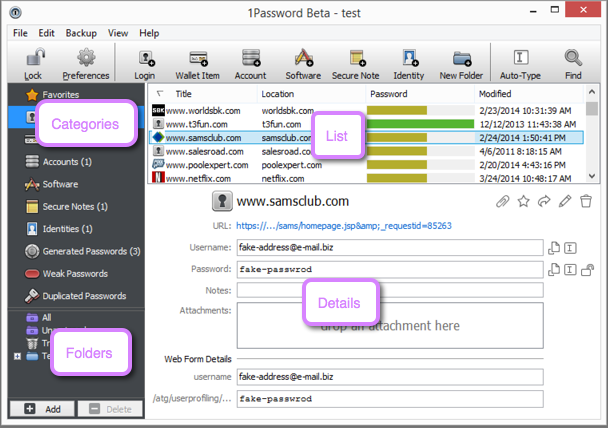
Yes the UI is "classic Windows" not "modern UI"[1] but written an afterthought seems a bit harsh.

[1] https://i.agilebits.com/db/2014-04-02_14-11-43.png

Re: On Password Managers

#276

Is there simple open source non-commercial self-hosted password manager? I need something like 1Password, but with much more primitive interface, 1Password is just too user-friendly for me, so I'm reverted to text files which isn't very good from security point. I don't really need native apps, web interface would be sufficient, of course with crypto implemented in JavaScript.

I think what you are looking for is KeepassXC

Re: On Password Managers

#277

Good security hygiene is like a diet or exercise plan: the most effective one is the one you will stick with. Most users don't follow good habits because its a giant pain for non technical users to get set up. 1p's subscription plan is aimed squarely at those people and I think its a great idea. It's reasonably secure and easy to set up everywhere. That is a big deal in my mind. Yes, its not bullet proof but its a 10…

You don't have to "manage your own password vault" thought. I sync my 1Password vault via iCloud. It's like two clicks to turn it on. And surely Apple have an even bigger and better team dedicated to keeping my data safe?

Re: On Password Managers

#279
post #266

Password managers are the definition of "putting all your eggs in one basket". You need to compromise 1 (ONE) password to get access to EVERYTHING. They are a lot more convenient, but barely more secure than a plaintext notepad file. And some people actually storing bank accounts and credit cards info there. This is insane to me.

It is exponentially easier to practice good security hygiene for exactly one password than it is for the 200 or so passwords/sensitive numbers I keep track of in my password manager. Maybe you are extremely disciplined and can remember 200 unique passwords/passphrases each with 100+ bits of entropy and are (effectively) mutually independent, but alas I cannot, and neither can the billions of people who use the same 8…

The biggest problem, is that password managers give layman false sense of security and by doing so, they are putting him in much bigger risk than he was before. Most advertisements are basically implying "Use password manager and you don't have to worry about losing your accounts". This is wrong on so many levels.

People should be aware that password managers are just glorified notepad file with one password. And after attacker compromise password manager, he not only gets your passwords (lesser evil), he also gets all information about your accounts (huge problem). This is a pretty big deal. He doesn't need to search where you are registered, manager will tell him everything he wants to know. Possible damage is massive. Even if you reuse one weak password everywhere (worst case of password security), he doesn't get that amount of information after successful attack.

And I really doubt you actually need "200 unique passwords/passphrases each with 100+ bits of entropy". Btw, do you know why password needs to have high entropy? It's not to stop attacker from brute-forcing login page (nobody is doing it in 2017), it's to make it harder to crack password hash, in case he gets it. There is no point in using extremely strong unique passwords on accounts you don't care to lose. Even worse, by using 200 unique passwords with passmanager, in case attacker gets your one master password, manager will tell him about every single account you have. By storing a lot of info there, you are just increasing amount of damage you will receive after being compromised.

The whole system security is as strong as the weakest link in the system. It doesn't matter, if every single password is unique with 100000+bits of entropy. All it's around your one master password.

Re: On Password Managers

#280

With a couple UI/UX enhancements, Apple could take over the iOS/MacOS marketshare of these products with Keychain. It's already possible to use keychain in your workflow for password management, it's just not super convenient. I'd switch from Lastpass, if Apple made it easier to autofill and autogenerate passwords and added support for sharing / teams.

Being Apple, they aren't going to release apps for non-Apple platforms or extensions for other browsers. So they could only take over the marketshare among people who only use Apple products.

Thats what they said.
Post reply on HN