Live data from Hacker News

KDE beats macOS

old.reddit.com

261–270 of 308 posts

Re: KDE beats macOS

#261
post #234

Earlier quoted context omitted.

Why do you think that "windows" are the appropriate level at which to consider things, rather than a hierarchy in which one first choose the appropriate "application" and then switches between windows for that application, if more than one exist? Using a "single UI" to do two different things seems like an odd choice, albeit clearly one you're used to.

Not the GP, but I routinely have use-cases where I switch back and forth between (say) two windows of one app and one window of another app. That, is, for a given task I have a “working set” consisting of windows of different apps, involving more than one same-app window for at least one of the apps. It would be annoying to have to switch between different keyboard shortcuts, instead of just getting LRU behavior with…

My experience on MacOS is that whichever window for a given app was current when you last switched away will be current when you switch back, so it's still a single combo-keystroke to switch as you're describing.

My point was that people tend to favor whichever approach they're most used to. Switching only at the window level does "lose" information about the hierarchy, while switching with the hierarchy in place requires one to track the hierarchy which they might prefer not to do. One is not necessarily better than the other, and there are use-cases for both.
Re: KDE beats macOS

#262

Earlier quoted context omitted.

Been using it since 2012 or 2013 across a half-dozen devices and I'm not sure what you mean by any of that.

You can 'rm /usr/local/bin/*' without sudo. Or replace /usr/local/Homebrew/bin/brew with something malicious. That's laughable and I don't know how it gets a pass from everyone.

> You can 'rm /usr/local/bin/*' without sudo.

... so? I can also rm most or all of my home directory without sudo, and that's far bigger problem. If this happened it would be a minor annoyance at worst. Also, this is 775 on my system, and most of the contents are 755, so it's not even true except for one of my users.

> Or replace /usr/local/Homebrew/bin/brew with something malicious.

If I go out of my way to make that globally writable, sure. I just checked mine, though, and it's not.

Unless you mean that a program running under my user could replace that file with something malicious without my knowing about it, but there are a bunch of other ways it could accomplish similar things if a malicious program is running under my account, so yeah, I'm gonna give it a pass on that. About the only thing it makes a little easier is putting malicious code in the hands of other users on the system if the compromised account has write access to that file, but hell, if the same thing happened on a Linux system the malware would probably have my sudo password and a ton of other even-more-important info before long anyway, so it's not like that's any better.

Re: KDE beats macOS

#263
post #49
post #38

Earlier quoted context omitted.

> I don't really agree. The really interesting part of intuitiveness is how it scales once you became familiar with the basic set of UX primitives. Is intuitiveness the right word? I make the same arguments about Vim, that it's one of the most logically consistent editors once you learn the basic set of primitives (not perfect of course). But I don't think anyone would call it intuitive. > Take, for example copying.…

>I have no idea what you mean, but you can drag lots of stuff in windows to different places and stuff happens. On macOS, there's a concept called "Proxy Icons". These are little icons that are shown in a title bar of a document-based applications (e.g. "[ICON] My File.txt"). You can interact with these icons as if they are an actual file on the disk. For example, you have "My File.txt" open in TextEdit, and you want…

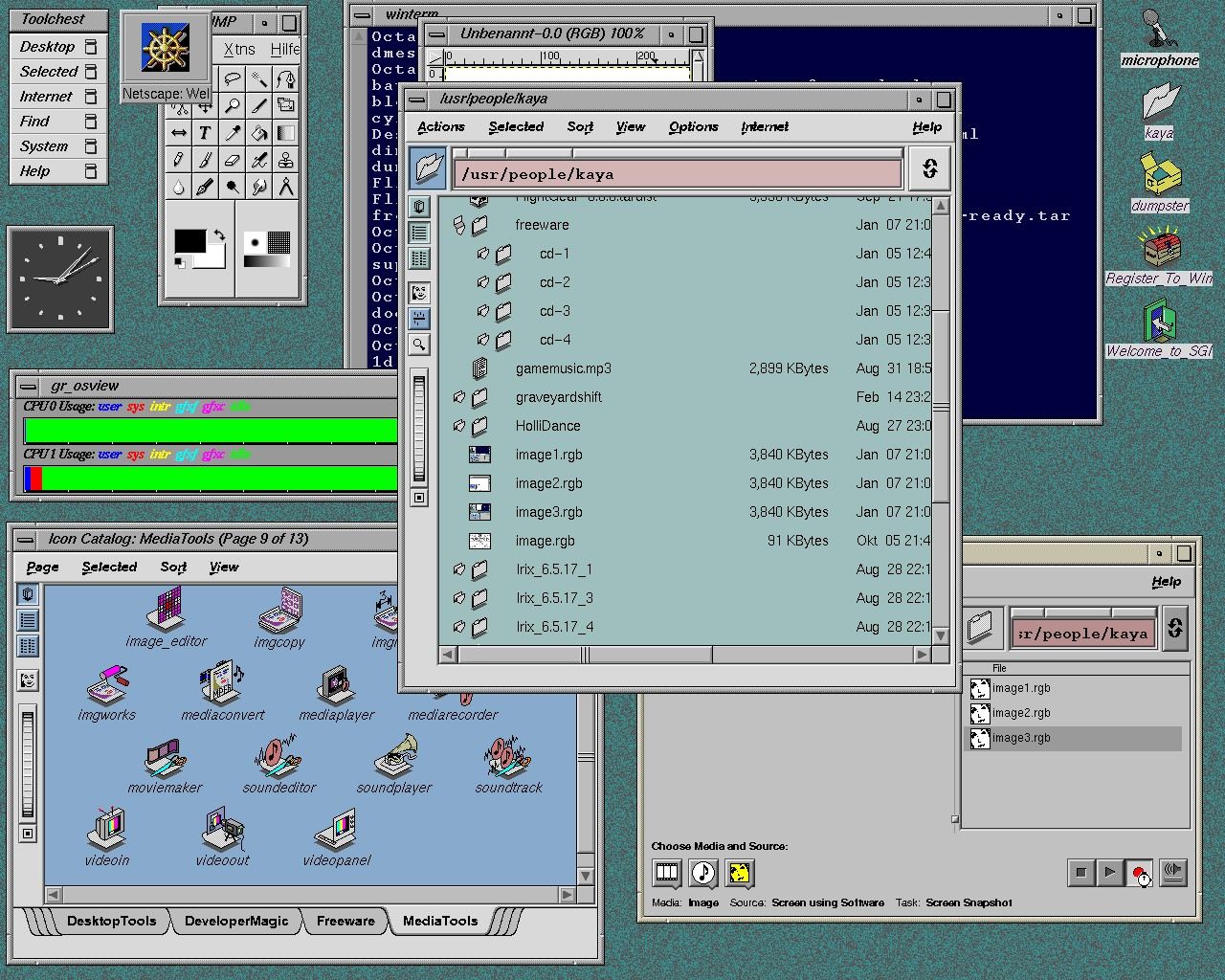
One of the nicer ui elements on sgi's was the drop pocket. a specific identifiable spot where dropping a item would do something, it is a ui feature I wish had been picked up by other toolkits.

The other really nice part about the sgi file explorer were the little buttons above the address bar to quickly go to a specific part of the hierarchy. Windows got this in 7(10 years later) and it works well but is via a hidden state. I am less familiar with mac's finder but I think it can do it, again via hidden state.

https://software.majix.org/irix/screenshots/screen.5.big.jpg

here you can see a drop pocket(the blue folder icon to the left of the address bar) that takes paths. and the very nice irix address bar.

Re: KDE beats macOS

#264
Comparing KDE and macOS is weird. One is a DE, the other an OS (and a hardware commitment.) I would never buy a Mac for myself. I can't justify the cost for a new one.

I use KDE - it works well, it's full-featured and lighter in resource usage than GNOME. I have a older macbook, but I don't like the lack of default UI features I just got used to in KDE. (Window tiling, robust clipboard, the more than acceptable file manager, the underlying OS's package manager, simple way to put graphs and monitors in my panel(s)). It's not all perfect, but 'perfect' is not a problem to solve. I can't justify using macos with these things that just work well enough.

Also, if I had to use a Mac again as a daily driver, the first program I would install is a VM and install like Debian or FreeBSD on it and then setup KDE.

Re: KDE beats macOS

#265
post #68
post #43

Earlier quoted context omitted.

I have used/owned the macs at various points in my life. The user interface has remained consistent over the years, but it has poor usability compared to even Gnome due to the accompanying legacy baggage. Here's an example. Closing all document windows doesn't close the app. This is a design decision from 1984 (at which point we knew far less about the usability of Desktop UIs than we do now) which imho hasn't quite…

I'm the opposite. Just the other day I was trying to find if I could keep an application running without any window on KDE Plasma :-) I want to keep some applications running so it continue to receive its own thing in the background, but I do not want to accidentally open the window during Alt-Tab, e.g. my email client, my chat application. (On macOS it's still showing up on Cmd+Tab, but selecting the application doe…

You can pretty much do anything to a window in KDE Plasma: you could force it to stay behind, force some arbitrary state or geometry upon it, add a setting that hides it from the apps bar, or even from the alt-tab list - or you could do all of this, it's just a couple clicks away under the window title bar icon, other actions, configure... I'd wager to say you have much more control in KDE than in any other DE, macOS and Windows included.

Re: KDE beats macOS

#266

Earlier quoted context omitted.

That would explain why my recent-ish attempt at running an ubuntu VM in windows was so bad. I was kind of shocked, how could performance have degraded so much over the years? 10 years ago I was running that workload just fine, but today, on a ryzen 5950, it's slow? I wonder if Hyper-V is the culprit.

You can try running it with Hyper-V directly, or disabling Hyper-V (although that doesn’t seem to work on my Windows 11 box, perhaps because of the fancy virtualization-based security features?)

The last time I looked into doing that there was no good way to support anything but headless due to the lack of GPU acceleration.

Re: KDE beats macOS

#267

Earlier quoted context omitted.

That would explain why my recent-ish attempt at running an ubuntu VM in windows was so bad. I was kind of shocked, how could performance have degraded so much over the years? 10 years ago I was running that workload just fine, but today, on a ryzen 5950, it's slow? I wonder if Hyper-V is the culprit.

You can try running it with Hyper-V directly, or disabling Hyper-V (although that doesn’t seem to work on my Windows 11 box, perhaps because of the fancy virtualization-based security features?)

It is possible, but a bit difficult to fully remove Hyper-V. It does have to be fully removed or the whole OS will actually be sitting under it from boot time and you won’t be able to run another hypervisor. You’d have to search around the VMware Workstation forum for the solution though.

Re: KDE beats macOS

#268
> for the first time in my life I was finally forced to use MacOs daily

Okay, thanks for letting us know up front that you went into this unwillingly and you aren't interested in doing a balanced review. I was able to close the tab very quickly!

Re: KDE beats macOS

#269

Earlier quoted context omitted.

>Multiple windows within one app is badly supported. Finder window closing behaves different to everything - alt-tabbing to it rarely brings anything to the fore. How so? Finder seems to behave the same way as other multi-window apps, if you cmd-tab to it and a window is open, it will appear, and if there isn't the app will focus and you can press cmd-t to open a new window. This is consistent and in line with how ma…

> How so? Finder behaviour is technically consistent, all things being equal, but it's inconsistent in practice as a knock-on effect of other limitations: the root of this is the (inability) to quit Finder*. If you never quit any apps you ever use, you could probably get consistent behaviour across them, but broadly speaking if you do quit apps you're not using, opening those apps will tend to bring up a new window.…

Are you sure the inconsistency isn't because you have QuitMenuItem set? With it unset like default, Finder will launch a new window in the foreground when it's run from eg. Spotlight, even if it has no windows open, which is consistent with other apps. The only difference is that you can't actually close it. When QuitMenuItem is set to true and you actually quit Finder, that's when starting it won't open a window.

Re: KDE beats macOS

#270
post #161

How does this particular list of very minor gripes get so many upvotes? And it's not just minor gripes, half of them are wrong. Some of them have been addressed by others, but: * Taking screenshots requires to click the preview in order to copy to clipboard, which also causes to save it to Desktop. No, it doesn't. * Surprising lack of apps in the store Says someone defending KDE? But hey, strangely enough I'm typing…

> How does this particular list of very minor gripes get so many upvotes?

It gets upvotes from the hurr durr Apple bad crowd.

Post reply on HN